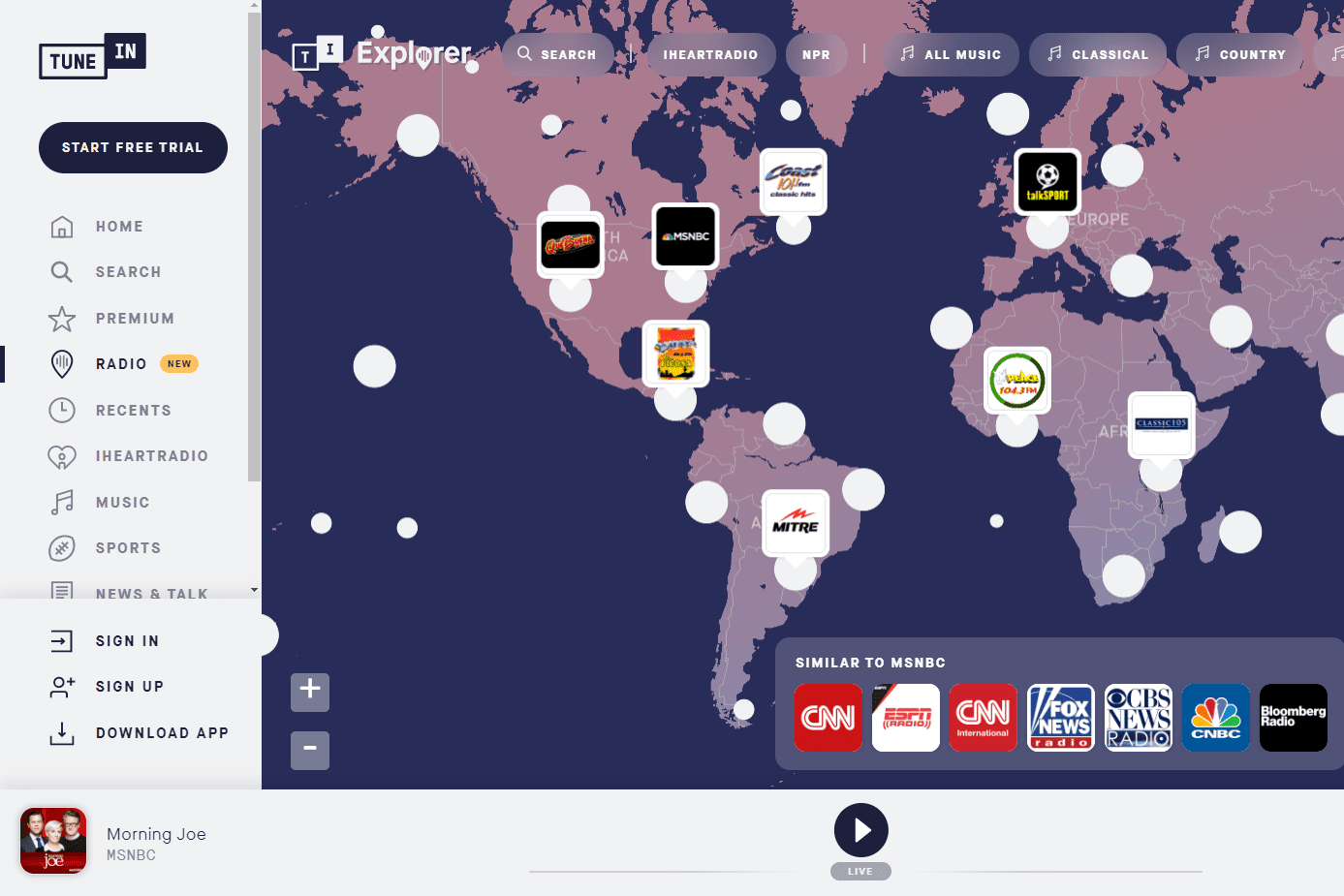
If the internet had a giant old-school radio dial, TuneIn would be the hand spinning it at dangerous speed. One minute you are listening to a local news station in Chicago, the next you are hopping to a jazz station in New Orleans, then suddenly you are knee-deep in international talk radio, sports commentary, podcasts, or an audiobook you definitely promised yourself you would start “after one more episode.” That is the basic magic of TuneIn: it takes the messy, scattered world of live audio and puts it inside one searchable app.
This TuneIn review takes a practical look at what the service does well, where it stumbles, who should use it, and whether TuneIn Premium is worth paying for. The short answer: TuneIn is one of the best apps for live radio, news, sports audio, and global station discovery. It is not the perfect music streaming app, and the free version can feel ad-heavy, but for people who still love the live, unpredictable feeling of radio, TuneIn remains a strong choice.
What Is TuneIn?
TuneIn is a live audio streaming platform built around internet radio, AM/FM stations, news, sports, podcasts, music channels, and audiobooks. Unlike Spotify or Apple Music, TuneIn is not mainly about choosing a specific song on demand. It is closer to a modern radio hub: you open the app, search for a station, topic, team, city, genre, or show, and start listening.
The platform gives users access to more than 100,000 global radio stations, along with podcasts, news networks, sports coverage, commercial-free music channels, and a growing audiobook catalog through Premium. It is available through mobile apps, desktop browsers, smart speakers, connected cars, TVs, and home audio systems. That broad device support is one of TuneIn’s biggest advantages. You can start your morning with local news on a phone, continue with sports radio in the car, and finish the day with a classical station on a smart speaker. Very few apps follow you around quite that politely.
TuneIn Free vs. TuneIn Premium
TuneIn has a free version and a paid subscription called TuneIn Premium. The free version is useful and generous in one important way: you can listen to a huge number of radio stations without paying. For casual listeners, that may be enough. If you mainly want to hear local radio, check international stations, or stream a favorite talk show while cooking dinner, the free plan does the job.
The trade-off is advertising. Free TuneIn includes ads, and some listeners complain that the interruptions can feel frequent, especially when switching stations or restarting streams. This is one of the most common criticisms of the service. To be fair, live radio has always had commercials; the problem is that internet radio can stack app-level ads on top of station-level ads, and nobody wakes up thinking, “I hope my morning starts with three pre-roll ads and a jingle that haunts my cereal.”
What TuneIn Premium Includes
TuneIn Premium adds several major perks. Current TuneIn materials list benefits such as commercial-free news from select major networks, access to more than 100,000 audiobooks, live sports coverage, commercial-free music channels, and fewer ads across supported stations. Premium is especially interesting for listeners who want live sports or news without bouncing between multiple apps.
Pricing may vary by platform and region, but TuneIn’s own Premium page currently lists a 7-day trial followed by $9.99 per month or $79.99 per year. One useful detail: TuneIn’s support page notes that subscribing through app stores can involve extra transaction fees, so users who want the cleanest pricing should compare web and in-app options before subscribing.
User Experience: Simple, Familiar, and Occasionally Cluttered
TuneIn’s interface is fairly easy to understand. Search is the star. Type a station name, city, genre, team, podcast, or topic, and the app usually finds something relevant quickly. The home screen pushes popular stations, news, music, sports, podcasts, and recommended content. Favorites help you save stations you return to often, which is essential unless you enjoy repeatedly typing “that one station with the morning host who laughs like a lawnmower.”
On mobile, playback controls are straightforward. You can pause, resume, browse related stations, and switch categories without much friction. The app also works well for background listening, which is important because live audio is often something people enjoy while driving, cleaning, working, studying, or pretending to clean while actually reorganizing a playlist.
The downside is that TuneIn can sometimes feel busier than it needs to be. There are many categories, promotions, Premium prompts, and station suggestions. For new users, the first few minutes may feel like walking into a giant audio supermarket where every aisle is yelling “try me.” Once you save your favorite stations, the experience becomes much smoother.
Content Library: TuneIn’s Biggest Strength
The best reason to use TuneIn is variety. The app is excellent for people who enjoy live audio from different places. You can stream local radio stations, national news, international broadcasts, sports talk, public radio, niche music channels, religious programming, comedy, business news, and podcasts.
Live Radio and Local Stations
TuneIn shines as a radio directory. If you moved away from your hometown and miss a local station, TuneIn may help you reconnect. If you are traveling and want familiar news, weather, or sports talk from home, it can be surprisingly useful. For radio fans, this is TuneIn’s core charm: it makes geography feel optional.
News and Talk Radio
News is another strong category. TuneIn aggregates national, local, and international news sources, making it convenient for listeners who want live updates without opening separate apps. Premium’s commercial-free news options from select networks make the paid plan more appealing for people who listen to news daily.
Sports Audio
TuneIn is also a strong option for sports fans, especially those who prefer audio play-by-play, post-game shows, and sports talk. Current Premium messaging highlights live NHL games, major college football and basketball games, motorsports, and other sports content depending on availability. Sports rights are complicated, so listeners should always check whether their favorite league, team, and region are covered before subscribing. Still, for fans who want games while driving or working, TuneIn can be more convenient than juggling team apps.
Podcasts
TuneIn includes podcasts, but it is not the most advanced podcast app on the market. It works well enough for casual listening, especially if you already use TuneIn for radio. However, power podcast users may prefer apps with better queue management, episode filters, transcripts, smart downloads, and detailed playback controls. TuneIn treats podcasts as part of a larger audio buffet, not as the entire restaurant.
Audiobooks
Audiobooks are now a bigger part of TuneIn Premium. The service advertises access to more than 100,000 audiobook titles with no monthly listening limit. That is an attractive feature, especially for people who want lots of listening time without buying individual books. However, listeners looking for every brand-new bestseller on release day may still prefer dedicated audiobook platforms. TuneIn’s audiobook value is best for volume listeners, casual book explorers, and anyone who likes the idea of wandering through a digital library without being charged per title.
Device Support: TuneIn Is Everywhere
One of TuneIn’s most underrated strengths is availability. It works on iOS, Android, web browsers, Apple CarPlay, Android Auto, Amazon Alexa devices, Google Home, Sonos, Bose, Roku, Chromecast, smart watches, tablets, and many connected car systems. That matters because radio is often situational. You may want news in the kitchen, music in the car, sports in the garage, and a podcast on a walk.
In this area, TuneIn feels mature. It has spent years building partnerships across devices, and that makes the service more useful than a smaller app with a better-looking interface but limited reach. The best radio app is often the one that works on the speaker you already own.
Audio Quality and Reliability
Audio quality on TuneIn depends heavily on the station or stream. Some stations sound clean and stable, while others are limited by the broadcaster’s feed. This is not entirely TuneIn’s fault. TuneIn is often serving as the bridge between you and a third-party stream, and some bridges are smoother than others.
In everyday use, TuneIn is generally reliable for major stations and popular streams. Smaller stations may buffer, disappear, or have inconsistent metadata. User reviews across app stores and review platforms show a split: many people praise the huge selection and convenience, while others complain about buffering, crashes, confusing subscription issues, or too many ads. That pattern is common for large apps with millions of users and many third-party content sources.
TuneIn Review: Pros and Cons
Pros
- Huge selection of live radio stations from the United States and around the world.
- Strong device support, including cars, smart speakers, phones, tablets, and home audio systems.
- Useful free version for casual radio listening.
- Premium includes valuable extras such as audiobooks, select commercial-free news, music channels, and sports content.
- Great for people who want live audio rather than algorithm-made playlists.
- Excellent discovery tool for local, national, and international stations.
Cons
- The free version can feel ad-heavy.
- Some station streams may buffer or vary in quality.
- Premium does not necessarily remove every ad from every third-party station.
- Podcast features are decent but not best-in-class.
- Sports availability can depend on rights, region, device, and plan details.
- The interface can feel crowded until you personalize it with favorites.
Is TuneIn Premium Worth It?
TuneIn Premium is worth considering if you listen to TuneIn frequently and value at least two of its paid benefits: live sports, commercial-free news, unlimited audiobooks, or commercial-free music channels. If you only open TuneIn once a week to hear a local station, the free version is probably enough. If you listen daily and ads make you want to toss your phone gently into a pillow, Premium becomes more appealing.
The best use case for Premium is the audio omnivore: someone who wants news in the morning, sports on the weekend, audiobooks during chores, and music stations in the background. For that listener, the annual plan may offer better value than paying month to month. For everyone else, the 7-day trial is the sensible move. Test your favorite stations, teams, devices, and audiobook categories before committing.
TuneIn Compared With Alternatives
TuneIn’s closest competitors depend on what you want. For American broadcast radio, iHeartRadio and Audacy are strong alternatives, especially for stations owned by those networks. For on-demand music, Spotify, Apple Music, YouTube Music, and Pandora are better choices. For satellite-style premium audio and exclusive entertainment, SiriusXM is the obvious comparison. For global radio discovery, Radio Garden is fun, visual, and simple, though it does not match TuneIn’s broader feature set.
The key difference is that TuneIn is not trying to be only a music app. It is trying to be a central hub for live audio. That makes it less ideal for people who want to play one exact song right now, but much better for people who want the feel of live broadcasting: real hosts, local flavor, breaking news, play-by-play, surprise interviews, and the occasional delightfully odd station you never knew existed.
Who Should Use TuneIn?
TuneIn is best for radio loyalists, commuters, sports fans, news listeners, expats, travelers, language learners, and anyone who enjoys discovering stations beyond their ZIP code. It is also handy for households with multiple devices because TuneIn works across so many platforms.
It is less ideal for listeners who want a clean, minimalist interface, completely ad-free listening across every station, advanced podcast organization, or full on-demand music control. If your main goal is to choose exact albums and songs, TuneIn should be a companion app rather than your main music service.
Final Verdict: TuneIn Still Deserves a Spot on Your Phone
TuneIn remains one of the most useful live audio apps available. Its biggest strength is not perfection; it is reach. The app gives you an enormous doorway into radio stations, news, sports, podcasts, music channels, and audiobooks, and it works almost everywhere. That makes it valuable in a way many prettier, narrower apps are not.
The weaknesses are real. Ads can be annoying. Stream quality is not always consistent. Premium can be confusing if users expect every single station to become magically commercial-free. But judged as a live audio platform, TuneIn does a lot right. It is especially strong for people who love radio as a format: the spontaneity, the voices, the local character, and the feeling that someone is broadcasting right now, not merely serving you another algorithmic playlist with the personality of a refrigerator magnet.
Overall rating: 4.1 out of 5. TuneIn is not perfect, but it is powerful, flexible, and genuinely useful. For live radio lovers, it is still one of the first apps worth trying.
Extra Listening Experience Notes: Living With TuneIn Day to Day
The everyday experience of using TuneIn depends on your listening habits. For someone who treats radio as background noise, TuneIn can feel like a tiny miracle. Open the app, choose a station, and your kitchen, bedroom, car, or office suddenly has atmosphere. It is not as demanding as video and not as repetitive as a playlist you have heard 400 times. Radio has a human messiness to it, and TuneIn keeps that alive.
One of the best experiences is using TuneIn while traveling. Imagine being in a hotel room in another state and wanting to hear your hometown sports station after a big game. Instead of searching random websites, you open TuneIn and stream it. Or maybe you are learning Spanish, French, or Japanese and want to hear real talk radio from another country. TuneIn makes that kind of casual immersion easy. It turns language practice from a textbook activity into something more natural, like eavesdropping politely on the world.
TuneIn is also helpful for routines. In the morning, a live news station feels more urgent and current than a playlist. During work, instrumental or public radio stations can create a steady background without forcing you to pick every track. While cooking, local talk radio can make the room feel less empty. During long drives, sports radio and news streams can make miles disappear faster than expected. That is where TuneIn is strongest: it fits into ordinary life without asking for too much attention.
The app is not always relaxing, though. Ads can break the mood, especially if you are switching stations quickly. A station may also stop working, buffer, or play a lower-quality stream than expected. Sometimes the search results include multiple similar station names, and you have to test a few before finding the right one. These are not deal-breakers, but they are reminders that TuneIn is part polished app, part giant audio map, and part “let’s see if this station feed behaves today.”
The best way to enjoy TuneIn is to personalize it early. Search for your favorite local stations, save them, add a few news sources, test a sports station, and explore one or two international music channels. After that, TuneIn becomes much better. Instead of scrolling through a giant catalog, you have your own radio shelf. That small setup step makes the difference between “this app is too busy” and “where has this been all my life?”
For Premium, the experience is most satisfying when you already know what you want from it. If you subscribe only because you dislike ads, read the plan details carefully and test your favorite stations during the trial. If you subscribe for audiobooks, browse the catalog first. If you subscribe for sports, verify the leagues and teams that matter to you. TuneIn Premium can be a great value, but it rewards informed listeners more than impulse clickers.
In daily use, TuneIn feels like a bridge between old radio habits and modern streaming convenience. It is not trying to replace every audio app. Instead, it gives live broadcasting a home on modern devices. And honestly, in a world of endless personalized feeds, there is something refreshing about pressing play and letting a real station surprise you.