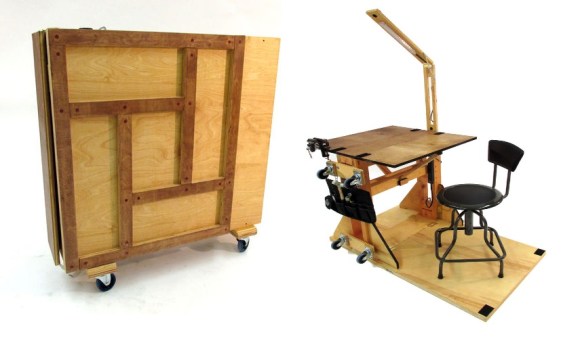
There are two kinds of people in small spaces: those who say, “I don’t have room for a workstation,” and those who quietly unfold one from a wall, cabinet, cart, or plywood contraption like a magician with a power strip. The ultimate workstation that folds up is not just a cute desk for tiny apartments. It is a compact command center for remote work, crafting, electronics, studying, writing, repairing, designing, and pretending your dining table is not permanently buried under cables.
A fold-up workstation solves a very modern problem: we need serious work surfaces, but many of us live in homes that were designed before video calls, mechanical keyboards, soldering stations, second monitors, ring lights, and “just one more hobby” became normal. Whether you live in a dorm room, studio apartment, guest room, shared house, garage, or multipurpose living room, a collapsible workstation gives you a place to work hard without sacrificing the entire room to the office gods.
The best version is not merely a folding desk. It is a system. It opens when you need focus, hides when you need breathing room, stores your essential tools, manages cables, supports good posture, and closes without turning your laptop charger into modern spaghetti art. Done right, it is part furniture, part productivity tool, and part small-space survival strategy.
What Is a Fold-Up Workstation?
A fold-up workstation is a desk, bench, or compact work area designed to collapse, close, roll away, or mount flat against a wall when not in use. Some look like wall-mounted Murphy tables. Others resemble secretary desks, portable maker benches, rolling cabinets, folding craft tables, or laptop stations with built-in storage.
The “ultimate” version goes further. It does not just give you a flat board and wish you good luck. It includes smart design features such as a stable work surface, shelves, lighting, power access, storage racks, cable routing, ergonomic equipment placement, and quick setup. In other words, it should feel like a real workstation when open and disappear gracefully when closed.
For a maker, that might mean a reconfigurable bench with side tool storage, casters, LED lighting, and a durable plywood surface. For a remote worker, it might mean a wall-mounted desk with a laptop stand, wireless keyboard, mouse, task lamp, and hidden compartments. For a student, it could be a fold-down study station that keeps books, notebooks, chargers, and headphones in one place.
Why Folding Workstations Are Having a Moment
Remote work, hybrid jobs, online classes, side hustles, and hobby projects have all made the home workstation more important. Unfortunately, homes did not magically expand. The result is a national epidemic of people working from couches, beds, kitchen islands, and coffee tables while their backs file emotional complaints.
A fold-up workstation creates a dedicated work zone without requiring a dedicated room. That matters because the physical act of opening and closing the station can help separate work time from home time. Open it, and your brain gets the message: “We are doing serious things now.” Close it, and suddenly the room is a living room again instead of a tax-document swamp with a chair.
It also helps reduce visual clutter. A traditional desk often becomes a magnet for mail, cables, snacks, coffee mugs, and mysterious screws that may or may not be important. A folding workstation forces a little discipline. If it has to close, you naturally keep only what belongs there. Minimalism becomes less of a lifestyle brand and more of a hinge requirement.
The Anatomy of the Ultimate Fold-Up Workstation
1. A Stable Surface That Does Not Wobble Like a Nervous Flamingo
The work surface is the heart of the workstation. It should be sturdy enough for your main tasks. Laptop work requires less strength than sewing, model building, electronics repair, or small hardware projects. If you plan to use tools, clamps, monitors, or heavy equipment, choose thicker plywood, solid wood, metal framing, or a reinforced engineered surface.
Stability is where many cheap folding desks fail. A desk that wiggles every time you type is annoying. A bench that bounces while you solder, cut, draw, or assemble parts is worse. Look for broad supports, locking legs, quality hinges, and a design that distributes weight evenly. If it rolls, the casters should lock. If it mounts to a wall, it must be properly secured into studs or suitable anchors.
2. Smart Folding Hardware
The hinge system determines whether your workstation feels clever or cursed. A good fold-up workstation opens smoothly, locks securely, and closes without pinching fingers or scraping the wall. Piano hinges, heavy-duty butt hinges, folding brackets, drop-leaf supports, and gas struts can all work depending on the design.
The key is matching the hardware to the load. A lightweight laptop shelf does not need the same support as a maker bench carrying tools and electronics. When in doubt, overbuild the support system. Nobody ever looked at a stable workstation and said, “This is too reassuring.”
3. Built-In Storage
Storage is what turns a foldable desk into a workstation. Shelves, pegboards, cubbies, side racks, bins, magnetic strips, shallow drawers, and cable pockets all help keep essentials nearby. The best storage is shallow and intentional. Deep drawers often become archaeological sites. Small compartments encourage you to keep only what you actually use.
For office work, store a keyboard, mouse, charger, notebook, pens, webcam, and headphones. For craft work, include scissors, rulers, glue, thread, brushes, and cutting mats. For electronics, think small parts bins, ESD-safe storage, soldering accessories, wire, pliers, tweezers, and a task light. The trick is to build around your real workflow, not your fantasy workflow where you label everything in perfect handwriting and never lose a USB cable.
4. Power and Cable Management
A fold-up workstation should not require crawling under furniture every time you need power. Add a mounted power strip, surge protector, cable clips, cord channels, or a small cable tray. Keep cords long enough to move safely but short enough that they do not dangle like vines in a jungle documentary.
If your workstation folds closed, test the cable path before loading it with equipment. Make sure wires do not pinch in the hinge area. Use Velcro ties rather than permanent zip ties where you may need flexibility. For laptop users, a single charging dock or USB-C hub can simplify the entire setup.
5. Lighting That Makes You Look and Work Better
Good lighting is not optional. A fold-up workstation often lives in a corner, hallway, closet, or multipurpose room where overhead lighting is not ideal. Add an LED task light, under-shelf strip light, clamp lamp, or magnetic work light. For video calls, position light in front of you rather than behind you unless you are going for “anonymous witness in a documentary.”
For detail work such as crafting, electronics, model painting, or repair, choose bright, even lighting with minimal glare. Adjustable arms are especially useful because the light can move with the project.
Ergonomics: The Fold-Up Desk Still Has to Fit Your Body
A workstation that folds up is only useful if it does not fold your spine into a question mark. Ergonomics matter even in compact spaces. Ideally, your chair should support your back, your feet should rest flat on the floor or on a footrest, your shoulders should stay relaxed, and your elbows should remain close to your body when typing.
For computer work, the keyboard and mouse should sit at a comfortable height so your wrists stay neutral. The monitor should be directly in front of you and roughly an arm’s length away. If you use a laptop for long sessions, pair it with an external keyboard and mouse and raise the screen on a stand. This simple upgrade can make a fold-up workstation feel dramatically more comfortable.
Height is the most common challenge. Many wall-mounted fold-down desks are fixed in place, so measure before installation. Sit in your chair, relax your shoulders, bend your elbows around 90 degrees, and mark the height where your hands naturally land. That is your working target, not the height that looked nice in a product photo.
Best Places to Put a Fold-Up Workstation
A Bedroom Corner
A bedroom corner can become a surprisingly effective work zone. A fold-down desk keeps the room from feeling like an office 24 hours a day. Add a slim chair, wall shelves, and a warm lamp to keep the setup calm rather than corporate.
A Living Room Wall
In a living room, style matters. Choose a fold-up workstation that looks like a cabinet, secretary desk, floating shelf, or console when closed. This is ideal for people who need work space but do not want their guests staring at a monitor stand and three unpaid bills during movie night.
A Kitchen Nook
Kitchen workstations are great for paying bills, answering emails, meal planning, or supervising homework. Just keep electronics away from sink splash zones and flour explosions. A fold-up surface can double as a breakfast perch, recipe station, or command center for family schedules.
A Garage or Workshop
For makers, a folding workbench in the garage is a beautiful thing. It can open for repairs, small builds, or electronics projects, then close to make room for bikes, storage bins, or the car that allegedly still fits in there.
A Dorm Room
Dorm rooms are where fold-up workstations become heroic. A compact rolling station or wall-mounted study desk can hold school supplies, laptop accessories, tools, art materials, and snacks. Mostly snacks. Be honest.
DIY vs. Buying: Which Route Makes Sense?
If you enjoy building, a DIY fold-up workstation can be customized perfectly. You can choose the dimensions, materials, tool storage, lighting, cable routing, and finish. Plywood is a popular choice because it is affordable, strong, and easy to work with. A single large sheet can go surprisingly far when planned carefully.
DIY is best if you need a maker bench, unusual dimensions, heavy-duty storage, or a workstation that fits a very specific corner. It is also satisfying. Few things feel better than building the thing you use to build other things. That is productivity with a recursive twist.
Buying makes sense if you need a polished look, quick installation, or a simple laptop-and-notebook setup. Fold-down desks, Murphy tables, wall-mounted cabinets, secretary desks, and compact folding desks are widely available. Many are designed for small apartments and include shelves, drawers, or charging features.
The downside of buying is compromise. Many ready-made folding desks are better for light work than serious projects. Check dimensions, weight capacity, mounting requirements, and reviews before committing. If a product photo shows one laptop, one tiny plant, and no cables, assume reality will be messier.
What to Look for Before You Build or Buy
Surface Size
Measure your actual equipment. A laptop alone can fit on a small surface. A laptop plus keyboard, mouse, notebook, coffee, and second monitor needs more depth. For comfortable computer work, depth matters as much as width.
Closed Depth
The whole point is saving space. Check how far the unit sticks out when closed. A slim wall-mounted desk may project only several inches, while a cabinet-style desk may extend farther but offer more storage.
Weight Capacity
Do not guess. If you plan to place monitors, tools, printers, sewing machines, or heavy equipment on the surface, confirm the maximum load. Wall-mounted units must be installed correctly, and heavy workstations should have strong supports.
Chair Compatibility
A fold-up workstation is not complete without a chair that fits. If the desk height is fixed and your chair cannot adjust, you may end up with shoulder strain, wrist discomfort, or knees awkwardly meeting the underside of the desk.
Workflow
Think through the entire routine: open, sit, plug in, work, store, close. If closing the workstation requires removing ten items and performing cable surgery, you will stop closing it. The best folding workstation makes the right behavior easy.
Common Mistakes to Avoid
The first mistake is making the surface too small. Tiny desks look adorable online, but real work needs elbow room. The second mistake is ignoring cable management. A fold-up workstation with tangled cords is just a drawer full of frustration attached to a wall.
The third mistake is installing it at the wrong height. A beautiful fold-down desk mounted too high or too low will slowly turn into a decorative shelf. The fourth mistake is using weak hardware. Hinges, brackets, screws, anchors, and casters are not glamorous, but they decide whether your workstation feels trustworthy.
The fifth mistake is overloading the design. A fold-up workstation should be efficient, not packed with every possible tool you own. Keep the essentials inside and store occasional-use items elsewhere. A compact workstation should feel ready, not stuffed.
Specific Fold-Up Workstation Ideas
The Remote Worker Setup
Use a wall-mounted fold-down desk with a laptop stand, external keyboard, mouse, compact task lamp, and small cable tray. Add a shelf above for a notebook, headphones, and a webcam. When closed, the desk hides work clutter and keeps the living area peaceful.
The Maker Station
Build a rolling plywood workstation with fold-out panels, locking casters, side tool storage, LED lighting, a mounted power strip, and removable bins. Add a heat-resistant mat for soldering or craft work. Keep the top surface reconfigurable so it can shift between electronics, assembly, painting, and repair.
The Student Study Hub
Choose a secretary-style desk or fold-down cabinet with cubbies. Store textbooks, pens, calculator, laptop charger, sticky notes, and index cards. A corkboard or whiteboard inside the door can hold deadlines and reminders.
The Creative Corner
Use a fold-out craft table with shallow drawers and vertical storage for paper, brushes, thread, fabric, or sketchbooks. Add bright adjustable lighting and a washable surface. When the creative storm ends, close the station and pretend the glitter never happened.
Maintenance Tips for a Workstation That Lasts
Check hinges and brackets every few months, especially if you open and close the station daily. Tighten loose screws, inspect wall mounts, clean caster wheels, and replace worn cable ties. If the surface is wood, protect it with a mat, finish, or sealant based on your work type.
Keep the closing path clear. Tools, notebooks, and chargers should have assigned homes. If something prevents the workstation from closing, do not force it. Find the obstruction before the hinge teaches you an expensive lesson.
Finally, review your setup as your work changes. A workstation that started as a laptop desk may evolve into a podcast corner, sewing station, coding nook, or mini electronics lab. The best fold-up workstation adapts instead of becoming obsolete.
Experience: Living With a Fold-Up Workstation
The first thing you notice about a fold-up workstation is psychological. It gives your work a beginning and an ending. When I first experimented with a compact fold-away setup, the biggest improvement was not the saved square footage. It was the ritual. Open the desk, switch on the light, connect the keyboard, place the notebook on the left, coffee on the right, and suddenly the room says, “We are working now.” Close it later, and the same room says, “Congratulations, you may now be a human being again.”
That separation is surprisingly powerful. A permanent desk can blur into the background, especially in a small home. You see it during breakfast, while watching TV, and while trying to relax. A fold-up workstation changes the visual message. When closed, the work disappears. Not spiritually, unfortunatelyemails are still out there lurkingbut physically, the space feels lighter.
The second lesson is that setup speed matters more than cleverness. A workstation can have brilliant hinges, secret compartments, and a design that looks like it was invented by a caffeinated architect, but if it takes too long to open, you will avoid using it. The sweet spot is under two minutes. Ideally, you should open it, pull out the chair, connect one cable, and start. If you need an instruction manual every morning, the furniture has won.
The third lesson is to be honest about clutter. A fold-up workstation is not a magic portal where messy habits vanish. If you leave too many objects on the surface, closing it becomes annoying. That annoyance is useful because it forces decisions. Keep a small tray for daily items. Use one pouch for cables. Store only the tools used every week. Everything else gets moved to a nearby bin, shelf, or drawer.
Comfort also becomes obvious very quickly. At first, it is tempting to focus on the cool factor: the folding panels, compact footprint, hidden shelves, and “look what this thing does” moment. But after an hour of typing, your shoulders will vote on the design. A laptop stand and external keyboard are worth it. A proper chair is worth it. A small footrest can be worth it. The workstation may fold, but your wrists should not.
For maker work, durability is the real test. A lightweight fold-down desk is fine for writing, but small repairs, cutting, soldering, and assembly need a surface that feels planted. Locking casters help. Wide supports help. So does accepting that a serious fold-up maker station may not be feather-light. Portability is nice, but stability is nicer when tiny screws are rolling around like they have somewhere important to be.
The best experience comes from designing the station around repeated actions. If you write every day, keep the keyboard and notebook ready. If you repair electronics, make the soldering tools easy to reach. If you study, put textbooks and chargers in the first-access zone. The workstation should reduce friction. Every saved movement is one less excuse to migrate back to the couch.
After using a fold-up workstation, the appeal becomes clear: it respects both work and space. It says you deserve a real place to focus, even if your home is small. It also says your home deserves to recover when work is done. That balance is the real luxury. Not marble countertops. Not a 12-foot executive desk. Just a smart surface that appears when needed, supports the task, and disappears before the room starts looking like a warehouse for half-finished ambitions.
Conclusion
The ultimate workstation that folds up is more than a space-saving desk. It is a flexible productivity system for people who need their rooms to do more than one job. The best designs combine stability, storage, cable management, lighting, ergonomic comfort, and easy setup. They work for remote employees, students, makers, artists, hobbyists, and anyone tired of turning the kitchen table into a permanent office annex.
If you build one, prioritize strong materials, reliable hardware, and a layout based on your real habits. If you buy one, check the dimensions, weight capacity, mounting requirements, and closed depth. Either way, remember the golden rule: a fold-up workstation should be easy enough to use every day and tidy enough to disappear when the day is done.
In a world where homes have become offices, classrooms, workshops, studios, and occasionally places to sleep, furniture needs to be smarter. A workstation that folds up gives you the best of both worlds: a serious place to get things done and the freedom to reclaim your space afterward. That is not just clever design. That is domestic peace with hinges.
SEO Metadata
Note: This article is written as an original, publication-ready synthesis based on real fold-up workstation designs, small-space furniture concepts, and established ergonomic recommendations. It contains no copied source text, no AI citation placeholders, and no unnecessary web-publishing artifacts.