Every Fortnite squad has that one moment: the party is ready, the Battle Bus is basically honking outside, and suddenly someone says, “Give me two minutesI need snacks.” Or maybe your friend group has five players but the mode only allows four. Or maybe you just survived three chaotic matches in a row and your brain now sounds like a loot chest being opened underwater.
Good news: you do not have to leave the party, vanish from voice chat, or make everyone reinvite you like you are applying for a government permit. Fortnite includes a handy party option called Sitting Out. When you sit out in a Fortnite lobby, you stay in the party while your friends queue into a match without you. You can keep chatting, take a quick break, rotate turns, troubleshoot your settings, or simply watch the squad carry on without accidentally dragging you into the next game.
This guide explains how to sit out in a Fortnite lobby in four simple steps, what the feature does, when to use it, how to rejoin, and what to check if the option does not appear. Whether you play on PC, PlayStation, Xbox, Nintendo Switch, or mobile, the idea is the same: open your profile or party settings, find Participation, and switch from Playing to Sitting Out.
What Does “Sitting Out” Mean in Fortnite?
In Fortnite, Sitting Out means you remain inside your party but do not participate in the next match your group starts. You are still connected to the lobby. You can still talk to your friends through party voice chat. You can still see the party setup. The main difference is that Fortnite treats you as unavailable for matchmaking until you switch yourself back to Playing.
Think of it as putting your controller down without ghosting your squad. You are not leaving the party. You are not quitting Fortnite. You are simply telling the game, “Do not include me in the next queue.” It is especially useful in Battle Royale, Zero Build, Reload, Creative experiences, and party rotations where not every player can fit into the selected mode.
Sitting Out vs. Leaving the Party
Leaving the party removes you from the group. Your friends may need to invite you back, and you may lose the flow of party voice chat. Sitting out is softer. It keeps you nearby while the active players continue. If leaving the party is walking out of the room, sitting out is staying on the couch while everyone else goes to the kitchen.
Sitting Out vs. Ready Up
The Ready Up button tells Fortnite you are prepared to join another match. Sitting out does the opposite. You can be in the lobby but unavailable for matchmaking. If your party leader starts a queue while you are sitting out, Fortnite should not count you as part of the active team.
How to Sit Out in a Fortnite Lobby: 4 Simple Steps
The exact button labels may shift slightly as Fortnite updates its interface, but the basic path is consistent: open your profile or party menu, locate Participation, and choose Sitting Out. Follow these four steps.
Step 1: Join or Stay in a Fortnite Party
First, make sure you are in a Fortnite party with at least one other player. The sit-out feature is designed for party play, so it is most useful when your friends are preparing to queue into a match.
You can sit out before matchmaking begins. This is important. If your squad has already loaded into a match, you cannot magically teleport yourself back to the lobby and call it “strategy.” Use the setting while everyone is still in the lobby, preferably before the party leader presses play.
Common reasons to sit out include:
- You need a short break but want to stay in voice chat.
- Your squad has more players than the selected mode allows.
- You are waiting for a friend to finish a match.
- You want to rotate turns in Duos, Trios, or Squads.
- You need to adjust settings, fix audio, or handle a quick real-life interruption.
Step 2: Open the Sidebar, Social Menu, or Profile Menu
Next, open the menu that shows your Fortnite profile and party options. On PC, this is usually done by clicking your profile icon or opening the sidebar/menu. On PlayStation, Xbox, and Switch, you may use the controller’s Options, Menu, or Plus button depending on your system. On mobile, tap the menu or profile area on the screen.
Fortnite’s layout changes from season to season, so do not panic if a button has moved. Epic Games loves refreshing menus almost as much as players love arguing over landing spots. Look for your player profile, party panel, or social sidebar. The goal is to reach the area where Fortnite shows your status, party options, and account-related quick settings.
If you see your display name, avatar, online status, or party controls, you are probably in the right place.
Step 3: Find “Participation” and Change “Playing” to “Sitting Out”
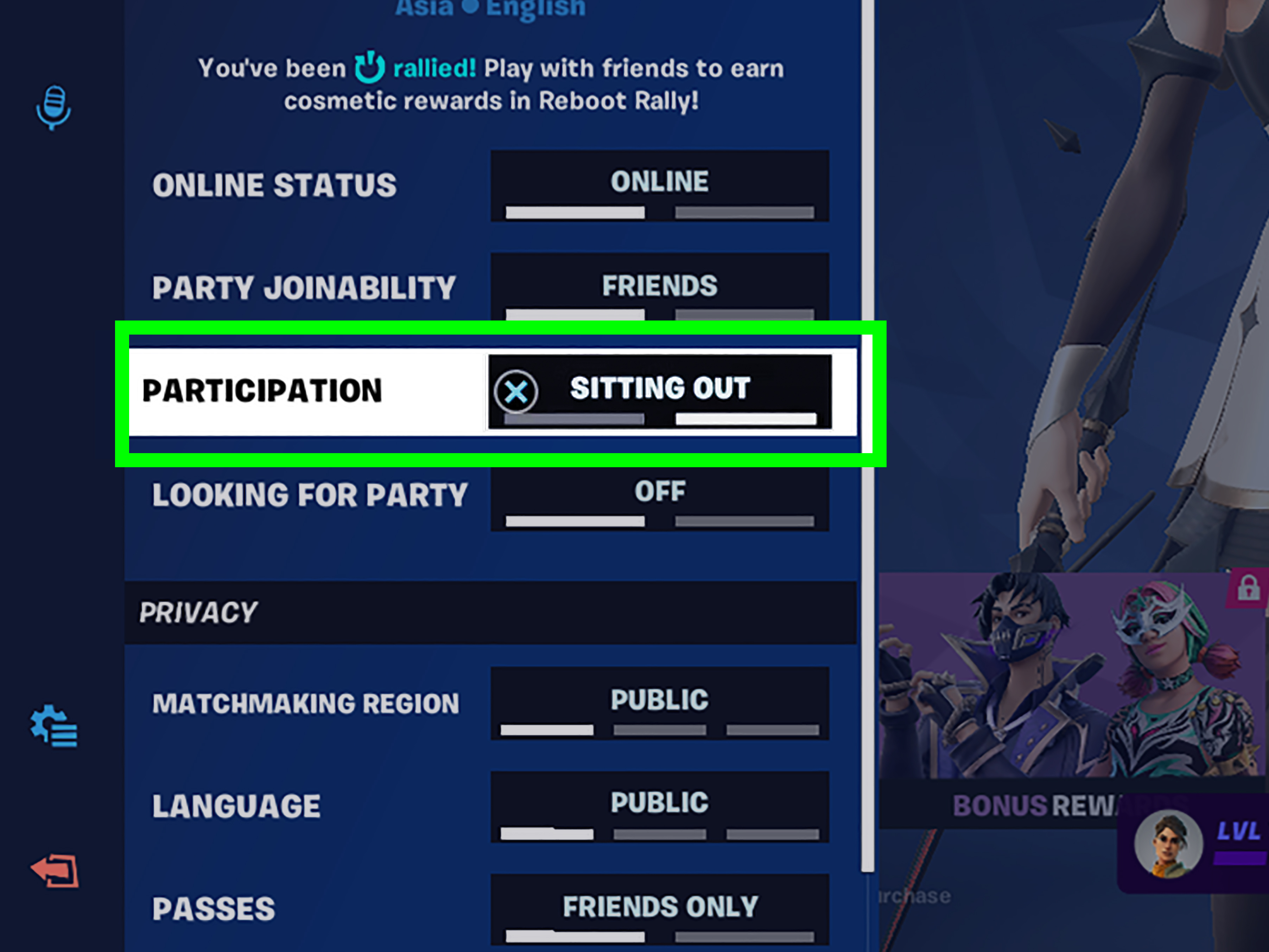
Once you are in your profile or party options, look for a setting called Participation. By default, it is usually set to Playing. Select that option and change it to Sitting Out.
After you make the switch, your status should show that you are sitting out. Your friends can now queue into a match without you being included. You remain in the party, but Fortnite treats you as a non-participating member for matchmaking.
This is the key step. If you remember nothing else, remember this simple path:
Profile or Party Menu → Participation → Sitting Out
That tiny setting can save your squad from awkward mode switching, broken rotations, and the classic “Wait, why did it queue all five of us?” confusion.
Step 4: Switch Back to “Playing” When You Want to Rejoin
When you are ready to jump back in, open the same menu again. Go to Participation and change your status from Sitting Out back to Playing. Once you do that, you can be included the next time your party queues for a match.
Do this before your friends start matchmaking. If they already launched into a match while you were sitting out, you will usually need to wait until they return to the lobby or finish the round. Fortnite is powerful, but it cannot politely shove you onto the Battle Bus mid-flight just because you found your sandwich.
Why Use the Sitting Out Feature?
The Fortnite sit-out feature sounds simple, but it solves several common squad problems. It is not just for people who need bathroom breaks, although yes, it is absolutely heroic in that department.
It Helps With Party Size Problems
Fortnite has different team sizes depending on the mode. If five friends are in a party but the group wants to play Squads, one person may need to sit out. Instead of leaving the party completely, that player can stay connected while the other four play.
This makes rotations easier. Your group can take turns sitting out without constantly sending new invites. It is cleaner, faster, and less likely to create the emotional drama of “Why did you kick me?” when all you wanted was an organized queue.
It Lets You Take a Break Without Disconnecting
Fortnite matches can be intense. Between sprinting, building, editing, aiming, healing, reviving, driving, sliding, and wondering why someone is playing the banjo emote during a firefight, a short break can help. Sitting out lets you rest without abandoning the party.
You can refill water, grab food, answer a message, stretch your hands, or simply reset your focus. Then you can come back and switch to Playing when ready.
It Keeps Voice Chat Open
One of the best parts of sitting out is staying in party voice chat. You can still talk with your friends while they play. This is perfect if you want to cheer them on, laugh at their questionable decisions, or remind them that yes, they walked past three shield potions.
However, be careful about giving unfair information if your friends are in a competitive environment. Keep things friendly, casual, and respectful of the game mode’s rules.
It Helps Parents and Younger Players Manage Play Time
Sitting out can also be useful for families. A player can pause participation without shutting everything down immediately. This makes transitions easier when it is time for dinner, homework, chores, or the mysterious parental phrase “come here for a second,” which is never actually one second.
What Happens When You Sit Out?
When you sit out in a Fortnite lobby, you should remain in the party while active party members can start a match without you. You are not counted as a participating teammate. You do not fill a team slot. You do not ready up with the group until you change your participation status back.
Your party may still be able to talk with you, depending on voice chat settings. You can wait in the lobby while the match runs. When your friends return, you can rejoin the rotation by switching back to Playing.
Can You Watch the Match While Sitting Out?
Sitting out is mainly a lobby participation setting. Depending on the mode, party setup, and current Fortnite features, you may be able to follow along through voice chat, but it is not the same as being an active teammate. Do not expect full spectator control in every situation.
If you want to watch closely, your options may depend on whether you were in the match, whether spectating is available, and what mode your friends are playing. For most casual players, sitting out is best understood as “stay in the party while others play,” not as a full broadcast booth experience.
Do You Earn XP While Sitting Out?
Generally, you should not expect to earn match progress for a game you are not participating in. If you are sitting in the lobby while your friends play, you are not actively completing objectives, quests, eliminations, survival milestones, or match actions. For XP and quest progress, you usually need to participate in eligible gameplay.
What to Do If You Cannot Find the Sitting Out Option
If the Sitting Out option is missing, greyed out, or not working, do not immediately blame your controller, your Wi-Fi, or the friend who always lands too far away. Try these fixes first.
Check That You Are in a Party
The setting is most relevant when you are grouped with other players. If you are alone, there may be no practical reason for Fortnite to show or enable sitting out. Join a party and check again.
Return to the Main Lobby
If your party is already matchmaking or loading into a game, the option may not behave as expected. Return to the lobby and change your participation status before the next queue begins.
Open the Correct Profile Menu
Fortnite has several menus: settings, social, account, party, voice, and mode selection. The participation option is normally connected to your profile or party status, not graphics settings or controller sensitivity. If you are staring at motion blur options, you have wandered into the wrong neighborhood.
Restart Fortnite
Occasionally, interface options can fail to update correctly. Restarting Fortnite may refresh the party menu and restore missing status controls. This is the classic tech support move because, annoyingly, it often works.
Check for Updates or Known Issues
Fortnite changes frequently. New seasons, patches, event modes, and interface updates can temporarily move, rename, disable, or bug certain options. If sitting out suddenly stops working for many players, it may be related to a current update or known issue rather than something you did wrong.
Tips for Using Sitting Out Without Annoying Your Squad
Sitting out is simple, but good party etiquette makes it even better. A tiny bit of communication can prevent confusion and keep everyone from yelling over the lobby music.
Say You Are Sitting Out Before the Queue Starts
Tell your party, “I’m sitting this one out,” before the leader starts matchmaking. This helps them choose the right mode and team size. It also prevents the classic panic moment where someone says, “Why are we in Trios?” halfway through the countdown.
Switch Back Before You Are Ready to Play
When you return, change your status to Playing before asking the leader to queue. If you forget, the party may start without you again, and yes, everyone will roast you lovingly.
Use It for Fair Rotations
If your group has more players than the mode allows, rotate the sitting-out spot. One person can sit out while four play Squads, then another player swaps next round. It keeps the group together and avoids making one unlucky friend the permanent lobby goblin.
Do Not Use Sitting Out to Stall the Party
If you need a long break, let your friends know. Sitting out is great for short pauses and rotations, but if you disappear for an hour, your squad may start to wonder whether you were abducted by Loot Llamas.
Platform Notes: PC, PlayStation, Xbox, Switch, and Mobile
The feature works through Fortnite’s in-game interface, so the steps are broadly similar across platforms. The main difference is how you open the menu.
PC
On PC, use your mouse to open the sidebar, social menu, or profile icon. Look for your profile options and select Participation. Change Playing to Sitting Out.
PlayStation
On PlayStation, use the controller button that opens Fortnite’s menu or sidebar, commonly the Options button. Navigate to your profile or party status and switch participation to Sitting Out.
Xbox
On Xbox, open the menu with the controller’s Menu button, then move through the party or profile panel. Select Participation and choose Sitting Out.
Nintendo Switch
On Nintendo Switch, use the Plus button or the current menu control shown in Fortnite. Find your profile or party options, then change participation from Playing to Sitting Out.
Mobile
On mobile, tap the menu or profile area. Because screen layouts can vary, look for your player icon, social sidebar, or party panel. Then change the participation setting to Sitting Out.
Common Mistakes When Trying to Sit Out
Most sit-out problems come from timing, menu confusion, or forgetting to switch back. Here are the mistakes to avoid.
Trying to Sit Out After Matchmaking Starts
Change your status before your party queues. Once matchmaking begins, the party state may already be locked in.
Forgetting to Rejoin
If your friends keep starting matches without you, check your participation status. You may still be sitting out. It happens. Fortnite does not judge you, but your squad might.
Looking in the Main Settings Menu Only
The participation option is usually tied to profile or party controls, not the full settings menu where you change graphics, audio, or keybinds. If you are adjusting shadows while trying to sit out, you have taken the scenic route.
Assuming It Works the Same in Every Mode
Fortnite includes many experiences and limited-time modes. Some modes may handle party size, spectating, and matchmaking differently. If something feels off, test it in the main lobby with a standard party setup.
Extra Experience: Real-World Ways Players Use Sitting Out
The sitting-out feature may look small, but in real Fortnite sessions, it can save the entire mood of a party. Anyone who has played with a regular group knows that the lobby is not just a waiting room. It is a planning center, snack negotiation zone, comedy club, and sometimes a courtroom where everyone debates who forgot to ready up.
One of the most common uses is squad rotation. Imagine five friends online at the same time. Everyone wants to play together, but the group is choosing Squads. Without sitting out, someone has to leave, or the party leader has to reorganize everything. With sitting out, one person stays in the party while the other four play. After the match, someone else takes a turn sitting out. It is simple, fair, and much less awkward than pretending someone “volunteered” when they definitely did not.
Another helpful use is the quick break. Fortnite can pull players into back-to-back matches before they realize they have not moved in an hour. Sitting out gives you a clean pause. You can stretch your wrists, drink water, grab a snack, answer a message, or check whether the pizza delivery person has been standing outside while you were fighting for a crown win. Instead of making your friends wait in the lobby, you sit out and let them keep playing.
It is also useful when someone is fixing technical issues. Maybe your microphone suddenly sounds like a robot trapped in a toaster. Maybe your controller disconnected. Maybe your game audio vanished, and now every enemy is a silent ninja. Rather than forcing the whole squad to wait, you can sit out, adjust your settings, and rejoin when everything works again.
For casual groups, sitting out can even make the night more social. Some players enjoy staying in voice chat while friends play, especially if they are eating, multitasking, or winding down. They can react to funny moments, celebrate wins, and laugh at the dramatic “I had him for 99 white!” speeches without being in the match themselves.
Parents and younger players may also find the feature practical. Instead of abruptly leaving a party, a player can sit out for a round when called away. It creates a softer transition from game time to real-life responsibilities. Fortnite may be full of rifts, rockets, and banana people, but sometimes the strongest force in the universe is someone saying, “Dinner is ready.”
From experience, the best way to use sitting out is to communicate clearly. Say, “I’m sitting out this round,” switch your participation status, and confirm that the party leader sees the right player count. When you come back, say, “I’m back in,” and change your status to Playing. Those two tiny announcements prevent most confusion.
The feature is not flashy. It will not improve your aim, build your edits, or stop your teammate from challenging an entire squad with eight health and a dream. But it does make Fortnite party management smoother. In a game where the action can be wonderfully chaotic, that little bit of lobby control feels surprisingly powerful.
Conclusion
Learning how to sit out in a Fortnite lobby is easy, and it can make party play much smoother. Join your party, open your profile or party menu, find Participation, and switch from Playing to Sitting Out. When you are ready to return, switch back to Playing before your squad queues again.
Sitting out is perfect for short breaks, party rotations, mode-size limits, technical fixes, and those moments when real life interrupts your Victory Royale dreams. It keeps you connected without forcing your friends to wait. In other words, it is the polite Fortnite way to say, “Go on without meI’ll be back after snacks.”