So, you finally wrote the fanfiction. The plot is dramatic, the dialogue has sparkle, and your favorite character has been emotionally rearranged like furniture during spring cleaning. Now comes the next big quest: learning how to post a fanfiction to Ao3, also known as Archive of Our Own.
AO3 can look intimidating the first time you open the posting form. There are ratings, warnings, fandom tags, relationship tags, summaries, notes, privacy options, collections, series, chapters, and enough checkboxes to make a spreadsheet blush. But once you understand the flow, publishing on AO3 is refreshingly simple. Think of it less like “uploading to a mysterious archive” and more like “filing your masterpiece in a very organized fandom library run by people who deeply understand tags.”
This guide walks you through the process step by step: preparing your story, choosing the right tags, formatting your work, previewing before publication, posting new chapters, avoiding common beginner mistakes, and making your fic easier for readers to find. Whether you are uploading a 1,000-word one-shot or the opening chapter of a 200,000-word slow-burn saga, the same basic process applies.
What Is AO3?
Archive of Our Own, usually shortened to AO3, is a nonprofit, noncommercial archive for fanworks created by the Organization for Transformative Works. It is designed for fanfiction, podfic, fanart, meta, and other transformative fan creations. Unlike many social platforms, AO3 is not built around algorithms, ads, follower pressure, or daily posting streaks. It is more of a searchable archive: readers find works through fandoms, tags, filters, bookmarks, recommendations, and good old-fashioned late-night curiosity.
That archive-style design is one reason AO3 tags matter so much. Tags are not just decoration. They are the map, the menu, the warning label, and sometimes the tiny neon sign that says, “Yes, this fic contains exactly the trope you are craving.”
Before You Post: Prepare Your Fanfiction
Before clicking “Post New Work,” spend a few minutes preparing your story. This saves you from the classic beginner panic of realizing your chapter pasted in as one giant paragraph, your title has a typo, and your summary sounds like it was written by a tired raccoon at 2 a.m.
Finish Editing the Chapter First
AO3 lets you edit after posting, but it is still better to proofread before publication. Read your chapter out loud if possible. Check for missing words, repeated lines, broken scene breaks, inconsistent names, and accidental notes to yourself like “[fix this fight scene later].” Readers are usually forgiving, but clean formatting helps them enjoy the story instead of mentally reaching for a red pen.
Save a Backup Copy
Never write directly into the AO3 posting box as your only copy. Use Google Docs, Microsoft Word, Scrivener, Pages, Notion, or a plain text file. Websites can refresh. Tabs can crash. Cats can walk across keyboards with villain-level timing. Keep your own saved version before pasting anything online.
Decide Whether It Is a One-Shot or Multi-Chapter Work
A one-shot is a complete story posted as one work. A multi-chapter work is better if your fanfiction has several installments, updates, or planned chapters. AO3 lets you mark a work as complete or incomplete, so readers can decide whether they want a finished fic or are ready to subscribe and follow along.
Step-by-Step: How to Post a Fanfiction to AO3
Step 1: Log In to Your AO3 Account
You need an AO3 account to post. Once you are logged in, look near the top of the page for the “Post” menu. Select “New Work.” This opens AO3’s posting form, which is where you will enter the information readers see before opening your fic.
If you do not have an account yet, you may need to request an invitation. AO3 has historically used an invitation system to manage account creation and site load. Once your account is active, you can post, edit, bookmark, subscribe, and manage your works from your dashboard.
Step 2: Choose the Rating
The rating tells readers the general maturity level of your work. AO3 includes options such as General Audiences, Teen and Up Audiences, Mature, Explicit, and Not Rated. Choose the rating that best matches your story. If you are uncertain, it is safer to choose a broader or more cautious rating rather than undersell intense material.
For example, a fluffy coffee-shop fic with mild language may fit Teen and Up or General Audiences depending on the content. A darker story with serious themes may need Mature. The goal is not to scare readers away; it is to help the right readers find the right work.
Step 3: Select Archive Warnings
AO3 requires you to choose an Archive warning option. These warnings help readers avoid major content they do not want to encounter. You can select specific applicable warnings, “No Archive Warnings Apply,” or “Creator Chose Not To Use Archive Warnings.”
Use this section carefully. It is one of the most important parts of posting responsibly on AO3. If your story includes major sensitive content covered by AO3’s warning system, mark it accurately. If you do not want to reveal whether a warning applies because it would spoil the plot, “Creator Chose Not To Use Archive Warnings” is available, but readers will understand that this means they should proceed with caution.
Step 4: Add the Fandom
The fandom field is required. Start typing the name of your fandom, then choose the correct tag when AO3 suggests it. For example, you might enter the title of a TV show, book series, movie, game, band, anime, comic, or other source material.
If your work crosses over multiple fandoms, add each relevant fandom. However, avoid tagging fandoms that are not actually present in the posted content. If a fandom will only appear in chapter ten, consider adding that fandom tag once the relevant chapter is posted.
Step 5: Choose Categories
Categories describe the general relationship type in your work. Options may include F/M, M/M, F/F, Gen, Multi, Other, or combinations. “Gen” usually means the story is not focused on romance or sexual relationships. Choose what best describes the central relationship focus of your fic.
This field is optional, but it helps readers filter works. If your story is mostly friendship, found family, adventure, or mystery with no main romantic pairing, Gen is often a useful choice.
Step 6: Add Relationship Tags
Relationship tags are where many AO3 readers go first. Use a slash, such as Character A/Character B, for romantic or sexual pairings. Use an ampersand, such as Character A & Character B, for platonic, familial, or non-romantic relationships.
This distinction matters. If your fic is about two characters becoming best friends, use the ampersand. If it is a romance, use the slash. Mixing them up can disappoint readers who are searching for a specific dynamic. AO3 readers are friendly, but they are also tag detectives with excellent memories.
Step 7: Add Character Tags
Character tags show who appears in the story. Tag the major characters who truly matter to the plot. You do not need to tag every background cameo, waiter, ghost, or person who appears for half a sentence and leaves dramatically through a doorway.
A good rule: if a reader searched for that character and found your fic, would they be satisfied with the character’s role? If yes, tag them. If no, leave them out or mention them in additional tags only if needed.
Step 8: Use Additional Tags Wisely
Additional tags are where AO3 becomes both useful and delightfully chaotic. This is where you can include tropes, genres, themes, content notes, settings, alternate universe labels, tone, and writing style. Examples include “Alternate Universe,” “Slow Burn,” “Canon Divergence,” “Hurt/Comfort,” “Fluff,” “Angst,” “Time Travel,” “Found Family,” or “Post-Canon.”
Be specific, but do not tag every tiny detail. A strong tag list helps readers decide whether your fic matches their mood. A tag list that is longer than the chapter may make readers wonder if the story is hidden somewhere inside the labels.
Step 9: Enter the Work Title
Your title is required. It can be poetic, funny, dramatic, or simple. A good fanfiction title usually matches the tone of the story. For example, “After the Storm” suggests emotional recovery, while “Five Times the Spaceship Broke and One Time It Didn’t” signals a classic fandom structure with humor.
Do not worry if the title is not perfect. Many beloved fics have titles borrowed from songs, poems, jokes, or random midnight inspiration. Just make sure it is spelled correctly and easy to read.
Step 10: Write a Summary
Your summary is your fic’s tiny storefront window. It should tell readers what the story is about without explaining every twist. You can use a short excerpt, a simple plot description, or a combination of both.
Weak summary: “I’m bad at summaries, just read it.”
Better summary: “After the final battle, Mara expects peace. Instead, she gets one haunted spaceship, three unanswered messages, and a former enemy who keeps making tea in her kitchen.”
The second version gives readers character, conflict, tone, and curiosity. That is what a good AO3 summary does.
Step 11: Add Notes If Needed
AO3 allows notes at the beginning and end of a work or chapter. Use beginning notes for brief context, such as “Written for a prompt challenge” or “Set after episode six.” Use end notes for thank-yous, update information, or light author commentary.
Keep notes helpful. Readers generally enjoy personality, but they came for the story. A small note is charming. A 900-word apology for existing may make them worry about you and forget what the fic was about.
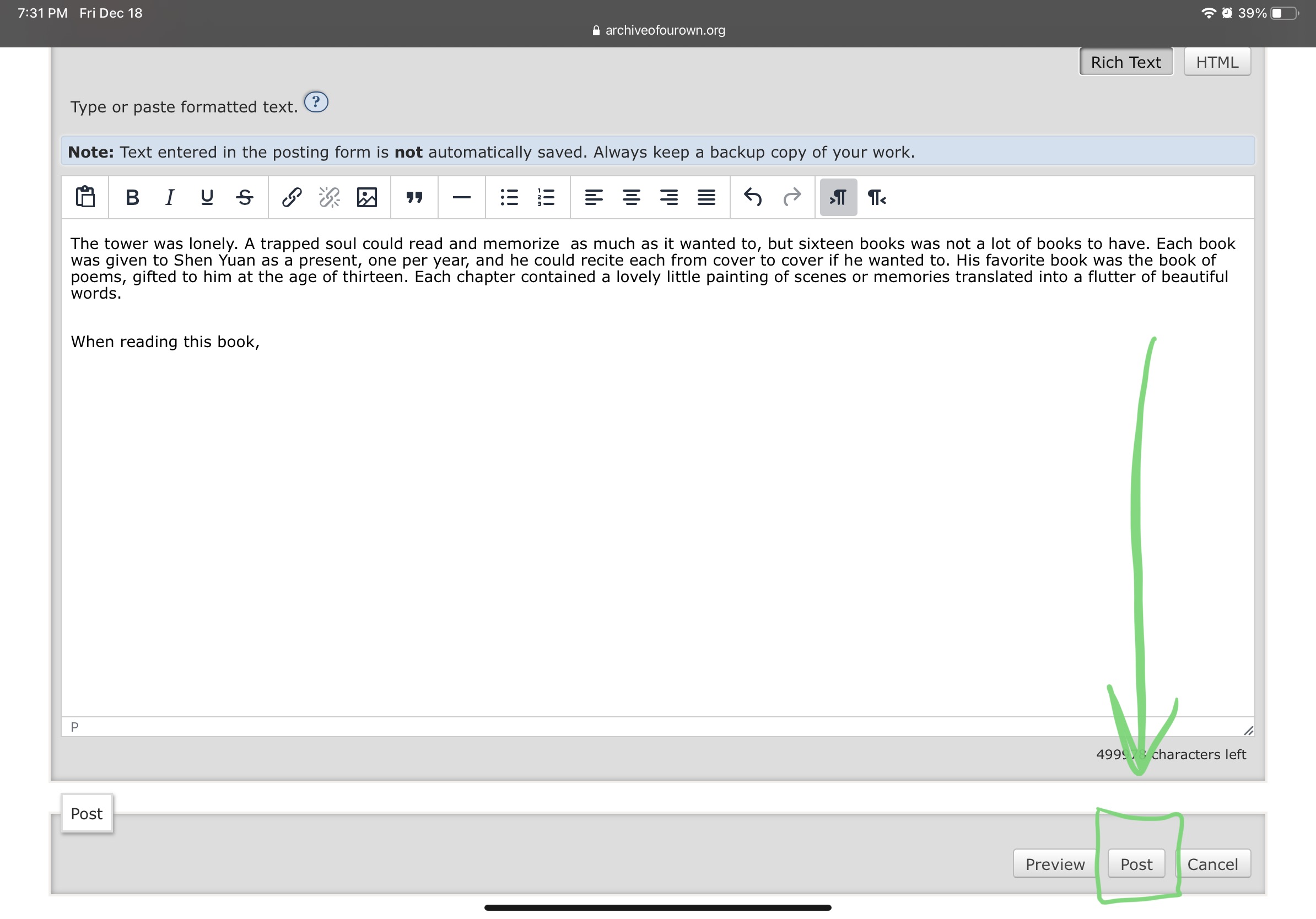
Step 12: Paste Your Fanfiction Text
The work text box is where your story goes. AO3 offers Rich Text and HTML options. Rich Text is easier for most beginners because it lets you paste formatted text from a word processor. HTML gives you more control if you know markup.
After pasting, check paragraph breaks, italics, bold text, scene dividers, and special formatting. If your fic includes texts, letters, poems, or stylized sections, preview carefully. Formatting that looks beautiful in a document may behave differently online.
Step 13: Preview Before Posting
Always use the preview option. Previewing lets you see how your work will appear to readers before it goes live. Check the title, tags, summary, notes, and chapter text. Look for missing spaces, broken italics, accidental formatting weirdness, or tags that do not say what you meant.
This is also your final “are we really doing this?” moment. The answer is yes. You wrote the thing. Let it breathe.
Step 14: Post the Work
Once everything looks right, select the button to post. Congratulations: your fanfiction is now on AO3. Readers can find it through fandom pages, tags, filters, searches, bookmarks, and recommendations. Depending on your settings, logged-in users may be able to comment, leave kudos, bookmark, or subscribe.
How to Post a New Chapter on AO3
For multi-chapter works, go to your work and choose the option to add a chapter. Paste the new chapter text, add chapter notes if needed, preview, and post. You can also update the chapter count if you know how many total chapters the story will have.
If you do not know the final chapter count, that is fine. Many writers start with a question mark because stories grow. A fic that begins as “probably five chapters” can turn into twenty chapters, three side stories, and a playlist. Fandom is not always a tidy cabinet.
Should You Use a Series?
AO3 series are useful when you have multiple related works that should remain separate but connected. For example, if you write three one-shots in the same universe, you can place them in a series. This keeps each work searchable on its own while helping readers follow the larger storyline.
Use chapters when the story is one continuous work. Use a series when each piece can stand alone or has its own title, summary, tags, and structure.
Common AO3 Posting Mistakes to Avoid
Overtagging
Tags help readers, but too many tags can become clutter. Focus on the main fandom, main characters, central relationships, important tropes, genre, tone, and major content notes. If a tag does not help a reader make a decision, it may not need to be there.
Undertagging
The opposite problem is posting with almost no helpful information. If your fic is a slow-burn enemies-to-friends story set in a college AU, say so. Readers who want that exact flavor of emotional soup will thank you.
Using the Wrong Relationship Symbol
Remember: “Character A/Character B” usually means romantic or sexual relationship. “Character A & Character B” means platonic or non-romantic relationship. This is one of AO3’s most important tagging customs.
Skipping the Preview
Preview is your best friend. It catches formatting problems, missing notes, and awkward summaries before the work goes live. Use it every time, even when you are sure everything is perfect. Especially then.
Putting Commercial Links in the Work
AO3 is noncommercial. Avoid using your fanfiction page to sell products, promote paid content, or direct readers to commercial activity. Keep your work focused on the fan creation itself.
Tips to Help Readers Find Your Fanfiction
AO3 does not work like a typical social media feed. Discovery depends heavily on fandom activity, tags, timing, bookmarks, subscriptions, and reader searches. You cannot control everything, but you can make your fic easier to find.
Use Clear, Searchable Tags
Think like a reader. What would someone type if they wanted a story like yours? Include the main trope, universe type, tone, and relationship dynamic. “Fake Dating,” “Post-Canon,” “Mutual Pining,” “Case Fic,” and “Happy Ending” are useful because they describe reader expectations.
Write a Strong First Line in the Summary
Readers often skim. Give them a reason to click. Lead with conflict, emotion, or an intriguing setup. A summary does not need to reveal the whole plot; it needs to open the door.
Update Consistently If Possible
If you are posting a chaptered fic, a consistent update rhythm can help readers stay engaged. That does not mean you must post every Tuesday at 6:03 p.m. while holding a candle. It simply means readers appreciate knowing whether a story is active.
Be Kind in Your Notes and Comments
AO3 readers often enjoy interacting with authors. A friendly end note can invite comments without pressure. For example: “Thanks for reading! I’d love to know which scene made you grin suspiciously at your phone.” That is warmer than demanding feedback like a tiny comment goblin.
of Real Posting Experience: What AO3 Teaches You After You Finally Click “Post”
The first time you post a fanfiction to AO3, the hardest part is rarely the form itself. The hardest part is the tiny emotional circus happening in your chest while your cursor hovers over the final button. You may suddenly notice every possible flaw. The title looks weird. The summary sounds too dramatic. The tags feel either too many or not enough. You may even consider changing the entire plot because one comma looked at you funny. This is normal. Posting creative work is vulnerable, even when the story is about fictional characters arguing in a magical bakery.
One of the best experiences AO3 gives new writers is the realization that readers search for very specific things. On other platforms, you may feel pressured to chase trends or please an algorithm. On AO3, someone may find your fic three months later because they filtered for a rare pairing, a specific trope, and “hurt/comfort with a hopeful ending.” That means your tags are not just administrative chores. They are little bridges between your story and the exact reader who wants it.
Another lesson: summaries matter more than you think. Many writers feel awkward writing them, but a clear summary can completely change how readers approach your fic. You do not need to sound like a movie trailer narrator. You only need to answer three quiet reader questions: Who is this about? What is the situation? Why should I care? A short, confident summary usually works better than apologizing for the story before anyone has read it.
Formatting also becomes part of the learning curve. After posting once or twice, you start developing a pre-publication ritual. Paste the chapter. Check italics. Check paragraph breaks. Preview. Scroll slowly. Fix the one line that somehow became bold for no reason. Preview again. This may sound tedious, but it becomes comforting. It is the writer’s version of checking the oven before serving cake.
Comments and kudos can feel magical, but they should not become the only reason you write. Some fandoms are loud and active. Others are quiet. Some pairings get instant attention. Others receive one thoughtful comment from a reader who appears like a woodland spirit and then vanishes forever. That does not mean your work failed. AO3 is an archive, and archive life is long. A story can find readers weeks, months, or years after posting.
The most satisfying part of posting on AO3 is seeing your work become part of a larger fandom conversation. Your fic joins thousands of other interpretations, fix-its, alternate universes, missing scenes, and emotional experiments. You are not just uploading text. You are adding your voice to a creative tradition where fans ask, “What if?” and then answer with 12 chapters and a devastatingly good title.
So when you post, do it with care, but do not wait for impossible perfection. Choose honest tags. Write a useful summary. Preview the work. Save a backup. Then let your fic enter the archive. Somewhere out there, a reader is filtering for exactly the kind of story you wrote.
Conclusion
Learning how to post a fanfiction to AO3 is easier once you understand the purpose of each field. The rating, warnings, fandom, title, language, tags, summary, notes, and text box all work together to help readers find and understand your story. AO3 may look complex at first, but its structure gives writers a lot of control over presentation, discoverability, and reader expectations.
The best approach is simple: prepare your chapter, tag honestly, summarize clearly, preview carefully, and post with confidence. Your first upload does not have to be flawless. You can edit later, improve your tagging style over time, and learn what works for your fandom. The important thing is to respect readers, represent your story accurately, and enjoy the strange, wonderful feeling of placing your work on the archive shelf.