Most eBay transactions are wonderfully boring in the best possible way: buyer clicks, seller ships, tracking updates, everyone moves on with life. But every now and then, a seller runs into a buyer who turns a simple sale into a tiny customer-service thunderstorm. Maybe they keep sending aggressive messages. Maybe they repeatedly bid and disappear. Maybe they demand extras that were never included in the listing. That is where knowing how to block someone on eBay becomes less of a “tech trick” and more of a seller survival skill.
The good news: eBay gives sellers tools to block individual buyers from bidding on or buying their items. You can also adjust buyer requirements, restrict buyers from places you do not ship to, report abusive behavior, and prevent blocked buyers from contacting you about listings. The slightly annoying news: the blocking feature is not always sitting in a giant glowing button labeled “Protect My Sanity.” You may need to know where to look.
This step-by-step visual guide explains how to block a buyer on eBay, how to unblock someone later, how to block messages, when blocking makes sense, and when reporting the buyer is the better move. Think of it as a calm, practical map through eBay’s seller toolswith fewer confusing clicks and fewer headaches.
What Happens When You Block Someone on eBay?
When you add a username to your eBay blocked buyer list, that member can no longer bid on or buy your active listings. They remain blocked until you remove their username from the list. In plain English: your store door is still visible, but that specific buyer cannot walk up to the checkout counter and start another transaction.
Blocking is especially helpful for sellers who have had repeated problems with the same person. For example, suppose a buyer purchased a vintage camera, complained that it did not include a modern charging cable clearly not mentioned in the listing, demanded a partial refund, and then tried to buy another camera from you the next week. Blocking that buyer can prevent round two of the same circus.
However, blocking is not a magic eraser for existing orders. If the buyer already purchased an item, you still need to follow eBay’s normal order, shipping, return, refund, and dispute processes. Blocking is mainly a prevention tool for future purchases and bids.
Before You Block: Make Sure You Have the Buyer’s Correct Username
To block someone on eBay, you need the member’s username. This is not always the same as their real name, shipping name, or email display name. Before adding someone to the blocked buyer list, copy the username carefully from the order details, message thread, bid history, or buyer profile.
Visual Cue: Where to Look
Imagine your screen as three zones:
- Top navigation: My eBay, Seller Hub, Help & Contact, account menu.
- Main content area: orders, messages, buyer information, listing details.
- Action menus: three-dot menus, “More actions,” “Edit,” “Submit,” or “Report” buttons.
When you are trying to block a buyer, your first job is to identify the username in the main content area, then move into the seller settings or blocked buyer page to add it. Copy and paste is your friend. Typing a username manually is how tiny spelling mistakes become tiny operational disasters.
How to Block Someone on eBay: Step-By-Step Visual Guide
Step 1: Sign in to Your eBay Account
Go to eBay and sign in to the seller account connected to your listings. If you manage multiple accounts, double-check that you are in the correct one. Blocking a buyer in one account will not automatically block them from another separate selling account.
Visual cue: Look for your name or account icon near the top of the page. If the page shows buyer-focused options only, navigate to “My eBay,” “Selling,” or “Seller Hub.”
Step 2: Find the Buyer’s Username
Open the order, message thread, bid history, offer, or buyer profile related to the problem. Copy the exact eBay username. If the issue came from a message, open the conversation and confirm the sender’s username before blocking.
Example: If the buyer’s visible name is “Sam R.” but the eBay username is “retrofinds_2024,” you need to block “retrofinds_2024.” Blocking “Sam R.” will not help because that is not the eBay user ID used by the blocked buyer tool.
Step 3: Go to the Block Buyers Page
eBay’s official blocking tool is usually called the “Block buyers from your listings” page or “Block bidders or buyers from your listings.” You can often reach it through seller settings, buyer requirements, or by searching eBay Help for “block buyer.”
Visual cue: The page typically includes a large text box where you can enter usernames. It may already contain usernames if you have blocked buyers before. Do not delete existing names unless you intentionally want to unblock those members.
Step 4: Enter the Username in the Text Box
Paste the buyer’s username into the blocked buyer list text box. If you are adding multiple usernames, separate them properly according to the page instructions. eBay allows sellers to add many names to the blocked list, but that does not mean you should treat it like a guest book for everyone who has ever asked a mildly annoying question.
Use blocking thoughtfully. A buyer asking, “Can you ship today?” is not the same as a buyer sending threatening messages or repeatedly abusing return policies. One is normal marketplace noise; the other is a reason to use seller protection tools.
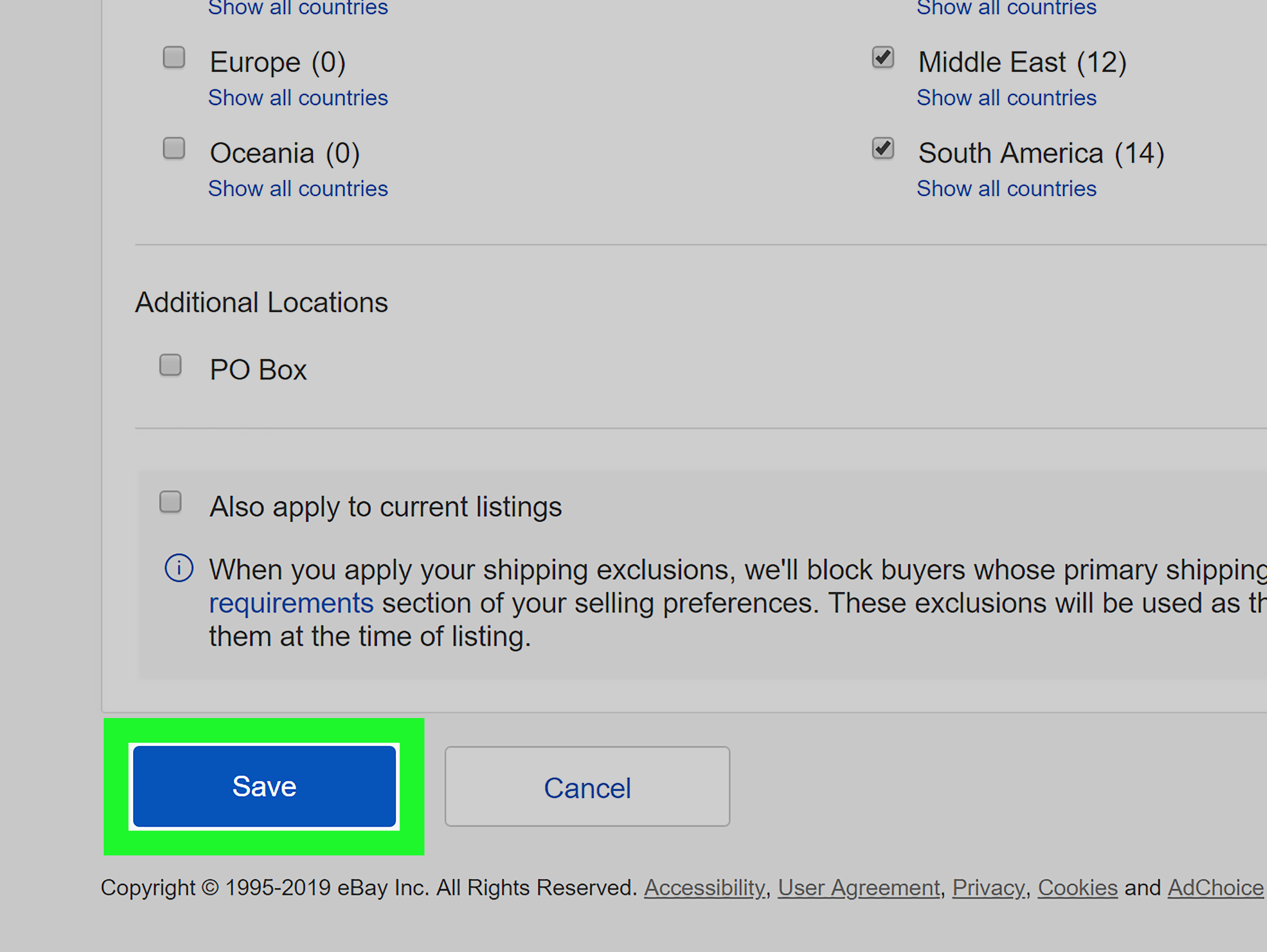
Step 5: Select Submit
After entering the username, choose “Submit” to save the change. Do not leave the page before submitting. If you paste the username and close the tab, eBay will not politely chase you down the hallway yelling, “Wait, you forgot to save!”
Visual cue: Look for a confirmation message or check that the username remains in the text box after the page refreshes. That is your sign the block has been saved.
Step 6: Decide Whether to Block Messages Too
By default, blocking a buyer from purchasing or bidding may not always stop all contact about listings. In buyer management or site preferences, sellers can choose a setting that prevents blocked buyers from contacting them about listings. This is useful if the problem includes unwanted, aggressive, repetitive, or inappropriate messages.
Important: A buyer may still be able to contact you about an existing transaction. That is intentional because eBay may need both sides to resolve shipping, returns, refunds, or other open order issues.
How to Block Someone from eBay Messages
If the issue is mainly messaging behavior, you may be able to block or report the member directly from the conversation. On mobile, look for the three-dot menu in the message thread. On desktop, look for an action menu in your inbox or message view. From there, you may see options to report a message or block the member.
Reporting and blocking are not the same thing. Blocking prevents future interaction or purchases depending on the tool used. Reporting tells eBay that the member may have violated marketplace policies. If the message includes threats, harassment, scam attempts, offensive language, or requests to complete a transaction outside eBay, reporting is usually the smarter move.
When to Report Instead of Only Blocking
Report a buyer when you believe they are violating eBay policies. Examples may include abusive messages, misuse of returns, false claims, feedback extortion, attempts to move the sale outside eBay, or demands for something not offered in the original listing.
For routine problemssuch as a buyer asking for a refund, changing their mind, or failing to payuse eBay’s normal resolution tools. Reporting should be accurate and honest. Treat it like filling out an incident report, not writing a dramatic movie review.
How to Unblock a Buyer on eBay
Unblocking someone is simple: return to the blocked buyer list, remove the username from the text box, and select “Submit.” Once removed, the buyer may be able to bid on or buy your listings again, depending on your other buyer requirements.
This is useful if you blocked someone by mistake, resolved a misunderstanding, or inherited an old blocked list and want to clean it up. Just remember that unblocking should be intentional. If a buyer caused serious problems before, keep notes before deciding to give them access again.
How to Use Buyer Requirements to Prevent Future Problems
Blocking one buyer solves one problem. Buyer requirements help reduce broader patterns of trouble. In eBay buyer management settings, sellers can set requirements that block certain types of buyers from bidding on or buying items. For example, you may be able to restrict buyers whose primary shipping address is in a location you do not ship to, or buyers who have a history of unpaid purchase cancellations.
This is especially helpful for sellers with high-volume stores. If you sell one collectible mug a month, manually blocking a buyer may be enough. If you sell hundreds of items, buyer requirements can act like a bouncer at the doorprofessional, quiet, and much better than you personally reviewing every suspicious interaction at midnight.
Be Careful Not to Overblock
Buyer requirements can reduce risk, but they can also reduce sales if used too aggressively. Blocking entire categories of buyers may prevent legitimate customers from purchasing. A good seller strategy is balanced: protect your account without making your store feel like a members-only fortress guarded by dragons.
Common Reasons Sellers Block Buyers on eBay
Every seller has a different threshold, but common reasons to block an eBay buyer include repeated unpaid purchases, hostile communication, unreasonable demands, suspected scams, misuse of returns, false claims, and attempts to pressure the seller into discounts or partial refunds after delivery.
Another common case is the “serial negotiator.” This buyer sends lowball offers, asks for free shipping, requests extra accessories, complains about the price, and then returns later to do the same thing again. Not every tough negotiator deserves a block, but repeated bad-faith behavior can waste time and create unnecessary risk.
What Blocking Does Not Do
Blocking someone on eBay does not delete past messages, cancel existing orders automatically, remove feedback by itself, or guarantee that eBay will take enforcement action. It also does not replace good listing practices. Clear photos, accurate descriptions, honest condition notes, strong packaging, tracking, and professional communication still matter.
If a buyer already left feedback you believe violates policy, use eBay’s feedback-related tools. If the buyer opened a return, follow the return process. If they made a false claim, document the issue and use the appropriate report or appeal options. Blocking is a shield for future activity, not a time machine.
Best Practices Before Blocking a Buyer
Keep Communication Professional
Even when a buyer is being difficult, keep your messages polite and factual. eBay can review messages in some dispute situations, so write every reply as if a support specialist may read it later. Avoid sarcasm in actual buyer messages. Save the sarcasm for your group chat, your dog, or the kitchen sink while you dramatically rinse a coffee mug.
Document the Issue
Keep order numbers, tracking details, photos, message screenshots, and timeline notes. Documentation helps if you need to report the buyer, appeal a defect, respond to a return, or request seller protection.
Use Accurate Listings
Many buyer conflicts start with unclear listings. Include measurements, condition flaws, compatibility details, shipping timelines, return policy information, and what is included in the box. The clearer your listing, the harder it is for a bad buyer to claim they were misled.
Do Not Block Emotionally
Pause before blocking. Ask yourself: Is this person risky, abusive, or repeatedly problematic? Or am I just annoyed because they asked three questions about a $9 item? Blocking is useful, but overusing it can shrink your buyer pool and make normal customer service feel more stressful than it needs to be.
Quick Troubleshooting: Why Can’t I Find the Block Buyer Page?
eBay’s layout can vary depending on device, account type, region, and whether you are using desktop or mobile. If you cannot find the page through Seller Hub, try using eBay Help and searching for “block buyer” or “block bidders.” You can also look through account settings, selling preferences, site preferences, or buyer management.
If you are on the eBay app and cannot find the full settings page, switch to a desktop browser. Some seller tools are easier to manage from desktop because the app often prioritizes buying, listing, messaging, and order tasks.
Desktop vs. Mobile: Which Is Better for Blocking Buyers?
For quick message actions, mobile can work well. The three-dot menu in a conversation may let you report or block a member from the message thread. For managing the full blocked buyer list, buyer requirements, exemptions, and contact settings, desktop is usually easier.
Think of mobile as the pocket knife and desktop as the toolbox. The pocket knife is handy, but when you need to adjust the whole system, the toolbox wins.
Real-World Experience: What Sellers Learn After Blocking Buyers
After working with eBay-style selling workflows, one lesson becomes obvious: blocking a buyer is rarely about revenge. It is about reducing repeat friction. The best sellers do not block because someone asked a question or negotiated a price. They block when a pattern suggests that future transactions are likely to be expensive, stressful, or unfair.
For example, imagine selling used electronics. You list a pair of headphones with clear photos, note the scuffs, test the audio, and state that the charging cable is included but the original box is not. A buyer purchases the item, receives it, then complains that the box is missing even though the listing clearly said so. You respond professionally. They demand a partial refund. You decline politely and point to the listing. Then they start messaging repeatedly and threaten negative feedback unless you pay them. In that situation, blocking the buyer after the transaction is not petty. It is basic account hygiene.
Another common seller experience involves unpaid purchases. A buyer wins an auction, does not pay, ignores reminders, and then later bids on another item. One unpaid purchase may be a mistake. Repeated unpaid purchases are a pattern. Blocking helps prevent the same buyer from tying up inventory again, especially for auctions where a non-paying bidder can cost you time and momentum.
Many experienced sellers also learn to combine blocking with better listing habits. If a buyer complains about size, add clearer measurements. If buyers keep asking whether an accessory is included, add a bold “Included in the package” section. If returns happen because color looks different in photos, add lighting notes. Blocking handles the difficult individual, but better listings reduce future misunderstandings with everyone else.
There is also an emotional benefit. Selling online can feel personal because your time, money, inventory, and reputation are involved. A single difficult buyer can make you question the whole business. Blocking gives sellers a boundary. It says, “I will provide good service, but I do not have to invite the same problem back into my store.” That boundary can help sellers stay calm, consistent, and professional.
The smartest approach is to create a small internal rule for yourself. For instance: block buyers who send abusive messages, repeatedly fail to pay, make false claims, demand off-platform transactions, or attempt feedback manipulation. Do not block buyers simply for asking reasonable questions, requesting a discount, or returning an item through the proper process. This keeps your blocked list useful instead of emotional.
Finally, review your blocked buyer list occasionally. Some usernames may be old, added during a temporary issue, or no longer relevant. If you run a large store, keep private notes explaining why a username was blocked. That way, months later, you are not staring at a random list of names wondering whether “sneakerfan88” was a serious problem or just someone who asked too many questions about shoelaces.
Conclusion
Learning how to block someone on eBay is an important skill for sellers who want to protect their time, inventory, and account health. The process is straightforward: find the buyer’s username, open the blocked buyer list, add the username, submit the change, and adjust message or buyer requirement settings if needed. Blocking is most effective when used carefully alongside professional communication, accurate listings, documentation, and eBay’s reporting tools.
Used wisely, the eBay blocked buyer list is not a drama button. It is a boundary-setting tool. It helps you keep your store open to good buyers while closing the door on repeat problems. And in online selling, fewer repeat problems means more time for sourcing, shipping, improving listings, and enjoying the rare beautiful moment when a buyer simply pays, receives the item, leaves nice feedback, and vanishes peacefully into the internet sunset.
Note: eBay menus and labels may vary slightly by account, device, region, and future platform updates. Always confirm the final action on the live eBay page before submitting changes.