There is something wonderfully rebellious about running BASIC on a Raspberry Pi Pico. The Pico is modern, tiny, inexpensive, and powered by a microcontroller that looks ready for serious embedded work. BASIC, meanwhile, arrives wearing vintage sneakers, carrying line numbers, and asking whether you still remember GOTO. Somehow, the combination makes perfect sense.
A BASIC interpreter for the Raspberry Pi Pico turns the board into a small, friendly programming machine. Instead of building a C/C++ toolchain, wrestling with headers, or wondering why your environment has developed a personal grudge against you, you can plug in a Pico, open a serial terminal, type a few commands, and make hardware respond. For students, hobbyists, retro-computing fans, and makers who want quick results, that is a very attractive proposition.
The phrase “BASIC interpreter for Raspberry Pi Pico” can point to more than one project. Two names often come up: PicoMite, which runs MMBasic and feels like a complete tiny computer environment, and PiccoloBASIC, a smaller interpreter aimed at bringing classic BASIC-style programming to the Pico. Both celebrate the same idea: the Pico is not just a board for compiled firmware. It can also be an interactive playground where code and electronics meet without requiring a ceremonial dance around a build system.
What Makes The Raspberry Pi Pico A Good Home For BASIC?
The Raspberry Pi Pico is different from the larger Raspberry Pi boards many people know. It does not run Linux, it does not boot into a desktop, and it will not politely host your browser with 27 tabs open. It is a microcontroller board, designed to run one program close to the hardware. That makes it ideal for blinking LEDs, reading sensors, controlling displays, logging data, and building small embedded devices that do one job reliably.
At the heart of the original Pico is the RP2040 microcontroller. It includes a dual-core Arm Cortex-M0+ processor, 264KB of SRAM, flexible digital interfaces, ADC support, PWM, I2C, SPI, UART, and the famous Programmable I/O system known as PIO. In plain English: it is small, cheap, and surprisingly capable. In slightly more emotional English: it is the kind of board that makes makers say, “I’ll just test one little idea,” before losing an entire Saturday in the best possible way.
Those hardware features matter because a BASIC interpreter is only useful on a microcontroller if it can talk to the outside world. On a Pico, BASIC can be more than a nostalgic language. It can read a button, drive a relay, display sensor data, generate PWM, save information to storage, or communicate with other modules. That makes BASIC practical, not merely adorable.
PicoMite: MMBasic Turns The Pico Into A Tiny Computer
PicoMite is one of the most polished ways to run BASIC on the Raspberry Pi Pico. It uses MMBasic, a Microsoft BASIC-compatible language that includes modern conveniences while keeping the immediate, approachable feel of classic BASIC. The result is not just a language interpreter. It feels like a small operating environment for the Pico.
With PicoMite, users can work with variables, arrays, strings, floating-point numbers, long variable names, a built-in editor, and a broad collection of commands. The firmware also supports real-world hardware features such as displays, touchscreens, SD cards, serial communication, I2C, SPI, and more depending on the build and board. That is a major reason PicoMite has earned attention from embedded hobbyists: it reduces the gap between “I have an idea” and “the thing on my desk is actually doing something.”
In a traditional embedded workflow, you often write code on a computer, compile it, flash the board, test it, discover one tiny mistake, and repeat. PicoMite changes the rhythm. You can type, edit, run, and debug in a more interactive way. It feels closer to the early home-computer era, but with far better hardware and fewer beige plastic keyboards large enough to qualify as furniture.
Why Makers Like PicoMite
PicoMite is especially appealing for projects where the Pico is expected to act as a standalone controller. A small data logger, a bench instrument, a display dashboard, a sensor reader, or a home automation controller can be built without pulling in a heavy software stack. The interpreter becomes the development environment, and the Pico becomes the computer.
For beginners, that is empowering. For experienced users, it is efficient. There are times when you do not need maximum performance from compiled C. You need to read a sensor every second, show the value on a display, and save it somewhere. BASIC says, “Sure, let’s not turn this into a doctoral thesis.”
PiccoloBASIC: A Lightweight, Retro-Friendly Interpreter
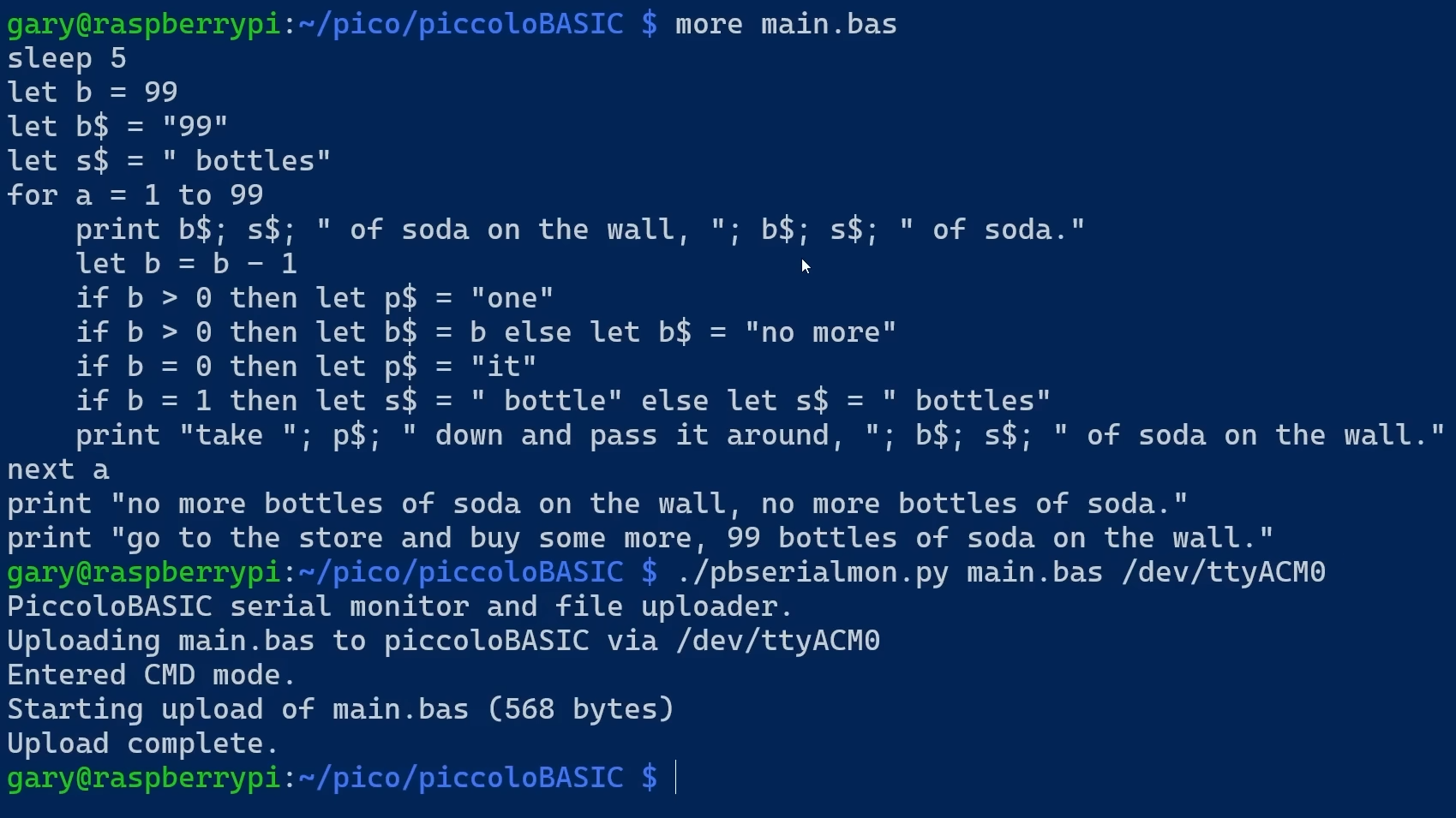
PiccoloBASIC takes a different route. It is a smaller BASIC interpreter for the Raspberry Pi Pico, inspired by the spirit of simple BASIC systems. It supports classic programming structures such as LET, PRINT, FOR/NEXT, GOTO, and GOSUB. It also adds useful routines for regular microcontroller programming, including delays, sleep functions, pseudorandom numbers, trigonometric functions, and floating-point handling.
Where PicoMite feels like a richer environment, PiccoloBASIC feels like a compact retro lab. It is a good example of how the Pico can host an interpreter without pretending to be a full desktop computer. You can explore programming logic, make small hardware demos, and enjoy the satisfying directness of BASIC without installing a giant development environment.
The charm is obvious: type a program, run it, change it, run it again. For anyone who first learned programming through line-numbered BASIC, the experience feels like meeting an old friend who now owns GPIO pins.
BASIC On Pico Versus MicroPython, CircuitPython, C/C++, And Arduino
The Raspberry Pi Pico already has strong language support. MicroPython is widely used on Pico boards and is beginner-friendly, especially with tools such as Thonny. CircuitPython is popular in the Adafruit ecosystem because it makes libraries and hardware modules approachable. C and C++ provide the highest control and performance through the official Pico SDK. Arduino support gives many makers a familiar sketch-based workflow.
So why bother with BASIC?
The answer is not that BASIC is “better” in every technical sense. It is that BASIC offers a different style of interaction. It is direct, readable, and forgiving. It encourages small experiments. It makes simple control flow visible. A beginner can understand PRINT "HELLO" instantly. A classroom can use BASIC to teach loops, conditions, variables, and hardware control without burying the lesson under syntax anxiety.
For serious timing-sensitive work, C/C++ may still be the best choice. For huge library ecosystems, MicroPython and CircuitPython have strong advantages. For Arduino veterans, the Arduino-Pico core feels natural. But for quick embedded experiments, retro projects, education, and standalone control panels, BASIC on the Pico has a surprisingly strong argument.
A Simple Example: Blinking An LED In BASIC
The exact command names depend on the interpreter, firmware, and pin setup, but a BASIC-style blink program often looks beautifully simple:
This is not meant as a universal copy-paste program for every BASIC implementation, but it shows the spirit. Set a pin as output. Turn it on. Wait. Turn it off. Wait. Repeat until someone either stops the program or begins communicating with the LED emotionally.
That simplicity is powerful. It teaches the connection between software and hardware immediately. Students do not need to understand linker scripts to experience the magic of code controlling a physical object. Makers do not need to create a new project folder, configure a compiler, and sacrifice a USB cable to the debugging gods.
Real Projects You Can Build With BASIC On The Raspberry Pi Pico
1. Sensor Data Logger
A Pico running BASIC can read sensor values through ADC, I2C, or SPI, then store readings or print them over a serial connection. Add an SD card on a PicoMite-style setup, and the board can become a simple temperature, humidity, light, or voltage logger. It is the kind of project that starts as “just one sensor” and becomes a tiny weather station with opinions.
2. Display Dashboard
Because PicoMite supports display-oriented projects, BASIC can be used to create small dashboards. Imagine a tiny screen showing room temperature, system voltage, Wi-Fi status, or workshop measurements. BASIC is well suited to this because dashboard logic is often simple: read values, format text, draw output, repeat.
3. Retro Terminal Or Educational Computer
One of the most enjoyable uses for BASIC on the Pico is building a retro-style programming station. Add a serial terminal, keyboard arrangement, or display, and the Pico becomes a small learning machine. It will not replace a laptop, but it might replace boredom, which is arguably a more important achievement.
4. Small Automation Controller
For simple automation, BASIC can monitor inputs and control outputs. A Pico can read switches, drive indicator LEDs, trigger relays through proper driver circuits, or manage timing sequences. Because BASIC code is readable, it is easier to revisit after a few months without asking, “Who wrote this?” and then realizing, with horror, that it was you.
Strengths Of A BASIC Interpreter On The Pico
The biggest strength is immediacy. BASIC makes the Pico feel interactive. You can test logic quickly, make edits easily, and learn through experimentation. That is valuable for beginners and for experienced makers who want fast iteration.
The second strength is readability. BASIC code tends to be plain. A program that reads a pin, checks a condition, and prints a message is easy to understand. This makes it useful for education, documentation, and projects that need to be maintained by someone who may not live inside a compiler manual.
The third strength is nostalgia with purpose. Retro computing is fun, but BASIC on the Pico is not just cosplay for microcontrollers. It can perform useful work. It lets classic programming ideas control modern embedded hardware.
Limitations To Keep In Mind
A BASIC interpreter is still an interpreter. It usually will not match compiled C/C++ for speed, memory efficiency, or low-level control. If you need precise timing, heavy computation, complex networking, or advanced PIO work, you may eventually move to C, C++, or another lower-level environment.
Memory is another consideration. The Pico is capable, but it is not a desktop computer. Programs, variables, buffers, display assets, and file storage all compete for limited resources. Good BASIC projects stay focused. They do not try to become a spreadsheet, web server, media player, and emotional support robot at the same time.
Finally, hardware safety still matters. Pico GPIO pins use 3.3V logic. Connecting 5V signals directly can damage the board. Motors, relays, bright LED strips, and other higher-current devices require appropriate drivers, transistors, resistors, external power supplies, and common-ground planning. BASIC makes coding easier, but it does not repeal electronics.
How To Choose Between PicoMite And PiccoloBASIC
If you want a more complete environment with strong hardware support, a built-in editor, and the feeling of a tiny embedded computer, PicoMite is the more obvious starting point. It is well suited to display projects, storage projects, serial devices, and practical controllers.
If you want a smaller interpreter that captures the classic BASIC experience and helps you explore how a simple interpreter works on the Pico, PiccoloBASIC is a fun and educational option. It is especially attractive for retro-style learning, small demos, and people who enjoy minimal systems.
In other words, PicoMite is like building a compact workshop. PiccoloBASIC is like opening a delightful toolbox from 1983 and discovering that someone added RP2040 support.
Why BASIC Still Matters In 2026
BASIC survives because it solves a human problem. It reduces friction. Not every project needs industrial-grade architecture. Sometimes the best language is the one that gets a student excited, helps a hobbyist finish a prototype, or lets an engineer test a sensor before lunch.
The Raspberry Pi Pico has kept microcontroller development affordable and accessible. A BASIC interpreter extends that accessibility even further. It gives users a direct path into physical computing, where a few lines of code can create a visible result. That is educational gold. It is also deeply satisfying for adults who still believe computers should occasionally feel like toys, tools, and magic tricks all at once.
Hands-On Experience: What It Feels Like To Use BASIC On A Raspberry Pi Pico
Working with a BASIC interpreter on the Raspberry Pi Pico feels refreshingly immediate. The first pleasant surprise is how little ceremony is involved once the firmware is installed. Instead of opening a complex IDE, creating a project, selecting a board package, and wondering whether your USB cable is secretly charge-only, you can connect over a terminal and begin typing commands. The board feels alive in a way that compiled workflows sometimes hide.
The second surprise is how useful the old BASIC style remains. A simple loop is still a simple loop. A conditional statement still reads like a decision. When testing hardware, that matters. Suppose you are wiring a button and an LED. In a compiled workflow, each small test may involve editing, building, uploading, and resetting. In BASIC, the feedback loop feels shorter. You can test a pin, print a value, change a pause, adjust a threshold, and rerun the program quickly. It turns debugging into conversation instead of paperwork.
One practical lesson is to keep the first setup boring. Start with the onboard LED. Then test one external LED with a proper resistor. Then test one button. Then try one sensor. The temptation is to connect a display, SD card, buzzer, rotary encoder, relay board, and three mystery modules from a drawer labeled “probably I2C” on day one. Resist. BASIC is friendly, but electronics still rewards patience.
Another experience worth noting is that serial terminals matter more than beginners expect. A good terminal connection makes the Pico feel like a classic computer. A bad one makes it feel like a haunted USB stick. Once the connection is stable, commands such as listing, editing, saving, and running programs become part of the rhythm. The workflow is pleasantly old-school: write a few lines, run them, smile when the hardware responds, frown when it does not, then discover the wire was in the wrong row of the breadboard. Tradition is important.
For classroom or club use, BASIC on the Pico is especially strong because it keeps attention on cause and effect. Students can see that code changes behavior. A line that turns a pin on makes an LED glow. A loop makes it blink. A condition makes it respond to a button. That direct connection builds confidence. It also gives teachers room to explain programming ideas without needing to spend half the lesson on environment setup.
For hobbyists, the biggest benefit is project momentum. Many small embedded ideas die in the swamp between “cool concept” and “toolchain configured.” A BASIC interpreter helps rescue those ideas. You can prototype a timer, counter, display, sensor reader, or simple controller in a relaxed way. Later, if the project needs more speed or tighter control, you can rewrite it in C/C++ or MicroPython. BASIC does not have to be the final destination. Sometimes it is the excellent first sketch.
The most enjoyable part is the personality of the workflow. BASIC invites experimentation. It does not judge your line numbers. It does not sigh when you use GOTO. It simply runs the program and lets the Pico do something in the real world. That combination of retro simplicity and modern microcontroller capability is why a BASIC interpreter for the Raspberry Pi Pico remains more than a novelty. It is a practical, playful, and surprisingly productive way to build small embedded projects.
Conclusion
A BASIC interpreter for the Raspberry Pi Pico is a beautiful collision of old and new. The Pico brings modern microcontroller power, flexible I/O, low cost, and a thriving maker ecosystem. BASIC brings immediacy, readability, and a friendly path into programming. Together, they create a development experience that is useful for education, prototyping, retro computing, and small embedded projects.
PicoMite is the stronger choice for users who want a capable MMBasic environment with serious hardware support. PiccoloBASIC is a charming option for lightweight, retro-style exploration. Both prove that BASIC still has a place in modern electronics, especially when the goal is to learn, experiment, and make hardware respond without unnecessary drama.
If you have a Raspberry Pi Pico sitting in a drawer, a BASIC interpreter may be the excuse it has been waiting for. Plug it in, type a few lines, and let the tiny board remind you why programming felt magical in the first place.
Note: This article is written in original, publication-ready American English and is based on real technical information from official Raspberry Pi documentation, BASIC interpreter project materials, and reputable maker-community references.