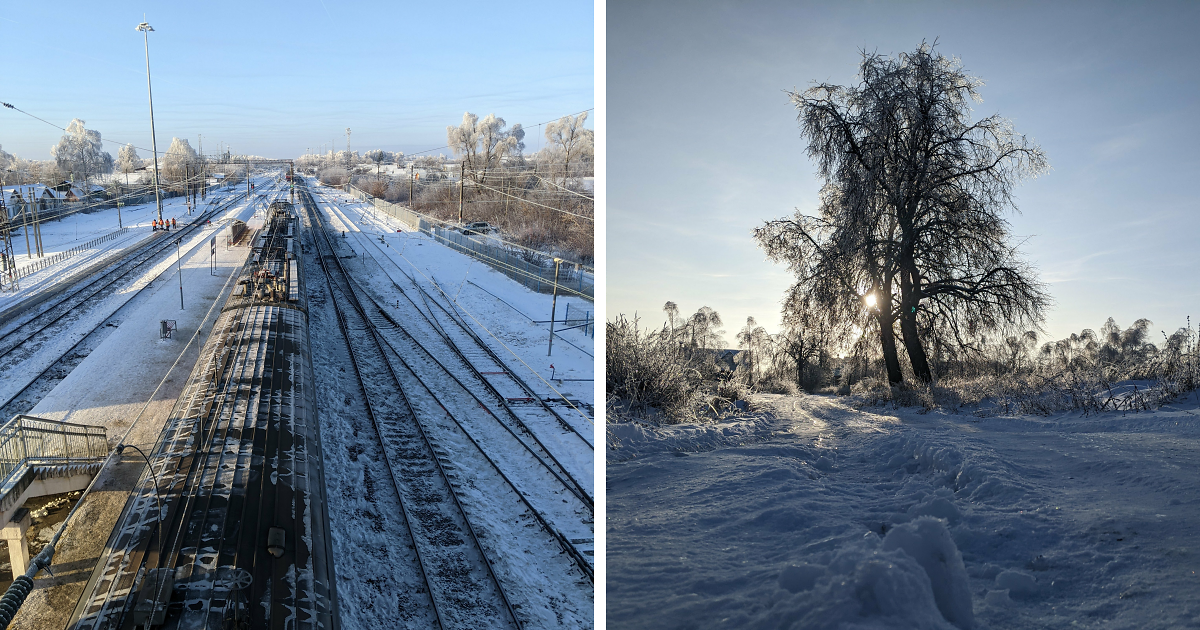
Winter has a funny way of making ordinary places look like they accidentally wandered into a movie trailer. A bare tree becomes dramatic. A parked car becomes a powdered doughnut. A sidewalk turns into a skating rink with legal consequences. And somehow, the same phone we use to order coffee, ignore group chats, and take suspiciously blurry pictures of receipts can also capture the quiet magic of the season.
This photo essay, “Winter Photographed With My Phone (14 Pics)”, is about seeing winter without overcomplicating it. No giant camera bag. No frozen tripod tantrum. No lens that costs more than a used snowmobile. Just a phone, a pair of gloves that still sort of work on a touchscreen, and the willingness to stop for thirty seconds when the light hits the snow just right.
Phone photography has become more powerful than many people realize. Modern smartphone cameras can handle challenging light, close-up details, low-light scenes, portraits, and wide landscapes with surprising confidence. Still, winter is a tricky subject. Snow can fool your camera into making everything too gray. Bright ice can blow out highlights. Cold temperatures can drain your battery faster than a teenager drains Wi-Fi. But with a little attention to exposure, composition, timing, and storytelling, winter phone photography can feel intimate, cinematic, and wonderfully human.
Why Winter Looks So Good Through a Phone Camera
Winter strips the world down to shapes, shadows, and silence. In spring, everything competes for attention. Summer arrives with too much color and too many people holding melting snacks. Fall is gorgeous, yes, but it knows it is gorgeous. Winter is different. It is minimalist without asking permission.
That simplicity works beautifully for phone photography. Snow creates clean backgrounds. Bare branches become natural line drawings. Fog softens busy streets. A single footprint can become the entire story. Because smartphone cameras are easy to carry and quick to use, they are perfect for catching those blink-and-you-missed-it moments: steam rising from a cup, frost on a windshield, a dog wearing boots with the emotional range of a betrayed Shakespeare character.
The best winter photos are rarely about “perfect” scenery. They are about atmosphere. They show how cold feels, how quiet sounds, and how light changes when the sun is low and the air looks almost blue. A phone camera is not a compromise here. It is an advantage because it lets you react quickly before the snow melts, the light shifts, or your fingers file a formal complaint.
The 14 Pics: A Phone Gallery of Winter’s Small Miracles
1. The First Footprints on Fresh Snow
The first photo in the series captures a clean patch of snow crossed by a single line of footprints. Nothing dramatic, no mountain peak, no heroic wolf in the distance. Just tracks moving from one side of the frame to the other. That is the charm. Winter often tells its best stories through evidence: someone passed here, someone walked slowly, someone probably regretted not wearing better socks.
For this kind of shot, shooting from a low angle makes the texture of the snow more visible. The tiny ridges and shadows become part of the composition. A phone camera works especially well because you can crouch, tilt, and frame quickly without making the whole scene feel staged.
2. Bare Trees Against a Pale Sky
Winter trees are underrated models. They do not blink, charge by the hour, or ask to see the final edit. Their branches create beautiful patterns against a white or gray sky, especially when photographed vertically. In this image, the phone turns a group of leafless trees into a graphic design: dark lines, soft sky, and just enough mood to make you consider writing poetry in a scarf.
When photographing trees in winter, it helps to simplify the frame. Avoid too many buildings, cars, or signs unless they add to the story. Tap the brightest part of the sky on your phone screen, then adjust exposure slightly if the branches look too dark or the sky loses detail.
3. Frost on the Window
Frost is winter’s free wallpaper. Up close, it looks like tiny feathers, ferns, crystals, or the handwriting of a very artistic ghost. A phone camera is perfect for frost because it can focus closely and capture texture without needing special equipment.
The trick is to move slowly. Get close, tap to focus, and look for side light. Direct light can flatten frost, while angled light brings out the raised patterns. If the phone struggles to focus, step back slightly and crop later. Cropping a sharp photo is always better than keeping a blurry “almost masterpiece.”
4. A Streetlamp in Falling Snow
Nothing says winter like a streetlamp glowing through snowflakes. It is cinematic, cozy, and slightly suspicious, as if a mysterious character is about to arrive wearing a long coat. This photo uses the streetlamp as the anchor, while the snow creates depth and motion around it.
One important tip: avoid using flash when snow is falling. Flash can light up nearby flakes and turn them into bright white dots that look less like a winter wonderland and more like the camera sneezed. Natural light, streetlights, porch lights, and shop windows usually create a softer, more atmospheric result.
5. The Red Scarf Moment
Winter scenes can become monochrome quickly, which is why one strong color can make an image pop. In this photo, a red scarf stands out against snow-covered steps. The rest of the frame is quiet: white snow, gray stone, dark railing. Then the scarf enters like a tiny parade.
For better winter phone photos, look for color accents: mittens, doors, berries, sleds, mailboxes, coffee cups, or even a bright umbrella. A single warm color can give the viewer’s eye a place to land.
6. Dog Prints, Human Prints, Mystery Prints
This picture is a small detective story. There are boot prints, paw prints, and one weird mark that could be a squirrel, a dropped mitten, or winter trying modern art. Snow turns every surface into a temporary notebook, recording movement before wind or fresh flakes erase it.
Composition matters here. Try placing the prints diagonally across the frame instead of straight down the middle. Diagonal lines add energy, guiding the eye through the image and making a simple scene feel more intentional.
7. The Frozen Bench
A park bench covered in snow is not just a bench. It is an invitation nobody accepted. It says, “Have a seat,” while also saying, “Absolutely do not have a seat unless you enjoy becoming part of the weather.” This photo uses humor and stillness together.
Winter photography often works best when you notice objects out of season: empty picnic tables, silent playground swings, bicycles locked under snow, patio chairs pretending they are in storage. These details create contrast between what an object is for and what winter has done to it.
8. Morning Light on Ice
Ice is difficult to photograph because it reflects light in unpredictable ways. But when morning light hits it from the side, it can glow like glass. In this image, a thin layer of ice on a puddle catches warm sunlight, creating gold and blue tones in the same frame.
To photograph ice with a phone, avoid shooting straight down every time. Move around until the reflection changes. Tilt the phone slightly, lower your angle, and watch how the colors shift. Sometimes the best winter photo is hiding three steps to the left.
9. Snow on a Car Roof
Yes, even a car roof can become interesting in winter. This photo focuses on the smooth curve of snow sitting on top of a parked car, with a tiny windshield edge visible below. The shape looks almost like a dessert. A cold dessert. A dessert that requires scraping.
Simple shapes are powerful in phone photography. When the world feels cluttered, zoom with your feet, not the digital zoom. Move closer, fill the frame, and turn an everyday object into an abstract winter detail.
10. The Coffee Steam Shot
A paper cup held against a snowy background may be a familiar photo, but familiar does not mean boring. Steam rising from hot coffee in cold air tells the viewer exactly what the moment feels like. The image says warmth, pause, survival, and possibly “I paid too much for this latte but emotionally needed it.”
Portrait mode can work well here if your phone handles the steam naturally. Keep the background simple and avoid over-blurring the scene. A little contexta snowy street, a mitten, a benchmakes the photo feel real rather than like an advertisement for beverages with feelings.
11. Blue Hour After Sunset
Winter’s blue hour is one of the best times to take phone photos. The sky turns deep blue, snow reflects the remaining light, and windows begin to glow. In this photo, houses line a quiet street, their warm lights contrasting with the cold snowbanks.
Night mode can help, but stability matters. Hold the phone with both hands, brace your elbows against your body, or rest the phone on a fence, mailbox, or railing. The goal is to let the camera gather light without turning every lamp into a jellyfish.
12. A Snow-Covered Fence
Fences are natural leading lines, and winter makes them even better by outlining every rail with white. This photo uses a fence to pull the viewer into the distance, where the snowy path disappears softly around a bend.
Leading lines are one of the easiest ways to improve smartphone photography. Roads, fences, sidewalks, shadows, footprints, and tree rows can all guide the eye. In winter, these lines become cleaner because snow covers distractions.
13. Mittens on the Radiator
Not all winter photos need to be outside. This indoor shot shows a pair of wet mittens drying on a radiator. It is simple, cozy, and instantly relatable. Anyone who has survived a snowy walk knows the small luxury of returning indoors and slowly becoming a person again.
Indoor winter photography benefits from warm light. Lamps, candles, fireplaces, and kitchen windows all create mood. Avoid harsh overhead lighting when possible. It can make cozy scenes look like they are being questioned by airport security.
14. The Last Snowflake on a Sleeve
The final photo is the smallest: one snowflake caught on a dark coat sleeve before melting. It is a reminder that winter is full of temporary details. The best phone camera is not always the newest one. It is the one already in your hand when the moment appears.
For tiny details like this, patience matters. Tap to focus, hold still, and take several shots. One may be blurry, one may be awkward, and one may catch the snowflake clearly enough to feel like a tiny miracle. That is the rhythm of phone photography: notice, shoot, adjust, repeat.
Phone Photography Tips for Better Winter Pictures
Brighten Snow Without Losing Detail
Snow often confuses automatic exposure because the camera sees so much brightness and tries to tone it down. The result can be gray snow, which is accurate only if your winter aesthetic is “parking lot slush at 4 p.m.” To keep snow looking bright, tap the screen and gently raise the exposure. Do not push it too far, or the snow will lose texture and become a blank white sheet.
Use the Grid for Cleaner Composition
Most phones include a grid option in camera settings. Turn it on. The grid helps with horizons, symmetry, and the rule of thirds. Winter scenes often have strong horizontal lines: snowbanks, rooftops, fences, shorelines, and roads. Keeping those lines straight makes a photo feel polished without much effort.
Protect Your Battery in the Cold
Cold weather can reduce phone battery performance, especially during long outdoor walks. Keep your phone in an inside pocket when you are not shooting. Carry a small power bank if you plan to spend hours outside. Also, avoid charging a freezing-cold phone immediately; let it warm gradually indoors first. Your phone may be smart, but it still hates being treated like an ice cube with apps.
Clean the Lens Often
Winter coats, gloves, snowflakes, and pockets are all excellent at making phone lenses dirty. A smudged lens can turn beautiful light into foggy disappointment. Before taking an important shot, wipe the lens gently with a clean microfiber cloth or soft fabric. This one habit can improve phone photos instantly.
Look for Contrast
Winter gives you white snow, dark branches, warm windows, colorful scarves, and long shadows. Contrast makes images readable. A person in a dark coat walking through a snowy field, a red barn against white hills, or a golden porch light in blue evening snow will almost always photograph well.
Why “Imperfect” Phone Photos Often Feel More Real
There is a temptation to edit winter photos until they look like postcards produced by a committee of snowflakes. But the most memorable phone photos often keep a little imperfection. A fogged edge, a slightly crooked footprint, a mitten in the corner, or a blur of falling snow can make the image feel lived-in.
Phone photography is personal because it is close to daily life. You are not usually setting up a professional shoot. You are walking to the store, waiting for the bus, stepping outside before breakfast, or pausing because the yard suddenly looks like the opening scene of a quiet novel. That honesty matters.
Winter rewards people who pay attention. It turns routine places into scenes worth saving. The same street you ignore in July may become beautiful in January because snow removes clutter and light arrives at a lower angle. Your phone becomes a small notebook for these changes.
Editing Winter Photos Without Overdoing It
A light edit can bring winter phone photos closer to what your eyes actually saw. Start with exposure and contrast. If the snow looks dull, raise exposure slightly. If the image feels flat, add a little contrast. Adjust highlights carefully so snow keeps detail. Lift shadows if important areas are too dark, but avoid making the scene look unnatural.
White balance is especially important. Winter photos can turn too blue, too yellow, or too gray depending on the light. A cooler tone can make the scene feel crisp, while a warmer tone can make sunset snow look inviting. The best choice depends on the mood. Not every winter photo needs to look cold enough to make your eyebrows file for relocation.
Use sharpening and clarity sparingly. Snow already has texture, and too much sharpening can make it look crunchy in the wrong way. If your editing app includes selective adjustments, brighten the subject instead of changing the entire image. A small, careful edit often looks more professional than a dramatic filter slapped on like a digital snow shovel.
Extra Field Notes: My Experience Photographing Winter With a Phone
Photographing winter with a phone taught me that the best pictures usually happen when I stop chasing “big” scenes and start respecting small ones. At first, I wanted dramatic landscapes: huge trees, perfect snowfall, glowing skies, the kind of scene that makes people comment, “Wow,” instead of “Is that your neighbor’s driveway?” But the more I photographed winter, the more I realized the season is built from small moments.
One of my favorite experiences happened during a short walk after a light snowfall. The sky was plain gray, the street was quiet, and nothing seemed especially photogenic. I almost kept the phone in my pocket. Then I noticed a row of tiny icicles under a mailbox, each one catching a slightly different reflection. Up close, they looked like little glass teeth. Were they majestic? Not exactly. Would they win an international photography award? Only if the judges were mailboxes. But the photo had personality, and that mattered more.
Another lesson: winter photography requires patience, but not the dramatic, heroic kind. You do not need to stand on a frozen cliff at sunrise while eagles circle above you. Sometimes patience means taking three extra steps to avoid a trash bin in the background. Sometimes it means waiting for a person in a bright coat to walk into the frame. Sometimes it means taking your gloves off for five seconds and immediately questioning every life choice that led to that moment.
I also learned to take multiple versions of the same scene. Phone screens can be hard to judge outdoors, especially when snow reflects light everywhere. A photo that looks fine outside may appear too dark later. Now, I take one normal shot, one slightly brighter shot, and one from a different angle. This simple habit saves a lot of images. It also makes me look like I know what I am doing, which is useful when standing in public photographing a frozen puddle like it owes me money.
Cold weather changed how I handled the phone itself. I started keeping it in an inside pocket instead of my outer coat pocket. I carried a small cloth to wipe the lens because snowflakes and jacket fuzz are ambitious little photo destroyers. I also learned that touchscreen gloves are more of a suggestion than a guarantee. Some work beautifully. Some make your phone believe you are trying to text in a forgotten ancient language.
The biggest surprise was how emotional winter photos can be. A summer photo often says, “Look how alive everything is.” A winter photo says, “Look what remains when everything slows down.” That quietness gives the images space. A single bench, a glowing window, or a trail of footprints can feel meaningful because there is less visual noise around it.
Phone photography made the process easier and more honest. Because the phone was always with me, I stopped waiting for perfect conditions. I photographed snow before work, frost on errands, blue hour from a parking lot, and coffee steam while standing outside pretending not to shiver. The pictures became a record of attention rather than a record of travel. They reminded me that beauty does not always require a destination. Sometimes it is sitting on your sleeve, melting while you try to focus.
That is the real joy of “Winter Photographed With My Phone (14 Pics)”. It is not about proving that a phone can replace every camera. It is about proving that creativity does not need permission from expensive gear. Winter is already doing half the art direction. Your job is to notice, frame, and press the shutter before your fingers turn into decorative icicles.
Conclusion
Winter phone photography is a reminder that powerful images do not always come from complicated setups. They come from attention. They come from noticing how snow changes a familiar street, how frost decorates a window, how one warm color can wake up a quiet scene, and how a simple phone can turn a freezing walk into a small visual adventure.
The 14 pictures in this winter series show that beauty is often hiding in plain sight: in footprints, branches, benches, ice, steam, streetlights, and tiny snowflakes that disappear seconds after you see them. With a clean lens, steady hands, careful exposure, and a willingness to crouch awkwardly in public, anyone can create winter images that feel personal, atmospheric, and worth sharing.
So the next time snow falls, do not wait for perfect conditions. Step outside, keep your phone warm, look for light, and pay attention to the details. Winter may be cold, but it is generous to anyone willing to look closely. And if you come back inside with good photos and all your fingers still cooperating, that is what professionals call a successful shoot.
Note: This article is original, plagiarism-free editorial content based on real winter smartphone photography practices. It contains no source links, no unnecessary markup, and no contentReference tags.