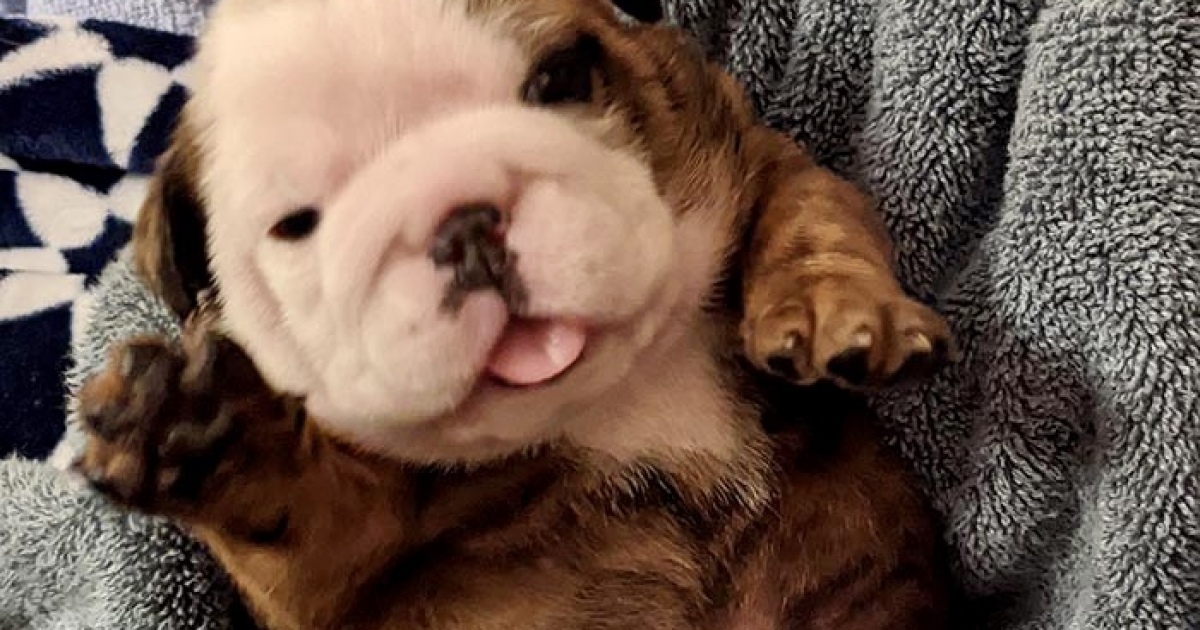
One tiny puppy, one big internet imagination, and suddenly the web has a new unofficial mascot wearing sunglasses, riding a skateboard, floating through space, or possibly running for mayor.
Why a Puppy Photoshop Challenge Works So Well Online
The internet has many serious jobs: sharing news, teaching skills, helping people compare air fryers they absolutely do not need, and occasionally reminding everyone that puppies exist. That last one may be the most important. A post like “Hey Pandas, Photoshop This Puppy I Found On Bored Panda” taps into three things online audiences love: cute animals, creative participation, and low-pressure humor.
Bored Panda has long been known for art, design, photography, animals, humor, and user-submitted stories. Its community-style format makes it a natural home for playful creative prompts. When someone posts a charming puppy photo and invites people to Photoshop it, the post becomes more than a picture. It becomes a digital playground. The original puppy is the blank canvas. The commenters and editors bring the confetti cannon.
That is why Photoshop puppy posts travel so easily across social platforms. They are simple to understand, easy to enjoy, and wide open to interpretation. A person does not need to be a professional designer to laugh at a puppy edited into a Renaissance painting. They do not need a degree in visual communication to appreciate a tiny dog sitting on the Iron Throne of chew toys. The concept is instantly readable: here is a cute puppy; now make it funnier.
The Magic Formula: Cute Dog + Creative Prompt + Community
The best Photoshop challenges usually begin with a photo that already has personality. Maybe the puppy has one ear up and one ear down. Maybe it looks shocked, proud, suspicious, heroic, or like it just heard the treat bag open from three rooms away. That expression gives editors something to exaggerate.
A puppy with a dramatic stare can become a tiny courtroom lawyer. A puppy mid-jump can become an astronaut launching into orbit. A puppy curled inside a basket can become a royal baby dragon guarding a pile of socks. The fun comes from seeing the ordinary transformed into something delightfully absurd.
What makes the original puppy photo edit-friendly?
A strong Photoshop challenge image usually has a clear subject, expressive body language, and enough visual space for editors to add new backgrounds or props. The puppy should stand out from the background, because clean edges make cutting and compositing easier. A funny pose helps too. If the puppy already looks like it is reacting to something invisible, the internet will gladly provide the invisible thing.
For example, a puppy looking slightly upward could be edited as if it is watching a UFO, waiting for falling meatballs, or staring at a motivational poster that says, “Believe in your paws.” A puppy sitting very seriously could become a CEO, a judge, a museum curator, or the world’s smallest security guard. The more expressive the image, the more directions the community can take it.
How Photoshop Battles Became an Internet Language
Photo-editing challenges are not new. Online communities have been remixing images for years, turning everyday photos into memes, jokes, visual puns, and miniature storytelling exercises. Reddit’s PhotoshopBattles community, for instance, popularized the idea of submitting a photo and letting users compete to create the funniest or most inventive edit. Bored Panda-style community posts share a similar spirit, but often with a softer, friendlier toneespecially when animals are involved.
Photoshop battles work because they are collaborative comedy. One person supplies the spark; everyone else builds the bonfire. In a puppy challenge, the original image becomes a shared joke that keeps evolving. The first edit may place the puppy on a surfboard. The next person may turn that into a movie poster. Another may add dramatic lighting, a cape, and the title Bark Knight Rises. Soon, the puppy has a cinematic universe.
Why visual jokes spread faster than text jokes
A good image edit communicates instantly. People scrolling on a phone can understand the joke in one second. That speed matters. Social media feeds move quickly, and visual humor catches attention before a headline even has time to stretch its legs. A puppy in a spacesuit does not require a long explanation. It simply exists, and the brain says, “Yes, this is important research.”
Visual jokes also cross language barriers. A reader in New York, Austin, Los Angeles, or Chicago may laugh at the same edited puppy as someone halfway around the world. The joke is in the contrast: tiny dog, enormous situation. That simple mismatch is the engine behind many viral animal edits.
Creative Ideas for Photoshopping the Puppy
If you are joining a challenge like “Hey Pandas, Photoshop This Puppy I Found On Bored Panda,” the goal is not to show off every editing trick you have ever learned. The goal is to make people smile. A clean, clever idea usually beats a cluttered masterpiece. The puppy should remain the star, not disappear under 47 layers, 12 lens flares, and a suspiciously dramatic volcano.
1. Turn the puppy into a tiny hero
Give the puppy a cape, a city skyline, and a heroic pose. Suddenly, it is defending the world from vacuum cleaners, squirrels, and the terrifying sound of the doorbell. Superhero edits work especially well when the puppy already looks brave or determined.
2. Create a movie poster parody
Movie posters are perfect for puppy Photoshop humor. A sleepy puppy can become the star of Nap Hard. A fluffy white pup can appear in Lord of the Treats. A dramatic close-up can become The Good, the Bad, and the Chewy. Add bold typography, cinematic lighting, and a tagline like “One bark. No mercy.”
3. Place the puppy in famous art
Imagine the puppy replacing a royal subject in an old portrait or sitting calmly beside the Mona Lisa. Art-history edits have built-in contrast because puppies are gloriously unserious. The trick is to match lighting and color enough that the puppy looks like it belongs, while keeping the joke obvious.
4. Give the puppy a job
Make it a chef, detective, astronaut, professor, barista, firefighter, pirate captain, or weather reporter. Job-based edits are funny because puppies are naturally unqualified for most professional roles. That is the joke. A puppy in a tie holding a tiny briefcase is not going to improve quarterly revenue, but morale is through the roof.
5. Build a fantasy scene
Turn the puppy into a dragon rider, woodland guardian, wizard’s apprentice, or ruler of a kingdom made entirely of tennis balls. Fantasy edits allow more dramatic backgrounds, magical lighting, and playful props. Just keep the puppy recognizable so viewers stay connected to the original charm.
How to Make a Puppy Photoshop Edit Look Good
A funny concept gets attention, but good execution makes people stop and admire it. You do not need to be an expert, but a few editing basics can make a huge difference.
Match the lighting
If the puppy is lit from the left, the background should not look like the sun is coming from the right, the floor, and possibly another galaxy. Matching light direction helps the edit feel believable. Even silly edits benefit from visual consistency.
Use clean cutouts
Fur is tricky. Puppy fluff does not always cooperate with selection tools. A slightly feathered edge can help the cutout blend naturally into the new scene. If the edges look too sharp, the puppy may appear pasted on like a sticker from a chaotic scrapbook.
Keep shadows believable
Shadows are the secret sauce of compositing. A small soft shadow under the paws can make the puppy feel grounded. Without it, the puppy may look like it is levitating. Unless your edit is about a magical floating puppy, gravity should probably be invited.
Do not over-edit the face
The puppy’s expression is usually the best part of the image. Avoid changing it too much. Add props, backgrounds, and costumes, but keep the face readable. The audience came for puppy energy, not a plastic-looking dog-shaped mannequin with suspiciously human eyebrows.
Ethics: Cute Edits Should Still Be Respectful
Photoshop challenges are fun, but creators should still think about consent, credit, and kindness. If the puppy photo belongs to someone else, the safest approach is to use images that are clearly licensed for reuse, submitted for the challenge by the owner, or posted with permission. When in doubt, credit the original creator and avoid presenting someone else’s photo as your own.
Fair use can be complex, especially when images are transformed for parody, commentary, or humor. Still, “I found it online” is not the same as “I have permission.” For web publishers, bloggers, and social media managers, image attribution is not just politeit protects trust. A simple credit line can save a lot of tail-chasing later.
AI-assisted editing adds another layer. Tools like Generative Fill can help users add backgrounds, remove distractions, or invent props, but transparent labeling is becoming more important. When an image is substantially AI-edited, it is wise to say so. Audiences appreciate honesty, and creators benefit when their work is not mistaken for something it is not.
Keep the puppy safe in the story
Even though the edit is fictional, avoid creating images that suggest animal cruelty, unsafe handling, or distress. A puppy riding a skateboard in a helmet is cute. A puppy placed in a dangerous scene without clear cartoon exaggeration may feel uncomfortable. The best animal edits celebrate the pet; they do not make the animal the punchline in a mean way.
Why Puppy Content Builds Positive Engagement
Animal content performs well because it gives people a quick emotional reward. A puppy photo can soften a stressful day, break up a heavy news feed, and invite people to comment without needing to argue about anything. That alone is a small miracle. Online spaces can get noisy, but a puppy in a ridiculous hat has diplomatic power.
Community prompts also increase engagement because they give readers a role. Instead of passively viewing a picture, users can contribute. They can edit, vote, comment, suggest captions, or share their favorite version. That participation turns a post into a mini-event.
For publishers, this is valuable. Posts that encourage creative interaction often inspire longer time on page, repeat visits, and social sharing. For readers, it feels less like consuming content and more like joining a room full of people who all agree that this puppy should probably be edited into a tiny pirate ship immediately.
SEO Angle: Why This Topic Can Rank and Attract Clicks
The title “Hey Pandas, Photoshop This Puppy I Found On Bored Panda” has a very specific flavor. It includes community language, a recognizable platform reference, and a highly clickable subject: a puppy. From an SEO perspective, it can attract readers searching for funny Photoshop edits, Bored Panda animals, puppy memes, Photoshop challenges, and user-generated photo contests.
The article should naturally include related terms such as “funny puppy edits,” “Photoshop battle,” “Bored Panda community,” “dog memes,” “creative photo manipulation,” “cute animal pictures,” and “puppy Photoshop ideas.” These phrases should appear where they make sense, not sprinkled like SEO confetti from a broken party cannon.
Search intent behind the topic
People searching for this topic likely want entertainment, inspiration, or examples. Some may want to participate in a challenge. Others may be looking for funny dog content to share. A strong article should satisfy all three: explain the trend, offer creative ideas, and give practical editing tips.
What makes the content more useful
Useful content goes beyond “look at this cute puppy.” It explains why the trend works, how people can join in, what editing ideas perform well, and how to avoid common mistakes. That gives the article depth while keeping the tone light and enjoyable.
Experience Section: What It Feels Like to Join a Puppy Photoshop Challenge
There is a particular kind of joy that happens when you open a puppy Photoshop challenge and realize nobody is taking themselves too seriously. The first edit might be simple: the puppy wearing oversized sunglasses. Then you scroll down and find the same puppy piloting a spaceship. A few comments later, it is starring in a fake cooking show called MasterBark. By the time someone edits the puppy into a dramatic album cover, you have fully accepted this dog as a cultural icon.
Participating in a challenge like “Hey Pandas, Photoshop This Puppy I Found On Bored Panda” feels different from posting ordinary content. It is not about perfection. It is about timing, imagination, and knowing when a tiny cowboy hat is exactly the right artistic decision. The best edits often come from people who notice one small detail in the original photo. Maybe the puppy’s paw is lifted in a way that looks like it is waving. Suddenly, that becomes a presidential campaign poster: “Vote Biscuit 2026: More Treats, Fewer Baths.”
One of the most enjoyable parts is watching how different people interpret the same image. A designer might focus on lighting and realism. A meme-maker might go straight for absurdity. A dog lover might create something sweet, like the puppy sitting on a cloud of tennis balls. A movie fan might transform the pup into an action hero escaping an army of squeaky toys. The original photo stays the same, but every edit reveals the personality of the person behind it.
There is also a surprisingly wholesome side to these challenges. People often encourage each other, laugh together, and celebrate clever ideas. In a world where comment sections can sometimes resemble a raccoon fight inside a recycling bin, puppy Photoshop posts are refreshingly gentle. The stakes are low. The reward is high. Nobody needs to win the internet; they just need to make someone grin during a coffee break.
From a creator’s perspective, the challenge teaches useful skills without feeling like homework. You learn about cropping, masking, shadows, perspective, color matching, and composition because you are trying to make a puppy look believable on a pirate ship. That is education with snacks. Even a quick edit can improve your eye for detail. You start noticing whether the background angle fits, whether the puppy needs a shadow, or whether the tiny crown should be slightly tilted for maximum royal drama.
For website publishers, this kind of topic is also a reminder that audiences love participatory content. A simple invitation“Photoshop this puppy”can create dozens of micro-stories. Each edit becomes a new reason to scroll, comment, and share. Instead of one static article, the post becomes a living gallery of imagination. That is exactly the kind of experience that keeps readers engaged.
The real charm, though, is the puppy. No matter how wild the edit becomes, the tiny dog remains the emotional anchor. Put it in space, give it a wizard hat, place it on a magazine cover, or turn it into a courtroom sketch artistthe puppy still brings warmth to the joke. That is why these posts work so well. They combine creativity with affection. They invite humor without cruelty. And they prove that sometimes the internet’s best use is gathering a bunch of strangers around one small dog and saying, “Okay, what ridiculous adventure should we send this little legend on next?”
Conclusion
“Hey Pandas, Photoshop This Puppy I Found On Bored Panda” is more than a funny title. It captures a whole internet tradition: creative communities turning simple animal photos into joyful, shareable, and surprisingly imaginative visual stories. A great puppy Photoshop challenge succeeds because it is easy to join, instantly understandable, and endlessly remixable.
Whether the puppy becomes a superhero, chef, astronaut, detective, medieval ruler, or tiny motivational speaker, the heart of the post stays the same. It is about play. It is about community. It is about giving people a reason to laugh without needing a complicated setup. And in the grand history of the internet, that is a pretty noble mission for a small creature with floppy ears.