Mineplex was one of those Minecraft servers that felt less like a menu of minigames and more like a giant digital playground where everyone sprinted in different directions, nobody read the rules, and somehow everyone still had fun. For years, players jumped into survival games, arcade modes, team battles, parkour challenges, and social lobbies that turned “I’ll play for ten minutes” into “Wait, why is the sun coming up?”
Today, many players are searching for the best Mineplex server alternatives because they want that same quick-match, high-energy, friend-friendly Minecraft experience. The good news: the Minecraft server scene is still packed with excellent options. Some servers are huge and competitive. Some are perfect for Bedrock players. Some feel polished enough to make your old laptop sweat nervously. And some are basically parkour obstacle courses designed by people who clearly enjoy watching players miss the final jump by one block.
This guide covers four fun Mineplex alternatives worth trying: Hypixel, CubeCraft, The Hive, and MCC Island. Each offers a different flavor of multiplayer chaos, and each can scratch part of that Mineplex itchwhether you miss minigames, party play, PvP, parkour, or the simple joy of yelling “one more round” for the seventh time.
Why Players Look for Mineplex Alternatives
Mineplex built its reputation around accessible minigames, colorful hubs, and games that were easy to understand but surprisingly hard to master. That combination is still what most players want from a Minecraft multiplayer server: fast queues, recognizable game modes, low-friction joining, and enough variety to keep a friend group from arguing over what to play.
The best Mineplex alternatives are not necessarily exact clones. In fact, the strongest replacements usually do their own thing. A great alternative should offer active lobbies, reliable performance, fair matchmaking when possible, clear server rules, and games that work well for both casual players and try-hard legends who somehow speed-bridge like they were born on a keyboard.
Before joining any server, make sure you are using the correct Minecraft edition. Some servers support Java Edition only, some support Bedrock Edition only, and some support both. If a server does not appear or will not connect, the problem is often the edition, version, server address, or resource pack settingnot necessarily your Wi-Fi performing its usual dramatic monologue.
Quick Comparison: Best Mineplex Server Alternatives
| Server | Best For | Edition | Server Address / Join Method |
|---|---|---|---|
| Hypixel | Large-scale minigames, SkyBlock, Bed Wars-style competition | Java Edition | mc.hypixel.net |
| CubeCraft | SkyWars, EggWars, Lucky Islands, cross-platform fun | Java and Bedrock | play.cubecraft.net |
| The Hive | Bedrock minigames, casual parties, polished featured-server access | Bedrock Edition | Featured Server tab or geo.hivebedrock.network |
| MCC Island | Competitive minigames, parkour, tournament-inspired modes | Java Edition | play.mccisland.net |
1. Hypixel: The Giant Minigame Kingdom
If Mineplex was your childhood arcade, Hypixel is the enormous theme park across town with a suspiciously long line and somehow even more attractions. Hypixel is one of the most popular Minecraft servers in the world, especially for Java Edition players who want polished minigames, big communities, and competitive modes with endless replay value.
Why Hypixel Is a Great Mineplex Alternative
Hypixel works well for former Mineplex players because it offers the same “pick a game and jump in” energy. The server is known for fast-paced minigames, team modes, PvP-focused matches, and long-term progression experiences. Players who enjoyed Mineplex’s variety will likely appreciate how many choices Hypixel puts in front of them.
One of the biggest draws is the server’s massive player base. A large population usually means quicker matchmaking, more active lobbies, and a better chance that your favorite mode actually has players online when you log in. That matters because nobody wants to enter a lobby that feels like a dentist’s waiting room after closing time.
Hypixel also has strong community recognition. Whether you enjoy casual arcade games, competitive matches, or longer progression systems, it offers enough depth to keep players busy. The downside? Because it is so popular, competition can be intense. New players may run into veterans who move, click, and combo with the calm confidence of someone who has not touched grass since 2019.
How to Join Hypixel
- Open Minecraft: Java Edition.
- Click Multiplayer.
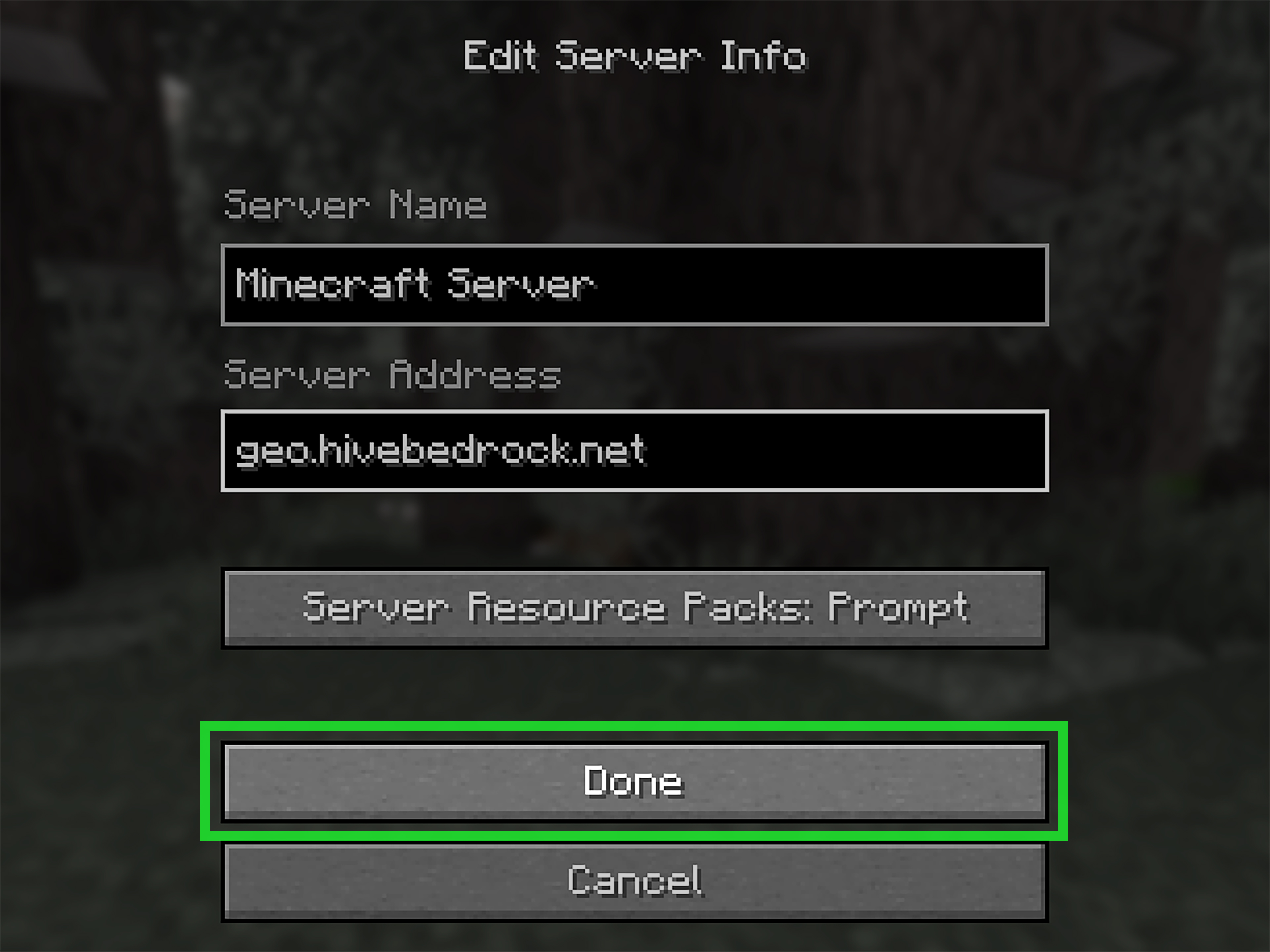
- Click Add Server.
- Enter any server name, such as “Hypixel.”
- Enter mc.hypixel.net as the server address.
- Click Done.
- Select Hypixel from your server list and click Join Server.
Best Type of Player for Hypixel
Hypixel is ideal if you want a big, active server with tons of games and a competitive edge. It is especially good for players who enjoy PvP, progression, ranked-feeling environments, and busy lobbies. If you miss Mineplex because it always felt alive, Hypixel is probably the first alternative you should try.
2. CubeCraft: A Colorful Cross-Platform Favorite
CubeCraft is another excellent Mineplex alternative, especially for players who want a friendly balance between casual fun and competitive minigames. It supports both Java and Bedrock editions, which makes it easier for friend groups split across PC, console, and mobile ecosystems. In other words, CubeCraft may save your group chat from the classic “Wait, you’re on Bedrock?” tragedy.
Why CubeCraft Feels Like a Strong Replacement
CubeCraft shines because of its bright presentation, accessible minigames, and simple joining process. The server features popular modes such as SkyWars, EggWars, Lucky Islands, Skyblock, and other rotating experiences. For players who liked Mineplex’s variety but want something modern and easy to navigate, CubeCraft is a comfortable place to start.
EggWars is one of CubeCraft’s signature-style attractions. It has that protect-your-base, gather-resources, upgrade-your-gear energy that can turn a peaceful friend group into a full board meeting of questionable strategy. Someone will insist on defending. Someone will rush mid. Someone will buy the wrong item. Beautiful chaos.
CubeCraft is also a good option for players who do not want every match to feel brutally competitive. Of course, skilled players exist everywhere, but CubeCraft’s atmosphere often feels more approachable than some ultra-sweaty PvP spaces. It is fun, colorful, and easy to recommend to players who want minigames without needing a training montage first.
How to Join CubeCraft on Java Edition
- Open Minecraft: Java Edition.
- Click Multiplayer.
- Click Add Server.
- Use “CubeCraft Games” as the server name.
- Enter play.cubecraft.net as the server address.
- Set server resource packs to Enabled if prompted.
- Click Done and join from the server list.
How to Join CubeCraft on Bedrock Edition
- Open Minecraft: Bedrock Edition.
- Go to the Servers tab.
- Look for CubeCraft in the featured server list, if available.
- If adding manually is supported on your device, use play.cubecraft.net.
- Join the server and follow the in-game menu to choose a mode.
Best Type of Player for CubeCraft
CubeCraft is great for players who want variety, clean minigames, and a server that works across both major Minecraft editions. If your friend group uses different devices, CubeCraft is one of the easiest recommendations on this list.
3. The Hive: A Smooth Bedrock Minigame Hub
The Hive is one of the best Mineplex alternatives for Minecraft Bedrock players. If you play on console, mobile, or Windows Bedrock Edition, The Hive is refreshingly simple because it appears as a featured server on supported platforms. That means you often do not need to copy an IP address, paste anything, or ask your friend to explain port numbers like they are reading ancient runes.
Why The Hive Is Fun
The Hive focuses on polished Bedrock minigames that are easy to join and quick to understand. It is a strong choice for casual players, younger players with family settings enabled, and friend groups who want short sessions that still feel exciting. The server’s menus, lobbies, and game presentation are designed to be approachable, which makes the first few minutes less confusing than some large multiplayer networks.
What makes The Hive stand out is how smooth the experience feels on Bedrock. Some Java-first servers make Bedrock players feel like guests at a party where all the snacks were already eaten. The Hive, by contrast, is built around Bedrock access, so the experience feels natural for that platform.
Players who enjoyed Mineplex’s casual minigame spirit may like The Hive because it emphasizes quick rounds, party-friendly gameplay, and easy navigation. You can hop in, choose a game, and start playing without needing to study a 40-minute tutorial titled “Beginner Basics, Part 1 of 17.”
How to Join The Hive
- Open Minecraft: Bedrock Edition.
- Click Play.
- Go to the Servers tab.
- Select The Hive from the featured server list.
- Click Join Server.
On devices that allow manual server entry, The Hive lists geo.hivebedrock.network as its main address. However, for most Bedrock players, the featured server list is the easiest route.
Best Type of Player for The Hive
The Hive is best for Bedrock players who want polished minigames, simple access, and casual-friendly gameplay. If you miss Mineplex but mostly play on console, mobile, or Windows Bedrock Edition, The Hive should be near the top of your list.
4. MCC Island: Competitive Chaos with Tournament Energy
MCC Island is a fantastic pick for players who want something newer, sharper, and more competition-focused than classic Mineplex. It is connected to the Minecraft Championship style of gameplay, offering minigames that feel fast, polished, and skill-based. If Hypixel is a giant theme park, MCC Island is the obstacle course where everyone looks friendly until the countdown hits zero.
Why MCC Island Is Worth Trying
MCC Island is built around energetic minigames such as Battle Box, Sky Battle, Hole in the Wall, To Get to the Other Side, Parkour Warrior, Parkour Warrior Survivor, and Rocket Spleef Rush. These games reward movement, timing, teamwork, and quick decision-making. Translation: yes, you will probably fall off something. Repeatedly. With style.
For former Mineplex players, MCC Island is appealing because it captures the feeling of compact, high-energy rounds. Games are easy to understand but difficult to master, and that creates a satisfying loop. You lose, you learn, you queue again, and then you confidently make the exact same mistake one more time because Minecraft gravity remains undefeated.
MCC Island is Java Edition only, so Bedrock players will need to choose another option from this list. But for Java players who want a fresh minigame server with tournament-inspired polish, MCC Island is one of the most exciting Mineplex alternatives available.
How to Join MCC Island
- Open Minecraft: Java Edition.
- Click Multiplayer.
- Click Add Server.
- Enter a server name, such as “MCC Island.”
- Enter play.mccisland.net as the server address.
- Set server resource packs to Enabled or Prompt.
- Click Done, select the server, and join.
Best Type of Player for MCC Island
MCC Island is best for Java players who like parkour, PvP, movement challenges, and competitive minigames. If your favorite part of Mineplex was learning a mode until you could outplay your friends, MCC Island is a great next stop.
How to Choose the Right Mineplex Alternative
The best server depends on what you actually miss about Mineplex. If you want the biggest Java minigame network, start with Hypixel. If you want colorful cross-platform fun, CubeCraft is the safest pick. If you play Bedrock and want a smooth featured-server experience, try The Hive. If you want skill-based minigames with tournament flavor, go to MCC Island.
It also helps to think about your group. A solo player may enjoy Hypixel or MCC Island because there is always something competitive to chase. A group of casual friends might prefer CubeCraft or The Hive because the games are easy to start and less intimidating. Families and younger players should also review chat, friend, and multiplayer settings through Microsoft or Xbox family controls before joining public servers.
General Tips Before Joining a Minecraft Server
Check Your Edition
Java and Bedrock are not the same thing. A Java-only server will not work from a Bedrock client, and a Bedrock-only featured server will not magically appear in Java just because you stare at the screen with enough determination.
Use the Correct Server Address
Server addresses change occasionally, and fake addresses can appear on random lists. Whenever possible, check the official server website or help page. One typo can send you nowhere, which is still better than being sent to a suspicious copycat server.
Enable Resource Packs When Needed
Some servers use resource packs for menus, cosmetics, maps, or game effects. If a server recommends enabling resource packs, do it. Otherwise, you may load into a beautifully designed lobby and see something that looks like a garage sale after a creeper incident.
Read the Rules
Yes, reading rules is less exciting than sprinting into a match, but it matters. Public servers usually prohibit cheating, exploiting, harassment, and inappropriate chat. Following the rules keeps the server fun and helps protect your account from punishments.
Start with Casual Modes
If you are new to a server, do not begin with the sweatiest ranked mode unless you enjoy emotional damage in block form. Start with casual games, learn the maps, understand the menus, and then move into more competitive queues.
Extra Experience: What It Feels Like to Move from Mineplex to New Servers
Switching from Mineplex to another Minecraft server can feel weird at first. Mineplex had a certain rhythm: colorful lobbies, quick minigames, familiar maps, and that old-school Minecraft community energy. When you join a new server, even a great one, the menus are different, the player behavior is different, and the first few matches can make you feel like you accidentally walked into the wrong classroom.
The best approach is to treat each alternative as its own experience instead of asking it to become Mineplex 2.0. Hypixel feels huge and busy, almost like a Minecraft city that never sleeps. The first time you join, the number of menus, NPCs, cosmetics, and players can be overwhelming. But once you find a few favorite games, it becomes easier to settle in. The trick is to pick one or two modes and learn them instead of bouncing around randomly for an hour like a confused bee.
CubeCraft feels friendlier for casual exploration. It is the kind of server where you can invite a friend, try a few games, lose badly, laugh about it, and immediately queue again. Its cross-platform support is especially useful because many Minecraft friend groups are split across devices. One person is on Java, another is on mobile, someone else is on console, and someone’s cousin is playing on a tablet with 4 percent battery. CubeCraft makes those sessions easier to organize.
The Hive is especially comfortable for Bedrock players. The featured server layout removes a lot of setup friction, which is perfect when you just want to play. It is also a good server for shorter sessions. You can log in, play a few rounds, and leave without feeling like you abandoned a 12-hour MMO raid. For players who loved Mineplex because it was quick and social, The Hive captures a lot of that easygoing spirit.
MCC Island, on the other hand, feels like a training ground for players who enjoy improving. The games can be funny and chaotic, but they also reward skill. Movement matters. Timing matters. Teamwork matters. If you panic and jump too early, the void will accept your donation. That learning curve is part of the fun. Every round teaches you something, even if the lesson is “do not follow your overconfident friend across a bridge made under pressure.”
One helpful habit is to play each server for at least a few sessions before deciding whether it fits. Your first match may be rough because you do not know the maps, kits, power-ups, or lobby layout. After a little time, the server’s personality becomes clearer. You might discover that Hypixel is your main competitive home, CubeCraft is your group hangout, The Hive is your Bedrock comfort pick, and MCC Island is where you go when you want to test your reflexes.
Also, do not underestimate the value of playing with friends. Mineplex was memorable not only because of its games, but because of the stories players created inside those games. The same is true for its alternatives. A server becomes more fun when you have someone to celebrate wins with, blame for losses, and accuse of “lag” even when everyone knows you simply missed the jump.
In the end, no single server perfectly replaces Mineplex for every player. But that is not a bad thing. The modern Minecraft multiplayer scene gives you more choices than ever, from massive Java networks to smooth Bedrock hubs and competitive minigame islands. Try all four, keep the ones that make you want one more round, and let the others sit in your server list like digital souvenirs.
Conclusion
Mineplex left a big block-shaped space in the Minecraft community, but players still have plenty of fun alternatives. Hypixel is the best choice for Java players who want a massive minigame network. CubeCraft is excellent for players who want colorful games and cross-platform support. The Hive is a smooth, casual-friendly Bedrock option. MCC Island is perfect for Java players who want fast, competitive, tournament-inspired gameplay.
The smartest move is simple: try each server and see which one matches your play style. Minecraft multiplayer has always been about discovery, experimentation, and occasionally falling into the void while insisting your keyboard betrayed you. Mineplex may be part of Minecraft history, but the fun is far from over.
Note: Server addresses and joining steps should be rechecked before publication because Minecraft server details, supported versions, and access methods can change over time.