Leaving feedback on eBay can feel a little like sending a text while half-asleep: it makes perfect sense in the moment, and then later you read it and think, “Well, that escalated quickly.” Maybe the package arrived late but the seller fixed everything fast. Maybe you left neutral feedback before customer service came through like a hero in bubble wrap. Or maybe you are a seller staring at a harsh comment and wondering whether the internet has always been this dramatic.
Here’s the good news: eBay does give users a way to revise certain feedback. Here’s the less-good news: it is not as simple as clicking a magical Edit button and pretending the original comment never happened. eBay’s system has rules, time limits, and a few important “you can do this, but definitely not that” boundaries. If you understand how those rules work, though, changing or clarifying feedback becomes much easier.
In this guide, you’ll learn how to edit feedback on eBay in four simple steps, what buyers can change, what sellers can and cannot change, and what to do when a direct edit is not available. We’ll also walk through practical examples, common mistakes, and smart ways to protect your reputation without sounding like a robot in a necktie.
Why eBay Feedback Matters More Than People Think
eBay feedback is not just a digital gold star. It helps buyers decide whether a seller is trustworthy, responsive, and accurate. It also helps sellers build credibility, especially when they are competing against dozens of similar listings. One clunky comment or unresolved complaint can stick out like a flamingo at a penguin convention.
For buyers, feedback is a public record of the shopping experience. For sellers, it is part reputation signal, part customer-service report card, part social proof. That is why editing feedback matters. Sometimes a first impression is fair. Sometimes it is incomplete. And sometimes it was written in the heat of the moment while someone was staring at a delayed tracking scan and losing faith in humanity.
Before you try to revise anything, you need to know one key truth: on eBay, feedback is easier to clarify than to completely erase. In many cases, the goal is not to make the problem vanish. It is to update the record so it reflects what actually happened once the issue was resolved.
What You Can and Cannot Edit on eBay
Let’s clear up the confusion right away. Buyers can leave positive, neutral, or negative feedback for sellers. They can also add comments and, in some cases, images. But buyers generally cannot just go back and freely rewrite feedback whenever they feel inspired. To revise negative or neutral feedback for a seller, they usually need the seller to send a formal feedback revision request.
Sellers, meanwhile, can only leave positive feedback for buyers. That means sellers do not have the same kind of public rating power buyers do. If a seller wants to deal with a bad buyer interaction, the usual options are to report the buyer, respond publicly to received feedback, or ask eBay to review feedback that appears to violate policy.
That distinction matters because the phrase “edit eBay feedback” can mean very different things depending on which side of the transaction you are on. So let’s do this the sensible way.
Step 1: Figure Out Which Kind of Feedback You’re Trying to Change
If You’re a Buyer
If you left feedback for a seller and now want to change it, ask yourself what exactly you want to fix:
- Do you want to change a negative or neutral rating to positive?
- Do you want to soften or update your comment because the seller made things right?
- Do you just want to add context without changing the rating?
If you only need to clarify what happened, a follow-up comment may do the trick. If you want to actually revise the rating or replace the original comment, you’ll typically need a revision request from the seller.
If You’re a Seller
If you received feedback from a buyer and want it changed, first determine whether the issue is:
- a genuine service complaint that can be resolved,
- a misunderstanding that needs context, or
- feedback that may violate eBay policy, such as extortion, irrelevant comments, or complaints about issues outside your control.
This step matters because your next move depends on the category. A resolvable complaint calls for customer service. A policy violation calls for review by eBay. And a comment that is simply annoying but allowed by policy calls for either a thoughtful public reply or a strong cup of coffee.
Step 2: Contact the Other Party and Resolve the Real Problem First
This is where people often rush, and rushing is how small eBay problems become medium-sized online soap operas.
If you are a buyer who wants to edit feedback, contact the seller first. Explain what changed. Maybe the item finally arrived, the seller issued a refund, or the missing part showed up after all. Politely ask whether they can send you a feedback revision request. Keep the message short, clear, and factual.
Example buyer message:
“Hi, I originally left neutral feedback because the package was delayed and I had trouble getting an update. Since then, you resolved the issue and the item arrived safely. If possible, please send a feedback revision request so I can update my comment. Thank you.”
If you are a seller, your job is not to argue the buyer into submission like you are auditioning for a courtroom drama. Your job is to solve the problem. Offer the refund, replacement, clarification, or return help that makes sense. Once the issue is genuinely resolved, then ask whether the buyer would consider revising the feedback.
Example seller message:
“Hi, I’m sorry the order did not meet expectations. I’ve issued a refund and sent details through eBay messages. If you feel the issue has been resolved, I’d be grateful if you would consider revising your feedback. I can send the official revision request through eBay.”
That phrasing works because it is calm, specific, and professional. It does not pressure the buyer, and it does not promise anything shady. That matters. Review manipulation is a real issue across online marketplaces, and trying to push or pay for dishonest review changes can create bigger problems than the original complaint.
Step 3: Use eBay’s Feedback Revision Process the Right Way
Here’s the nuts-and-bolts part. If a buyer wants to revise negative or neutral feedback, the seller usually needs to send the official revision request. This is the formal mechanism eBay uses. No request, no revision. eBay is many things, but it is not a “manifest your own edit button” kind of place.
How the Process Works
- The seller sends a feedback revision request through eBay.
- The buyer receives an email or prompt with the request details.
- The buyer chooses whether to accept or decline.
- If the buyer accepts, eBay walks them through revising the rating and comment.
Timing is important here. Sellers only have a limited window to send a revision request after receiving feedback, and buyers only have a limited window to respond after receiving the request. In plain English: do not leave this sitting around like leftovers from three holidays ago.
Also, sellers do not get unlimited revision requests. That means sellers should use them strategically and only after a problem is genuinely fixed. Sending revision requests like confetti is not a smart reputation strategy.
Best Practices for Buyers Accepting a Revision Request
- Update the feedback honestly.
- Reflect the full experience, including whether the seller solved the issue.
- Do not overcorrect into fake enthusiasm if the outcome was merely “acceptable.”
A good revised comment might look like this:
“Item arrived later than expected, but seller communicated well and resolved the issue quickly. Updating my feedback to reflect the follow-through.”
That kind of edit is useful to future buyers because it tells the whole story. It does not hide the bump in the road, but it also gives credit where credit is due.
Step 4: If You Cannot Edit the Feedback, Use the Backup Options
Sometimes a direct revision is not possible. Maybe the time window passed. Maybe the buyer declined. Maybe the original comment cannot be changed, but the situation still deserves context. That is where your backup options come in.
Option A: Add a Follow-Up Comment
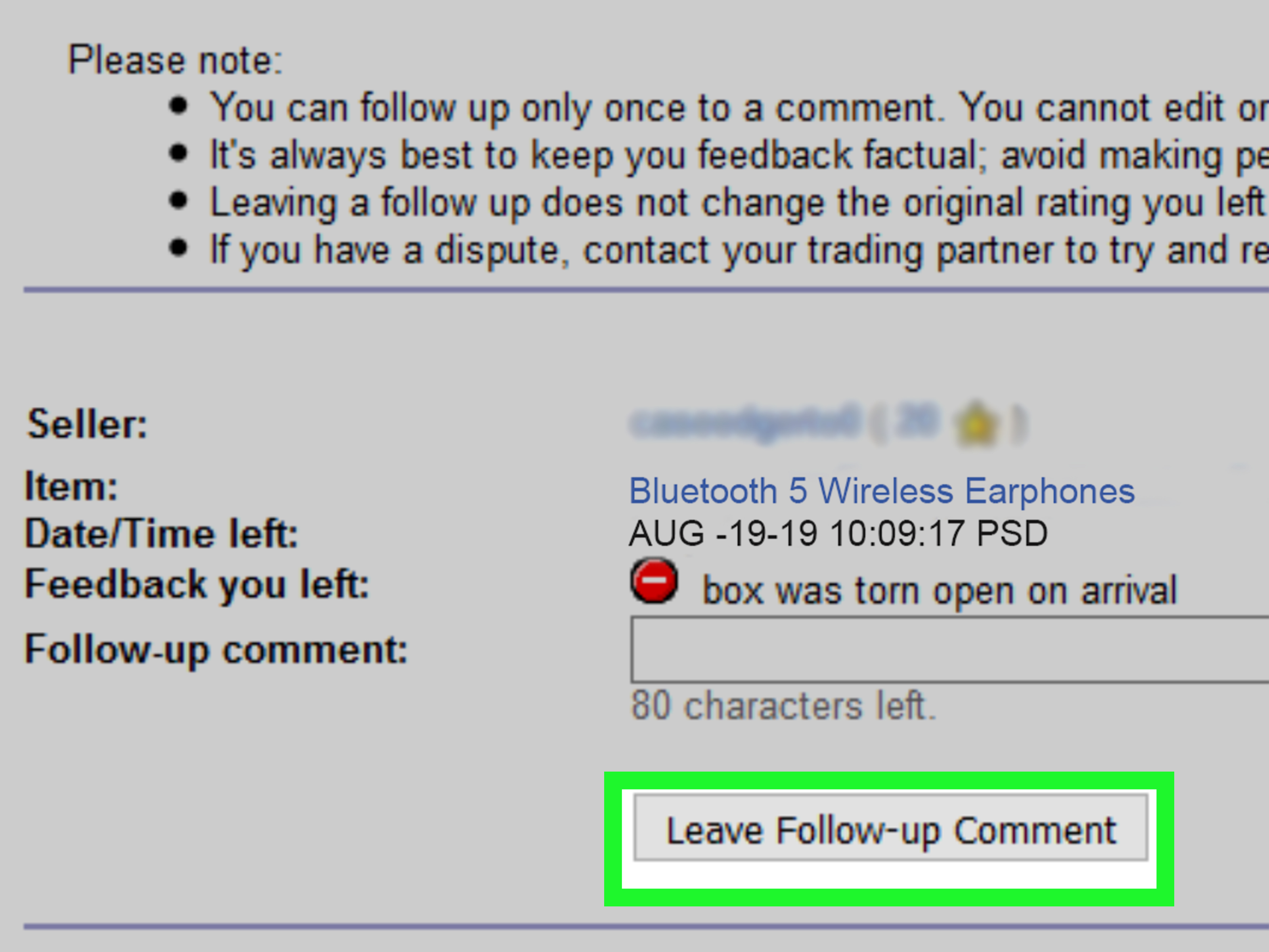
If you are a buyer and cannot revise the original rating, a follow-up comment may still help. This lets you clarify what happened after the original feedback was posted.
For example:
“Following up to say the seller later resolved the issue and refunded the damaged item.”
That is not the same as editing the original feedback, but it can soften the impression and provide a fuller picture.
Option B: Reply Publicly as a Seller
If you are a seller and the buyer will not revise the feedback, respond publicly in a calm, businesslike way. Do not be sarcastic. Do not type in all caps. Do not write a mini novel about how tracking scans ruined your weekend.
A strong seller response might be:
“Sorry again for the shipping issue. We refunded the buyer promptly and offered a replacement. We take service concerns seriously and appreciate the opportunity to improve.”
This kind of reply is not really for the unhappy buyer. It is for future buyers who are reading. They want to know whether you solve problems like an adult or explode like a toaster in a bathtub.
Option C: Ask eBay to Review the Feedback
If the feedback appears to break eBay policy, report it for review. This can apply in situations involving feedback extortion, irrelevant comments, threats, comments about disclosed issues, or complaints tied to circumstances clearly outside the seller’s control. Not every unfair comment will be removed, but policy-violating feedback is worth challenging.
This is also the correct path if someone leaves a comment that is clearly about the wrong item, includes inappropriate content, or tries to use feedback as leverage for something not promised in the original listing.
Common Mistakes to Avoid
1. Asking for a Revision Before Fixing the Issue
This is the fastest way to make a buyer feel ignored. Solve first. Request second.
2. Being Too Aggressive
Messages that sound pushy, guilt-trippy, or manipulative can backfire. Keep it factual and polite.
3. Offering Something Sketchy
Do not try to buy positive feedback with shady promises, hidden incentives, or pressure tactics. Honest revision after a real resolution is one thing. Manufactured praise is another beast entirely.
4. Waiting Too Long
Feedback revision on eBay is very much a “fresh bread” situation. The longer you wait, the staler your chances get.
5. Writing Defensive Public Replies
Future customers are reading those replies. A calm, concise response makes you look credible. A defensive rant makes you look like customer service is your villain origin story.
Practical Example: Buyer Revises Feedback After a Delay
Let’s say a buyer orders a collectible item. Tracking stalls for several days, the buyer panics, and leaves negative feedback. A day later, the seller responds quickly, opens a shipping trace, and offers either a refund or replacement. The item then arrives, safely packed and exactly as described.
At that point, the smartest move is not to pretend the delay never happened. It is to revise the feedback so it reflects the full transaction. The buyer can ask for a revision request, or the seller can send one. The updated feedback might mention the delay and the seller’s strong follow-up. That gives future buyers a much more useful picture than the original frustrated comment alone.
Extra Experience-Based Advice: What Actually Works in Real Life
If you spend any real time buying or selling on eBay, you learn pretty quickly that feedback is not just about the final package on the doorstep. It is about expectations, communication, timing, and emotions. In other words, it is part logistics and part human drama, with a small chance of someone getting very upset over a vintage lamp.
One of the most common patterns is this: a buyer gets nervous before a seller gets a chance to explain. The item is late, the tracking looks weird, or the description was read a little too optimistically. That is usually when negative or neutral feedback appears. But many of those situations are fixable, especially when the seller responds quickly and the buyer is willing to update the record.
Buyers who have the best outcomes usually do two things well. First, they keep their messages inside eBay, where the communication is documented. Second, they stay specific. Instead of sending a dramatic paragraph about ruined birthdays and broken trust, they say exactly what happened: “The package arrived late, but the seller refunded shipping,” or “A part was missing, but the seller mailed the replacement immediately.” Clear messages get clearer results.
Sellers who handle feedback well tend to understand something important: most buyers do not expect perfection. They expect effort. If a package is delayed by a carrier, that is annoying. But if the seller responds quickly, explains the next step, and follows through, many buyers become surprisingly reasonable. Sometimes the difference between permanent negative feedback and a revised positive comment is one thoughtful message sent at the right time.
Another practical truth is that public replies matter more than many sellers realize. Even when a buyer refuses to revise feedback, a good public response can still protect future sales. People browsing your listings are not expecting a flawless record. They are looking for signs that you are reliable, fair, and not secretly powered by chaos. A short reply that says, “We refunded the item and offered a replacement” does more for trust than a ten-line argument ever will.
There is also a lesson here for buyers: revising feedback is not “letting the seller off the hook” when the seller actually corrected the problem. It is simply making the review more accurate. Honest reviews are supposed to help the next person. If the seller made things right, that is part of the truth too.
Experienced eBay users also know that timing changes everything. When feedback is fresh, both sides still remember the details and still care enough to act. After too much time passes, motivation fades, records get fuzzy, and revision windows close. That is why prompt communication is so powerful. If something can be fixed, fix it now. If feedback should be updated, handle it while the transaction still feels current.
And finally, there is the reputation lesson. A single negative comment usually does not destroy a seller. What hurts more is a pattern of silence, poor communication, or defensive behavior. On the flip side, a seller with a few bumps but a visible habit of solving problems can still look trustworthy. Buyers notice that. So do repeat customers.
In other words, eBay feedback is less about chasing perfection and more about showing how problems are handled when perfection fails to show up for work. That is true whether you are buying sneakers, selling camera gear, or trying to explain why a package spent three mysterious days in Ohio.
Final Thoughts
Editing feedback on eBay is possible, but only when you follow the platform’s actual process. Buyers usually need a seller’s revision request to change negative or neutral feedback. Sellers cannot directly rewrite what buyers say, but they can resolve the issue, request a revision, respond publicly, and report feedback that appears to break policy.
The smartest approach is also the simplest: identify the type of feedback, fix the actual problem, use the official revision process, and fall back on follow-up comments or public replies when needed. That four-step method will not turn every rough transaction into a fairy tale ending, but it will give you the best chance of making your eBay feedback more accurate, more useful, and a lot less painful to look at.
Because on eBay, as in life, sometimes the package is delayed, the emotions are fast, and the best thing you can do is update the record before the internet remembers only the grumpy version.