A small desk can feel like a cruel joke. You sit down with a laptop, a notebook, a coffee mug, one charging cable, and suddenly the entire surface looks like rush hour traffic in a shoebox. But here is the good news: a small desk does not have to mean a small workspace. With smart layout, vertical storage, ergonomic adjustments, and a little clutter discipline, even a tiny desk can behave like it has been secretly training for a promotion.
The idea behind “Small Desk Turned Large Workspace” is not magic. It is design strategy. Instead of buying a massive executive desk that makes your room look like a furniture showroom with commitment issues, you can expand the usefulness of the desk you already have. The trick is to move items off the surface, give every tool a purpose, make your technology work harder, and create zones around the desk rather than relying on the tabletop alone.
Whether you work from home, study in a bedroom corner, manage a side hustle, or simply need a place where bills, ideas, and coffee can peacefully coexist, this guide will show you how to turn a compact desk into a comfortable, efficient, and surprisingly spacious workstation.
Why a Small Desk Often Feels Smaller Than It Really Is
Most small desks do not fail because of their dimensions. They fail because every inch is asked to do everything at once. The same surface becomes a computer station, paper zone, storage shelf, snack counter, charging dock, and emotional support pile for items you “might need later.” That is a lot of pressure for a piece of furniture with four legs and a humble attitude.
A workspace feels cramped when the desktop is visually crowded, when frequently used items are buried under less important ones, and when your chair, screen, keyboard, and lighting force your body into awkward positions. A desk can be physically small but functionally large if it supports the way you actually work. That means your eyes, hands, back, and brain all get a say in the design.
Start With a Ruthless Desktop Reset
Before adding organizers, shelves, monitor arms, or clever accessories, remove everything from the desk. Yes, everything. The mystery cable. The pen that has not worked since 2022. The receipt for something you already returned. The decorative object that is cute but somehow always in the way. Put everything in a temporary box and rebuild the desk from zero.
Keep Only the Daily Essentials on the Desk
The fastest way to make a small desk feel bigger is to stop storing nonessential items on it. Your laptop or monitor, keyboard, mouse, one notebook, one pen, and a task light may deserve prime real estate. Extra notebooks, backup chargers, old paperwork, mail, and office supplies can live somewhere else. A small desk should behave like a chef’s prep station: only the tools needed for the current job should be on the surface.
Use a simple rule: if you do not touch it during a normal workday, it probably does not need to live on the desktop. This single habit can double your usable work area without buying anything. It is the home-office version of finding money in a jacket pocket.
Think Vertically, Not Horizontally
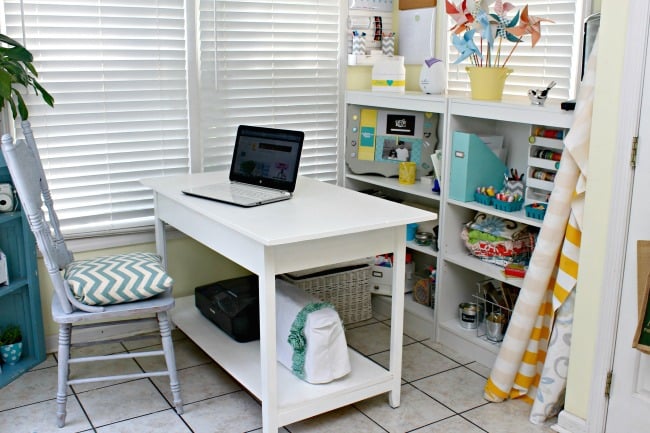
When your desk is narrow, the wall becomes your best employee. Vertical storage helps you move items upward instead of outward, freeing the desktop for active work. Floating shelves, pegboards, wall grids, corkboards, magnetic strips, and mounted file pockets can turn empty wall space into a command center.
Add Shelves Above the Desk
A shelf above the desk can hold books, storage boxes, camera gear, reference binders, or decor that would otherwise crowd the surface. Keep the shelf high enough that it does not make the desk feel boxed in. Use matching bins or labeled boxes to reduce visual clutter. The goal is not to create a wall museum of office supplies; it is to create storage that looks calm and works hard.
Use a Pegboard for Flexible Storage
A pegboard is especially useful for creative workspaces. It can hold scissors, headphones, small baskets, charging cables, rulers, sticky notes, and even small plants. The beauty of a pegboard is flexibility. If your workflow changes, you can rearrange the board faster than you can say, “Where did I put the stapler?”
Use Monitor Arms and Laptop Stands to Free Desk Space
A monitor base can eat up a shocking amount of desktop space. A monitor arm lifts the screen off the desk, creates open space underneath, and allows easier adjustment of height and distance. If you use a laptop, a laptop stand can raise the screen while an external keyboard and mouse let your hands stay in a more comfortable position.
When the screen is elevated, the area below it becomes useful again. You can place a notebook, small tray, compact keyboard, or docking station underneath. This is one of the simplest ways to make a small desk feel larger without physically extending it.
Create Zones Around the Desk
A large workspace is not always one large surface. It can be a system of nearby zones. Think of your desk as the main stage, then build supporting areas around it. A rolling cart beside the desk can hold printer paper, craft tools, camera equipment, or office supplies. A wall-mounted file holder can handle active paperwork. A drawer unit under the desk can store items that need to be close but not visible.
The Active Zone
The active zone is the desktop itself. This is where your current task happens. Keep it clear enough for typing, writing, and moving a mouse comfortably. If your small desk is constantly buried, your active zone disappears, and every task starts with an archaeological dig.
The Reach Zone
The reach zone includes shelves, carts, drawers, or wall storage within arm’s reach. This is where you place items used several times a week: chargers, files, sticky notes, headphones, reference books, or backup notebooks.
The Storage Zone
The storage zone is farther away. It holds items you use occasionally, such as tax documents, extra cables, printer supplies, archived notebooks, or seasonal materials. Do not waste precious desktop space on things you only touch once a month.
Make Ergonomics Part of the Expansion Plan
A workspace is not truly “large” if your shoulders are hunched, your wrists are bent, and your neck is performing a tragic downward gaze at your laptop. Ergonomics matters because comfort affects focus. A small desk should support neutral posture as much as possible: relaxed shoulders, straight wrists, supported feet, and a screen positioned so you are not constantly looking down or twisting.
Position the Keyboard and Mouse Correctly
Keep your keyboard and mouse close enough that your elbows stay near your body. Your wrists should remain as straight as possible while typing or clicking. If the desk is too high, consider an adjustable chair, footrest, or keyboard tray. If the desk is too shallow, a compact keyboard can help bring the mouse closer to your centerline and reduce reaching.
Lift the Screen to a Better Height
Your monitor or laptop screen should be easy to view without craning your neck. If you are using a laptop flat on the desk for long work sessions, your body is probably negotiating a bad deal. Raise the laptop and use separate input devices. Books can work in a pinch, but a stable stand is cleaner, safer, and less likely to make your workspace look like a library had a minor accident.
Improve Lighting Without Sacrificing Surface Space
Lighting can make a small desk feel open, pleasant, and easier to use. Poor lighting causes squinting, glare, and awkward posture. Instead of placing a bulky lamp in the center of your limited desktop, choose a clamp lamp, wall-mounted light, slim task lamp, or monitor light bar. These options provide focused illumination while preserving valuable work surface.
Place the desk so natural light comes from the side when possible. Avoid positioning the monitor directly in front of a bright window or with a window directly behind it, because both arrangements can create visual discomfort. Good lighting should help your eyes, not challenge them to a duel.
Tame Cable Chaos
Cables have a unique talent for making any desk look smaller. A few cords can quickly become a tangled nest that appears to be plotting something. Use cable clips, adhesive channels, Velcro ties, under-desk trays, or a small cable box to keep wires controlled.
Mount a power strip under the desk or along the back edge so chargers do not sprawl across the surface. Label cords if you have multiple devices. A clean cable setup instantly makes the workspace look more intentional and gives you back mental space as well as physical space.
Choose Multi-Functional Desk Accessories
Every accessory on a small desk should earn its keep. A monitor riser with drawers can lift the screen and store small supplies. A desk mat can define the work area and make the surface feel more organized. A vertical file sorter can hold active documents without creating paper mountains. A drawer organizer can prevent pens, paper clips, and sticky notes from forming a tiny office-supply jungle.
Use Trays to Control Visual Clutter
A tray gives loose items a boundary. Place one small tray on the desk for your phone, earbuds, notepad, and pen. When the tray is full, do not add another tray. That way lies chaos with handles.
Pick Stackable or Collapsible Tools
Stackable bins, nesting trays, foldable document stands, and collapsible laptop risers help small workspaces adapt. The best accessories create space when needed and disappear when not in use.
Use Under-Desk Space Wisely
The area under a small desk is often ignored, but it can be valuable storage if used carefully. A slim rolling drawer unit, hanging basket, cable tray, or hook for headphones can help. Just avoid filling the under-desk area so much that your legs have nowhere to go. Your knees are not guests; they live there during work hours.
If you store items under the desk, keep the center area clear for your feet and chair movement. Use the sides or back for storage. A small footrest can also improve comfort if your feet do not rest flat on the floor.
Go Digital Where It Makes Sense
Paper is one of the biggest enemies of a small desk. Not all paper can disappear, but much of it can be reduced. Scan important documents, use cloud storage, create digital folders, and unsubscribe from unnecessary mailings. Keep one physical inbox for papers that need action, and empty it regularly.
For notes, consider a hybrid system. Use one notebook for active thinking and digital tools for long-term storage. This prevents the classic “seven notebooks, no idea which one matters” problem. Your desk will thank you, silently, because desks are polite.
Design for Focus, Not Just Storage
A large workspace is not only about fitting more things. It is about removing friction from work. Visual clutter competes for attention. Too many objects, colors, and unfinished tasks in your line of sight can make your brain feel like it has 37 browser tabs open and one of them is playing music.
Choose a limited color palette for organizers. Keep decor meaningful but minimal. One plant, one framed photo, or one small object can make the desk feel personal without turning it into a souvenir shop. The goal is a workspace that feels inviting, not distracting.
Small Desk Layout Examples That Actually Work
The Minimal Laptop Setup
This layout works well for students, writers, freelancers, and anyone who mostly uses a laptop. Use a laptop stand, compact wireless keyboard, mouse, desk mat, small tray, and wall shelf above the desk. Store chargers and supplies in a nearby drawer or basket. The desktop stays open for typing and writing.
The Dual-Screen Power Setup
For remote workers who need more screen space, use a monitor arm, laptop stand, docking station, compact keyboard, and cable tray. Keep the laptop to one side and the main monitor centered. Add a vertical file holder to the wall and a rolling cart for supplies. This setup feels much larger because the screens are lifted and the desk surface stays usable.
The Creative Maker Setup
For artists, crafters, designers, or hobbyists, use a pegboard, rolling cart, labeled bins, and a clear cutting or sketching zone. Keep tools visible but off the desk. Store materials by category. The desk becomes a flexible workbench instead of a dumping ground for every brush, marker, and mysterious little plastic thing.
Daily Habits That Keep a Small Desk Feeling Big
Even the smartest setup will fail without maintenance. Spend five minutes at the end of the day resetting the desk. Put tools back, clear cups, toss scraps, file papers, and plug in devices. Future you will arrive the next morning to a workspace that says, “Welcome back,” instead of “Good luck, brave warrior.”
Use a weekly review to remove items that crept onto the desk. Check cables, papers, supplies, and drawers. The smaller the desk, the faster clutter becomes visible, but that is actually an advantage. A small workspace gives quick feedback. When it feels crowded, something needs a better home.
Experience Section: What It Feels Like to Turn a Small Desk Into a Large Workspace
The first time you transform a small desk into a larger-feeling workspace, the change can feel almost suspicious. You may stare at the same desk and wonder why it did not behave this well before. The answer is simple: the desk was never too small for the work. It was too crowded with decisions.
One of the most useful experiences is discovering how much space appears when the monitor is lifted. A monitor arm or riser can completely change the desk’s personality. Suddenly, the area underneath the screen becomes a parking spot for a keyboard, notebook, or planner. The screen feels more natural to look at, and the desk no longer has a bulky plastic base sitting in the middle like a tiny office monument.
Another big lesson is that vertical storage feels strange for about one day, then becomes addictive. Once a shelf or pegboard is installed, you start noticing every blank wall as a missed opportunity. Headphones can hang from a hook. Pens can sit in a wall cup. Files can stand in mounted pockets. The desk surface becomes reserved for actual work, which is exactly what it wanted all along.
Cable management is also more satisfying than expected. At first, it sounds like a boring chore for people who alphabetize batteries. But after clipping, tying, and hiding cords, the workspace feels calmer. Cleaning becomes easier. Moving the mouse no longer drags a charging cable into your coffee. That alone deserves a small parade.
The most practical experience is learning that a small desk requires boundaries. A large desk lets clutter spread out and pretend it is productivity. A small desk exposes the truth immediately. If you keep three mugs, five notebooks, two phones, snack wrappers, and a pile of mail on it, there is no room left for work. Once you accept this, the desk becomes easier to manage. You stop asking, “Can this fit?” and start asking, “Does this belong here?”
Comfort improves too. Raising the screen, bringing the keyboard closer, adding a footrest, and improving lighting may seem like tiny adjustments, but they change the way your body feels after a long work session. A workspace that supports your posture helps you stay focused longer. It also reduces that end-of-day feeling where your shoulders have migrated toward your ears.
Finally, the best part of turning a small desk into a large workspace is the sense of control. You are not waiting for a bigger room, a bigger budget, or a dramatic home makeover. You are using layout, storage, and habits to make the space work better right now. That is empowering. Also, it is cheaper than buying a giant desk and then realizing it blocks the closet door.
Conclusion: Small Desk, Big Possibilities
A small desk can become a large workspace when every inch has a job. Clear the surface, use vertical storage, lift screens, control cables, improve lighting, and create zones around the desk. Focus on what you use daily, store everything else with intention, and reset the space often.
The result is not just a tidier desk. It is a more comfortable, more productive, and more enjoyable place to think, work, study, create, and occasionally rescue your coffee from dangerous proximity to your keyboard. With the right setup, a small desk does not feel limiting. It feels efficient, smart, and ready for business.
Note: This article is for general home office planning and organization. For persistent pain, numbness, eye strain, or discomfort while working, consult a qualified health or ergonomics professional.