Note: This original article is written for web publication and synthesizes real information from public retro-computing coverage, open-source project documentation, Game Boy Printer preservation work, and maker-community discussions.
When a Printer’s Best Trick Is Not Printing
The phrase “An Open Source Game Boy Printer That Doesn’t Print” sounds like the setup to a joke told by a very tired hardware engineer. A printer that does not print? What’s next, a toaster that only writes poetry? Yet in the wonderfully odd world of retro gaming hardware, this idea makes perfect sense. The project in question is inspired by the Nintendo Game Boy Printer, a tiny thermal printer released in the late 1990s that let players turn pixel art, Pokémon records, and Game Boy Camera snapshots into little monochrome stickers.
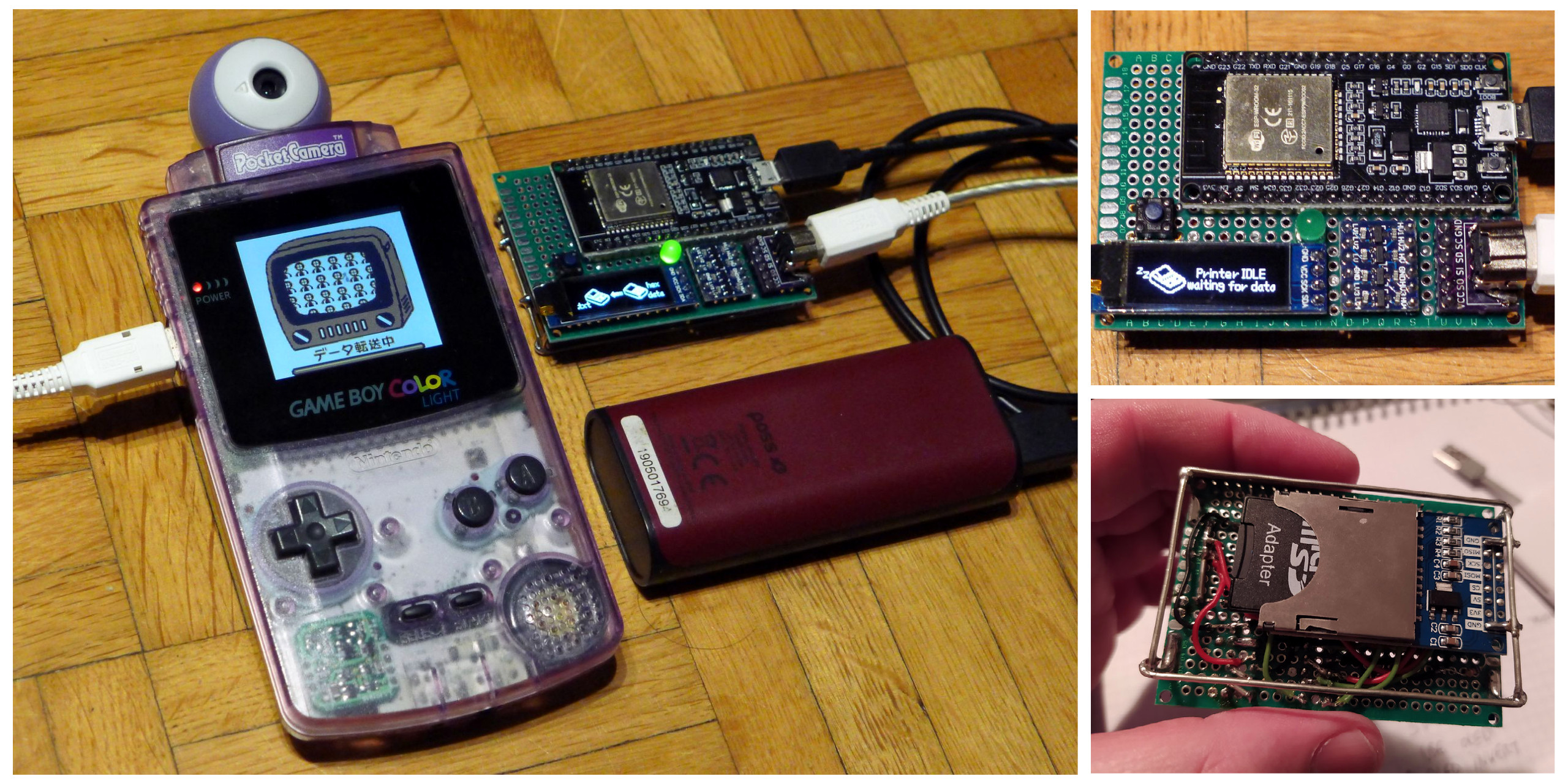
The modern twist is simple: instead of spitting out aging thermal paper, an open-source Game Boy Printer emulator captures the print data and saves it digitally, often to an SD card. That means your Game Boy still believes it is talking to a printer, but the “paper” becomes a PNG file. The result is part preservation tool, part electronics project, part nostalgia machine, and part practical joke on the word “printer.”
For fans of retro gaming, this is more than a cute hack. It solves a real problem. Original Game Boy Printer paper is increasingly rare, old thermal prints fade, and the printer itself depends on batteries, gears, motors, and proprietary supplies from another era. A digital Game Boy Printer emulator keeps the creative experience alive without asking collectors to burn through vintage paper like it is 1998 and everyone still thinks frosted tips are a long-term fashion strategy.
What Was the Original Game Boy Printer?
The Game Boy Printer was Nintendo’s pocket-sized thermal printer accessory for the Game Boy family. It launched alongside the Game Boy Camera, one of the strangest and most charming digital cameras ever released. The Camera captured low-resolution, four-shade images with the confidence of a device that knew exactly how weird it was. The Printer turned those images into tiny adhesive stickers.
It connected through the Game Boy link port and worked with a surprising range of compatible games. Players could print photos, mini certificates, Pokédex entries, high scores, artwork, and other in-game graphics. The printer used narrow thermal paper, not ink, which meant fewer cartridges to replace but also prints that could fade over time. Thermal paper is like a memory with trust issues: it looks permanent until heat, light, or age changes its mind.
For its era, the Game Boy Printer was magical. Today, it is also inconvenient. It needs the right cable, working hardware, batteries, and compatible paper. Even when everything functions, the output is physically fragile. That is exactly why modern open-source alternatives matter. They preserve the original printing experience while offering a cleaner, more flexible way to save the results.
The Open-Source Idea: Emulate the Printer, Save the Art
A Game Boy Printer emulator pretends to be the original printer. When a Game Boy game sends print data, the emulator receives it, interprets the printer protocol, and converts that data into an image file. Instead of feeding a paper roll, it writes the image to storage. In many builds, that storage is a microSD card. In newer variations, a Raspberry Pi Pico, Arduino, ESP32, or similar microcontroller handles the work.
The NeoGB Printer is one of the best-known examples of this idea. It is described as a standalone, SD-card-based Game Boy Printer emulator that is open-source, inexpensive to build, and designed around common parts. It was created for people who want the Game Boy to behave normally while avoiding the cost and limitations of original printer supplies. The Game Boy sends the image; the emulator catches it; the file lands safely on an SD card. Everyone wins, except perhaps the tiny roll of thermal paper that never got its big moment.
Other open-source projects have explored similar territory. Arduino-based Game Boy Printer emulators helped prove that the protocol could be reverse-engineered and implemented reliably. Some projects support all officially released games known to use the original printer. Later experiments added Wi-Fi transfer, web-based decoding, Android tools, e-paper previews, and bridges to modern receipt printers. The open-source ecosystem around this niche accessory is surprisingly lively, which is exactly what happens when nostalgia meets people who own soldering irons.
Why “Doesn’t Print” Is Actually the Feature
The clever part of a digital Game Boy Printer is that it does not try to recreate every mechanical detail of the original. It does not need a motor. It does not need a roll of sticky paper. It does not need to make that faint, charming, mosquito-like thermal printer sound. Instead, it focuses on the part that matters most: receiving and preserving the image.
That makes the device useful for Game Boy Camera photography. The Game Boy Camera has become a cult favorite among artists and retro photographers because its limitations are part of its style. Images are grainy, tiny, and full of personality. They look like memories smuggled out of a calculator. Saving those pictures digitally lets creators share them online, edit them, archive them, or print them later with modern equipment.
It also helps with preservation. Many Game Boy Camera cartridges contain photos from years ago. Some owners want to recover those images before cartridge batteries fail or before hardware becomes harder to maintain. A printer emulator gives them a way to export photos through the same path the original hardware expected: the print function. The Game Boy thinks it has completed a normal print job. The user gets a digital file. The past gets one more backup.
How the Game Boy Printer Protocol Fits In
Under the hood, the Game Boy Printer uses serial communication through the link cable. Compatible games send command packets containing image data and instructions. The printer responds with status information, and the game continues the process until the print is complete. Open-source emulators work because developers studied these packets, documented the behavior, and wrote software that can respond convincingly enough for real Game Boy hardware and games.
This is where the project becomes especially interesting for makers. It is not just a nostalgic shell with a USB cable glued to it. It is a protocol translation project. The emulator must receive timing-sensitive data, understand how the Game Boy structures an image, handle compression or palette behavior where relevant, and save the final result in a usable format. In some projects, the output is raw data that must be decoded later. In others, the device saves ready-to-view PNG files.
That technical layer is why open-source documentation matters. When schematics, firmware, and decoding tools are public, the community can test compatibility, fix bugs, design cleaner circuit boards, and adapt the project to new hardware. One builder may prefer an Arduino Uno. Another may want a compact Raspberry Pi Pico version. Someone else may build a Wi-Fi model because apparently even a Game Boy Printer emulator deserves to join the smart-home era.
The Retro Photography Community Loves This Stuff
Game Boy Camera photography has grown from quirky nostalgia into a real creative subculture. People use the Camera for portraits, street photography, live events, album art, and experimental visuals. The images are low-resolution, but they have a distinct look that modern filters can imitate only awkwardly. The Game Boy Camera does not pretend to be vintage; it simply is vintage.
A digital printer emulator fits this community perfectly. It allows photographers to keep using original hardware without being trapped by original supplies. A Game Boy Camera user can shoot a batch of images, select the print option, and export the results for modern sharing. That workflow feels authentic because the Game Boy is still doing what it was designed to do. The difference is that the final image ends up on digital storage instead of a fading strip of adhesive paper.
For artists, this matters. The output is not merely a screenshot. It is an image produced through the Game Boy’s own print process. That gives it a certain historical and technical honesty. The file captures the way the game or camera intended to send the image to the printer. In a world where retro aesthetics are often simulated after the fact, this kind of hardware-based workflow has extra charm.
Open Source Keeps the Project Approachable
The biggest advantage of an open-source Game Boy Printer emulator is accessibility. Commercial devices exist, and some are polished and easy to use, but they can be expensive or limited in availability. An open-source design gives hobbyists another path. With common microcontrollers, SD card modules, a suitable Game Boy link connection, and published firmware, builders can create their own device for a much lower parts cost.
That does not mean every build is effortless. Anyone who has ever wired a small electronics project knows the emotional journey: confidence, confusion, one cable in the wrong place, despair, a forum search, victory, then immediately wanting a nicer enclosure. But open-source projects reduce the mystery. They provide code, diagrams, issue discussions, and examples from other builders. Each successful build becomes another little lighthouse for the next person.
The community aspect also improves reliability. If a specific game behaves oddly, someone can test it. If a microSD library changes, someone can patch the firmware. If a builder designs a cleaner printed circuit board, others can reuse it. Retro hardware survives not because it is easy, but because enough people find it delightful enough to keep fixing.
Practical Benefits Over the Original Printer
No Rare Paper Required
Original Game Boy Printer paper is collectible, finite, and not always practical for everyday use. A digital emulator avoids the supply problem entirely. You can “print” as many images as your storage card allows, which is a lot more generous than a tiny paper roll from the Clinton administration.
Digital Files Are Easier to Share
Once saved as image files, Game Boy Camera photos and game prints can be uploaded, edited, cataloged, or printed with modern printers. This is ideal for artists, collectors, and anyone who wants to post pixelated masterpieces without photographing a tiny sticker under questionable desk lighting.
Hardware Wear Is Reduced
The original printer has moving parts. A printer emulator usually does not. Fewer moving parts means fewer things to jam, grind, or fail. It also reduces the need to keep original printers in daily service, which is good news for collectors who want to preserve working units.
It Encourages Experimentation
Because the project is open-source, people can modify it. Some may add displays. Others may design smaller boards, custom cases, Wi-Fi features, or direct smartphone workflows. The basic concept becomes a platform rather than a single-purpose gadget.
Specific Examples of What Users Can Capture
The most obvious use is exporting Game Boy Camera photos. Those tiny portraits, doodles, stamps, and strange mini-game images can be preserved before the cartridge’s internal memory becomes unreliable. But the Game Boy Printer was not limited to the Camera. Many games supported it in creative ways.
Pokémon titles are among the most famous examples. Players could print Pokédex information, party details, diplomas, or other records depending on the game. Other compatible titles used the printer for scorecards, labels, cards, maps, or decorative images. The printer was never essential to gameplay, but it added a playful physical layer to handheld games. It turned progress into something you could hold, peel, and stick on a notebook.
A digital emulator preserves that playful layer in a modern way. Instead of a sticker, you get an archive-ready image. That may sound less romantic, but it is far more practical. A PNG file can travel across decades more easily than thermal paper, especially if that paper has been sitting in a drawer next to batteries that should have been removed sometime around the release of the iPod.
Why This Project Matters for Preservation
Retro gaming preservation is not only about saving games. It is also about saving the strange accessories, workflows, and creative habits that surrounded them. The Game Boy Printer represents a moment when Nintendo experimented with personal media, portable photography, and user-generated content long before smartphones made those ideas ordinary.
The Game Boy Camera and Printer gave players a pocket-sized creative studio. It was limited, silly, and brilliant. You could take a photo, decorate it, print it, and share it as a sticker. That experience deserves preservation because it shows how playful consumer technology can be when it is not afraid to be weird.
Open-source printer emulators help preserve that experience without requiring every user to own a perfect original printer and a stash of vintage paper. They also document how the hardware communicated, which is valuable for researchers, emulator developers, hardware hackers, and museums. In preservation terms, the device is not merely a convenience. It is a bridge between original hardware and modern archiving.
The Joy of Building a Device With a Silly Purpose
Part of the appeal is that the project is both useful and delightfully unnecessary. Nobody needs a Game Boy Printer emulator to survive. But people do need creative tools that make them smile. There is a special joy in plugging a decades-old handheld into a homemade circuit board and watching it successfully save a ghostly, low-resolution image to an SD card.
This is the maker movement at its best. It takes an old device, studies how it works, and gives it a second life without erasing its personality. The Game Boy remains a Game Boy. The print menu remains a print menu. The only difference is that the output has quietly joined the digital age.
It is also a reminder that open-source hardware does not have to chase only serious problems. Sometimes the best projects are small, specific, and oddly charming. They teach electronics, reverse engineering, file handling, documentation, and design through a goal that feels playful. A student or beginner may learn more from building a Game Boy Printer emulator than from a generic blinking LED tutorial because the result has emotional gravity. It connects to games, memories, art, and a tiny Nintendo accessory that looks like office equipment for hamsters.
Experience Notes: Living With a Game Boy Printer That Refuses to Print
Using a digital Game Boy Printer emulator is a different experience from using the original printer, but not in a bad way. The first surprise is how normal it feels. You plug the emulator into the Game Boy link port, choose the print option in a compatible game or the Game Boy Camera, and the handheld behaves as if a real printer is waiting. There is no dramatic ceremony. No thunder. No tiny Nintendo employee appears to approve the transaction. The magic happens quietly.
The second surprise is how much trial and error still belongs to the process. Retro hardware likes to remind you that cables matter. A loose connector, weak batteries, incorrect wiring, or a picky SD card can turn a simple capture into a detective story. But that is part of the hobby. The small troubleshooting moments make the first successful saved image feel like a trophy. When the file finally appears on the card, it is hard not to grin at the absurdity of it all: a 1990s handheld just sent a pretend print job into a modern storage device.
The workflow also changes how you think about Game Boy Camera photography. With the original printer, every print had a cost. Paper was limited, and each image became a physical object. With a digital emulator, you are freer to experiment. You can capture bad photos, strange photos, accidental photos, and “why did I take this?” photos without guilt. That freedom encourages creativity. You start treating the Camera less like a novelty and more like a tiny art tool with a personality problem.
There is also something satisfying about reviewing the files later on a computer. The images are small, stark, and oddly expressive. Modern screens expose every blocky detail, but that is the point. A Game Boy Camera portrait can look more alive than a high-resolution selfie because it leaves so much to interpretation. The limitations create mood. The digital printer emulator simply gives those moods a safer place to live.
For collectors, the experience is practical. Original Game Boy Printers are fun, but using them regularly can feel risky if the unit is clean, boxed, or expensive. A digital emulator lets the original printer retire gracefully while the Game Boy’s print features remain useful. It is like hiring a stunt double for your vintage hardware. The original accessory gets to stay on the shelf looking important, while the open-source device does the daily work.
For builders, the project offers a balanced challenge. It is technical enough to feel rewarding, but not so abstract that the result disappears into theory. You can see the output. You can show it to someone. You can say, “This came from a Game Boy,” and watch their face move through confusion, curiosity, and delight. That reaction is worth a few jumper wires.
The best part is that the device preserves the spirit of the original without being trapped by it. The Game Boy Printer was about turning handheld play into shareable media. The open-source version does the same thing for today’s world. It does not print because it does not have to. It captures, saves, and extends the life of an idea that was ahead of its time in the goofiest possible way.
Conclusion: A Printer That Saves the Past Instead of Paper
An open-source Game Boy Printer that does not print is not a contradiction. It is a clever update to a beloved accessory. By emulating the original printer and saving images digitally, projects like the NeoGB Printer and related community builds make Game Boy Camera photography and printer-compatible games easier to preserve, share, and enjoy.
The original Game Boy Printer turned pixels into stickers. The modern open-source emulator turns those same pixels into files that can survive, travel, and be remixed. It is cheaper to run, easier to archive, and friendlier to experimentation. Most importantly, it keeps the playful spirit of Nintendo’s odd little printer alive.
In the end, this “printer that doesn’t print” understands the assignment better than it first appears. It does not waste paper. It does not fade in a drawer. It does not ask you to hunt for a vintage refill roll. It simply catches the tiny digital memories your Game Boy wants to send and gives them a future. For a device built around not printing, that is a pretty impressive output.