Some gadgets promise to change your life. Others quietly change your Friday night. A budget mini projector for iPhone sits firmly in the second camp, and frankly, that is more useful. Nobody needs another device that claims to “revolutionize productivity” while asking for three subscriptions and a blood oath. What people do need is a simple way to turn a blank wall, a bedsheet, a dorm room, a backyard fence, or the side of a garage into a movie screen without buying a television the size of a refrigerator.
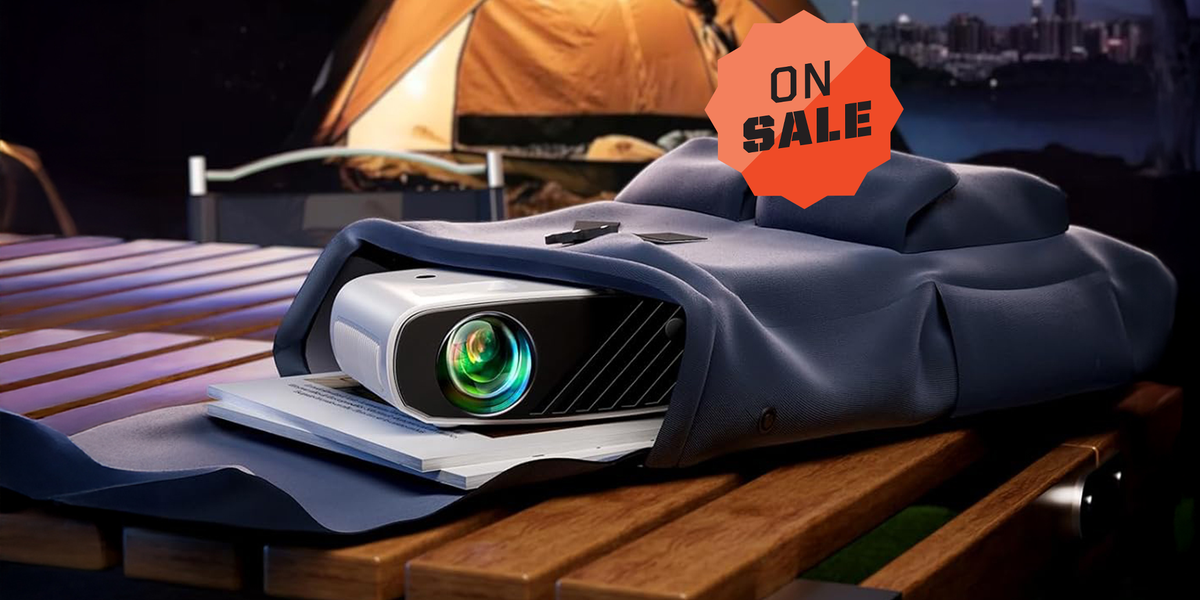
That is why the idea behind a $42 home projector is so appealing. For about the price of takeout for two, an iPhone user can experiment with big-screen entertainment at home. The specific deal that inspired this guide centered on the Elephas 2025 Upgraded 1080P HD Mini Projector, a compact projector promoted for iPhone users and sold with basic home-theater-friendly features like HDMI and USB connectivity, a portable body, and a tripod. The exact price can change because online deals have the attention span of a squirrel, but the bigger point remains: affordable mini projectors have become surprisingly accessible.
This article breaks down what a low-cost iPhone projector can do, what it cannot do, how to set it up, what to expect from the picture, and how to avoid the classic “why is my movie not playing?” panic spiral. Consider this your realistic, cheerful, no-nonsense guide to building a tiny home theater around the device already in your pocket.
Why an iPhone Projector Is Suddenly So Tempting
The iPhone is already a pocket-sized entertainment hub. It streams movies, plays games, stores photos, handles video calls, and politely reminds you that your storage is full at the worst possible time. Pairing it with a mini projector turns that small screen into something social. Instead of three people huddling around a phone like detectives examining suspicious evidence, everyone gets a shared screen.
A budget home projector is especially useful for renters, students, families, travelers, and anyone who wants a flexible screen without committing wall space to a giant TV. You can set it up in a bedroom one night, move it to the living room the next, and take it outside when the weather decides to behave. Unlike a mounted television, a portable projector does not need to become part of your furniture’s permanent government.
The attraction is also emotional. A projector makes ordinary content feel like an event. A cooking video becomes a kitchen theater. A slideshow becomes a family roast, lovingly delivered in high resolution. A movie night becomes a mini drive-in, minus the overpriced popcorn and the car that fogs up for mysterious reasons.
What You Actually Get With a $42-Style Mini Projector
A projector in this price range is not trying to compete with a premium 4K laser projector. That would be like comparing a scooter to a private jet because both technically move humans. A budget mini projector is designed for casual, low-stress viewing: movies in a dark room, YouTube videos, kids’ shows, photo nights, simple gaming, backyard hangouts, and portable presentations.
The Elephas model highlighted in the deal reporting is marketed with 1080P HD support, compatibility with iOS, Android, Windows devices, TV sticks, HDMI, and USB. Some product listings mention large projection sizes, often up to around 200 inches, though real-world quality depends heavily on lighting, distance, wall color, and how generous your eyes are feeling that day.
The included tripod is more important than it sounds. Tiny projectors can be fussy about placement. A tripod lets you raise, tilt, and stabilize the unit instead of balancing it on a stack of books, a candle, and one questionable coaster. That setup may look creative, but your projector deserves better than living in a furniture-based circus act.
The Best Use Cases
A low-cost iPhone projector makes the most sense for casual entertainment. It works well for movie nights, sleepovers, dorm rooms, small apartments, camping trips with power access, holiday slideshows, workout videos, recipe tutorials, and gaming sessions where absolute pixel perfection is not the goal.
It is also a smart “try before you upgrade” purchase. If you are curious about projector life but not ready to spend hundreds or thousands of dollars, a budget model lets you test the concept. You may discover that your family loves backyard movie night. You may also discover that your wall texture looks like the surface of the moon. Either way, you learn something before making a bigger investment.
How to Connect Your iPhone to a Mini Projector
There are two main ways to connect an iPhone to a projector: wired and wireless. Each has advantages, and each has the potential to make you mutter at technology like a person in a dramatic courtroom scene.
Option 1: Use a Cable or Adapter
A wired connection is often the most stable choice. Depending on your iPhone model, you may need a Lightning Digital AV Adapter, a USB-C Digital AV adapter, or another compatible adapter. From there, you connect an HDMI cable from the adapter to the projector, choose the correct HDMI input, and start viewing.
This setup is especially useful when Wi-Fi is weak, unavailable, or acting like it has personal issues. Wired HDMI also tends to reduce lag, which matters for gaming, presentations, and anyone who cannot emotionally handle audio arriving half a second after a character’s mouth moves.
One practical tip: keep your iPhone charged. Some Apple adapters include an extra port so your phone can charge while connected to the display. That is not glamorous, but it is the difference between finishing the movie and ending on a cliffhanger because your battery gave up during the final scene.
Option 2: Use Wireless Screen Mirroring
Some projectors support wireless screen mirroring, and some setups work through AirPlay-compatible devices. Wireless mirroring is convenient because it reduces cable clutter. When it works, it feels magical. When it does not, it feels like your devices are holding a secret meeting without you.
For AirPlay-style mirroring, the iPhone and receiving device typically need to be on the same Wi-Fi network. You open Control Center, choose Screen Mirroring, select the display, and enter a passcode if one appears. This is excellent for photos, presentations, home videos, and many casual uses.
However, wireless mirroring may not work perfectly with every streaming app because some platforms enforce content protection rules. If a movie app refuses to show video on the projector, do not immediately blame the projector. Sometimes the issue is digital rights management, adapter compatibility, or HDCP support.
The Streaming App Problem Nobody Mentions Soon Enough
Here is the part that deserves bold letters and possibly a small trumpet: not every streaming app loves being mirrored from an iPhone to a projector. Services such as Netflix, Disney+, Prime Video, and others may restrict playback depending on the connection method, adapter, cable, projector, or HDCP support. You might hear audio but see a blank screen. You might see an error. You might briefly consider moving to a cabin and reading paper books forever.
The easiest workaround is often to use a dedicated streaming stick, such as a Roku device or Fire TV Stick, plugged directly into the projector’s HDMI port. Then the projector behaves more like a small TV. Your iPhone can still help with setup, casting, remote apps, or hotspot use where allowed, but the streaming device handles the protected content more reliably.
Before buying a mini projector, check whether it has the ports you need. HDMI is the big one. USB can help with media playback or power depending on the device, but HDMI is usually the main doorway to streaming sticks, laptops, game consoles, and adapters.
Picture Quality: Keep Expectations Real and the Room Dark
A $42 projector can be fun, but it is not a miracle machine. The single biggest rule is simple: darkness is your friend. Projectors do not create black; they rely on the darkness of the room or surface. If you aim a budget projector at a wall while sunlight blasts through the windows, the image will look like it is trying to survive a desert hike.
For the best experience, use the projector at night or in a room with curtains. Turn off lamps, avoid bright wall colors, and project onto a smooth white or light-gray surface. A proper projector screen helps, but a clean wall can work well enough for casual use. A wrinkled sheet can work in a pinch, though it may give every actor’s face the texture of a crumpled receipt.
Brightness claims on budget projectors can be confusing. Some brands use different lumen measurements, and not all brightness numbers are directly comparable. More expensive projectors often publish ANSI or ISO lumen ratings, which are more standardized. In simple terms, a projector with a trustworthy brightness rating is easier to compare. A budget model with a huge “light source lumen” number may not look as bright as the marketing suggests.
Resolution Matters, But So Does Distance
Many affordable projectors advertise 1080P support. That can mean the projector accepts a 1080P input signal, but it does not always mean the projector’s native resolution is full 1080P. For casual movie nights, this may not matter much, especially if you keep the image size reasonable. Push the screen too large, though, and softness becomes more noticeable.
A good rule is to start smaller than the maximum advertised size. Try 50 to 80 inches first. That range often looks better than stretching the image to the biggest possible size just because the box says you can. Bigger is fun, but sharper is usually more watchable.
Sound: The Tiny Speaker Situation
Most mini projectors include built-in speakers, but physics remains undefeated. A small plastic projector body cannot deliver the same sound as a soundbar or dedicated speaker. Built-in audio is fine for casual viewing, kids’ cartoons, or quiet rooms, but movie night improves dramatically with external audio.
If the projector has a 3.5mm audio jack, you can connect powered speakers. If it supports Bluetooth audio, you may be able to pair a Bluetooth speaker, though there can be audio delay depending on the device. For the simplest setup, a small wired speaker often works beautifully. It is not fancy, but neither is eating popcorn from a mixing bowl, and both can be excellent decisions.
Setup Tips for the Best iPhone Projector Experience
Start with the projector on a stable surface. Use the tripod if one is included. Aim at a smooth wall or screen and adjust the focus manually until text looks clear. If the projector has keystone correction, use it carefully. Keystone correction can straighten a tilted image, but too much adjustment may soften the picture.
Place the projector as close to the center of the screen as possible. The more extreme the angle, the more correction you need. For small rooms, test the throw distance before movie night. Nobody wants guests arriving while you discover the only way to get a 70-inch image is to place the projector in the hallway next to a confused cat.
Use a power source you trust. Mini projectors usually need wall power, even if they are portable in size. If you plan to use a streaming stick, remember that the stick also needs power. Some can draw power from USB, while others work better with their included adapter.
Is This Better Than Buying a Cheap TV?
It depends on what you want. A cheap TV is brighter, easier to use in daytime, and better for everyday viewing. A projector is more flexible, more portable, and more fun for special viewing situations. If you watch sports every afternoon in a sunny living room, buy a TV. If you want weekend movie nights, backyard cinema, bedroom wall viewing, or a portable big-screen experience, a mini projector makes sense.
The charm of a budget iPhone projector is not that it replaces every screen in your life. It is that it adds a new kind of screen when you want one. It turns the iPhone from a personal device into a shared entertainment system.
Who Should Buy a $42 Home Projector?
This kind of projector is ideal for casual users. It is a great pick for students, families with kids, people who travel by car, renters who cannot mount a TV, and anyone who likes the idea of a movie night that can move from room to room.
It is less ideal for home theater purists, daytime sports fans, competitive gamers, or people who expect deep contrast, flawless motion, booming audio, and cinematic color accuracy from a gadget that costs less than a premium phone case. Budget projectors are fun, not flawless.
The smartest buyer is someone who understands the trade-off: low cost, good portability, easy setup, and big-screen fun in exchange for modest brightness, basic sound, and occasional connection troubleshooting.
Real-World Experience: Living With an iPhone Mini Projector
The first time you set up a cheap iPhone projector, you may feel both impressed and slightly suspicious. The box is small. The price is low. Your brain whispers, “There has to be a catch.” And yes, there are catches. The image needs darkness. The speaker is not going to shake the floor. The focus wheel may require patience. But then the movie appears on the wall, suddenly much larger than your laptop, and the whole room shifts from ordinary to cozy.
My favorite kind of setup is the simplest one: projector on a small table, iPhone connected through an adapter or streaming device, lights off, snacks dangerously close. A blank bedroom wall becomes a screen. A couch becomes the premium seating section. A blanket becomes “theater climate control.” It is not technically luxurious, but it feels special in the way homemade pizza feels special even when it is slightly oval and structurally confused.
For family use, the projector shines during photo nights. AirPlay or screen mirroring can turn your camera roll into a giant memory wall. Vacation pictures become more fun when everyone can see them without passing a phone around. Of course, this also increases the risk of accidentally displaying a screenshot of a grocery list, a blurry receipt, or the 47 nearly identical photos you took of your dog sleeping. That is part of the charm.
For kids, a mini projector can make cartoons and educational videos feel like an event. Instead of handing over an iPhone, you can project the content across the room and keep the phone out of tiny hands that somehow always find the settings menu. It also works well for sleepovers, where the projector creates a theater vibe without needing to move a television into the room.
Outdoor use is where expectations matter most. A budget projector can be fantastic after sunset. Before sunset, it may look weak. The best backyard setup uses a white screen or smooth wall, a long extension cord rated for outdoor use, a small external speaker, and a backup plan in case mosquitoes decide they bought tickets too. Keep the image size moderate, because stretching it too far reduces brightness. A 60- to 80-inch image that looks clear is better than a massive image that looks like it is being projected through soup.
Gaming is fun but should stay casual. Puzzle games, party games, retro titles, and slow-paced adventures work nicely. Fast competitive games may reveal input lag, especially with wireless mirroring. If you want to play seriously, use HDMI and keep expectations reasonable. A mini projector is perfect for “everyone laugh at my terrible kart racing skills,” not necessarily for tournament-level reaction times.
The biggest lesson from using a small iPhone projector is that setup habits matter more than specs. The same projector can look mediocre in a bright room and surprisingly enjoyable in a dark one. It can sound tiny through its built-in speaker and dramatically better through a basic external speaker. It can feel frustrating if you expect plug-and-play perfection with every streaming app, or delightful if you use a streaming stick and treat the iPhone as the control center.
In other words, the $42 projector experience is not about building the ultimate cinema. It is about creating a flexible, affordable, slightly magical screen wherever you can find a blank wall. And honestly, that is a pretty good trick for something that costs less than a family trip to the movies.
Final Verdict: Small Price, Big Fun, Reasonable Expectations
A budget mini projector can absolutely transform your iPhone into the heart of a simple home theater setup. It gives you a bigger screen, more flexible viewing, and a fun way to share videos, movies, games, and photos. It is portable, affordable, and surprisingly useful when paired with the right accessories.
Just remember what you are buying. This is not a premium 4K cinema projector. It is a compact, low-cost entertainment tool that works best in dark rooms, with a smooth screen surface, a stable connection, and possibly an external speaker or streaming stick. Treat it fairly, and it can deliver a lot of fun for very little money.
If you can find the Elephas mini projector or a similar iPhone-compatible projector near the $42 sale price, it is a tempting upgrade for movie nights, dorm rooms, bedrooms, family gatherings, and backyard hangouts. Your iPhone already does the hard work. The projector simply gives it a bigger stage, and every tiny screen deserves its Broadway moment.
Note: Prices, discounts, and product availability may change quickly. Before publishing, confirm the current retail price, included accessories, native resolution, wireless features, and streaming-app compatibility for the exact projector model being featured.